Sunday, February 19, 2006

Vi and Bash Shell Scripting

VI editor, while it's trivial to new users, it is always get me excited. I had just learned that there are two ways to get to the last part or end of the file easily with vi, one is using vi mode, you just need to press G key, another one would be using the command mode which is preceded with :, you can just type $ to go to the last line of the file. It is always fun to discover new tricks of using vi even though I have been using it for so long, in order to be proficient enough in using vi, I force myself to use the build in commands more often however there are still many uncovered or unknown tricks that I should try to figure out and learn, that's the interesting part of vi, you will never have enough.

Through my journey of bash shell scripting, I have never done this before to check my shell scripting syntax error until recently, if you want to check it if it's syntax is correct, for example your shell script's name is test, you can just run

shell>bash -n test

Then it will show the error if there's any or else just success without error.

Cheers :]

OpenBSD Xuvmstat

I found a virtual memory monitoring tool in the port, with it I have more clear view of how actually system memory works. The UVM virtual memory system manages access to the computer's memory resources. User processes and the kernel access these resources through UVM's external interface. By the way there's great documenetation out there that really helps me a lot in order to understand it, you should check it out here even though it is more on NetBSD system.

You can also find the man page useful especially uvm and vmstat in this case.

Xuvmstat shows the memory statistics in kernel

Cheers :)

Saturday, February 18, 2006

Improving Scripting Skillz

I'm currently reading this book that written by Ellie Quigley to sharpen my shell scripting skills, I haven finished half of the book. These days I'm more to reading book than online materials especially on my off days since it's what I need to get in depth on something and more self-contained. This book is recommended by one of my pal and even though I haven't finished the book, I found it really useful and I understand more about shell than ever after reading the first few chapters. Ellie Quigley is the woman who wrote the first shell programming book, with her 20 years++ experiences of being a shell programming instructor, she knows the foundations and tricks to take a newcomer or even advance shell programmer to next level of shell programming.

By introducing and showing examples of how grep, sed and awk been used and using great illustrations that provided in the book, I'm now more enlightenned in writing shell script. To be one good shell programmer, one should be really get ready and handy with the tools that provided in Unix or Unix-alike system. Ellie Quigley is really doing well on this part, I can't wait to finish her book.

It seems I'm revisiting old stuffs this days, sometimes getting back to basic or foundation again will discover things that you think you already understood but you actually not, hopefully by finishing Linux Firewalls and Unix Shells By Example book, I can be get to improved to be better me.

Peace :]]]

Wednesday, February 15, 2006

OpenBSD libstatgrab

Googling without directions get me to this page, and I learn that this is cool tool to do the same thing like top command but with different kind of monitoring functions, I quickly download the source to try out, the developer of the tool even provide OpenBSD unofficial port which is version 0.11 but I decide to compiled the latest source which is 0.12, it get compiled without problem and I decide to run it instantly to see what it actually offers after quickly finish reading it's manual. There are 2 binaries and 2 perl scripts installed once you finish installing it which are

shell>ls -la /usr/local/stow/libstatgrab-0.12/bin
-rwxr-xr-x 1 root wheel 50600 Feb 15 22:07 saidar
-rwxr-xr-x 1 root wheel 52335 Feb 15 22:07 statgrab
-rwxr-xr-x 1 root wheel 7060 Feb 15 22:07 statgrab-make-mrtg-config
-rwxr-xr-x 1 root wheel 2387 Feb 15 22:07 statgrab-make-mrtg-index

Saidar is the tool to view and monitor system statistic, statgrab provides a sysctl-style interface to all the system statistics available through libstatgrab, statgrab-make-mrtg-config allows you to generate MRTG configuration file and statgrab-make-mrtg-index is used to generate an XHTML index page from MRTG configuration files.

To run saidar, just

shell>/usr/local/bin/saidar

It looks cool :)

Considering this is Server01, so I generate the mrtg configuration file Server01 using statgrab-make-mrtg-config.

shell>statgrab-make-mrtg-config \
--workdir /nsm/statgrab-mrtg/Server01 \
--statgrab /usr/local/bin/statgrab > /etc/statgrab-Server01.cfg

Checking the statgrab mrtg config file if there's any error, if it exits without error that means config file is generated correctly. Make sure you have mrtg installed, if not just install from package or port will do.

shell>mrtg --check /etc/statgrab-Server01.cfg

Create the config file in html format that base on the libstatgrab,

shell>statgrab-make-mrtg-index --title Server01 \
/etc/statgrab-Server01.cfg > /nsm/statgrab-mrtg/Server01/Server01.html

Now I just query the Server01 and also create the first mrtg trafic graphs and webpages. When you run mrtg for the first time there will be a lot of complaints about missing log files. Don't worry, this is normal for the first 2 times you start mrtg. If it keeps complaining after this time you might want to look into the problem.

shell>mrtg /etc/statgrab-Server01.cfg

All the mrtg file will be generated under /nsm/statgrab-mrtg/Server01/

Finally I just add the mrtg command to run it every 5 minutes to generate mrtg report.

shell>crontab -e

Put this line in crontab

*/5 * * * * /usr/local/mrtg /etc/statgrab-Server01.cfg --logging /var/log/mrtg-Server01.log

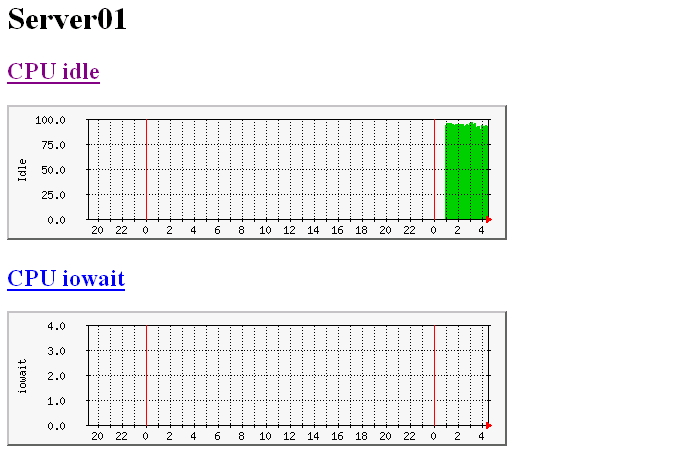
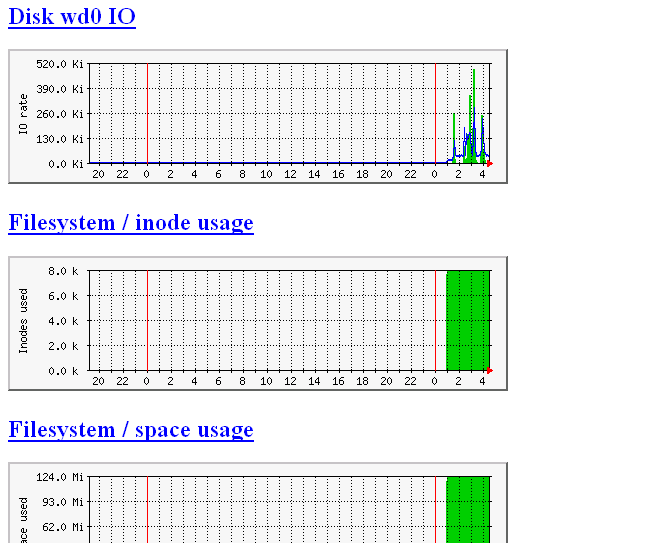
I'm done with it now and here's my MRTG output after sometimes.


Libstatgrab is one nifty monitoring tool, you can feed this data to your web server and browsing through http :]

fbpanel - Alternative for Gnome panel

If you can't live without gnome panel stuffs, considering yourself have another alternative which is recommended by my friend - fbpanel , it offers similar functions yet without relying much on other libraries, I quickly download all the fbpanel to my OpenBSD box and try to get it installed, after solving the compile errors, I finally get it worked on my OpenBSD box, here's how I have done it.

shell>wget http://jaist.dl.sourceforge.net/sourceforge/fbpanel/fbpanel-4.3.tgz

shell>pkg_add ${PKG_PATH}glib2-2.8.4

shell>pkg_add ${PKG_PATH}gtk+2-2.6.10p1

shell>./configure --prefix=/usr/local/stow/fbpanel --cpu=off

shell>gmake && gmake install

If you don't have gmake installed, you should install it first via package or port.

Here's the screenshot of fbpanel with it's configuration box.


We all love Open Source, you always have choices and freedom!!!!!

Linux Firewalls - Robert Ziegler

I'm currently reading this book - Linux Firewalls by Robert Ziegler to repolish my rusted skill in IPtables since I have stop practicing it for quite sometimes, even though this book is old but it is providing very good explanation on how, where and when you should apply the firewall rules, as well as the scenarios and conditions that applicable in real world environment.

Hopefully I can be better in IPtables right after finish reading the book :)

Cheers .....

Tuesday, February 14, 2006

Monday, February 13, 2006

Elive Linux Distro

The reason I mention this Distro is because of it is only distro I found using Enlightenment Window Manager, and it provides two environments for you to choose between E16(Stable) and E17(Devel). This is intuitive enough for me to try out and I really love it. From the irc channel #Enlightenment that I have noticed, there are not much people out there using Enlightenment, however I still give thumbs up for the work that have been done by the developers of Enlightenment. It provides fast switching, customizable key binding with e16keyedit and other cool features that you can't find in other Windows Manager. Here's the screenshot of Elive Linux.


If you notice the bar down there, it's not gdesklets but Engage which is actually a default application of Enlightenment, and it is far more better.

Enlightenment rocks :]

OpenBSD Enlightenment WM

I use google analytic to track my blog visitors, and found out that my OpenBSD Fluxbox setup post gets the highest visit rate especially traffics from bsdforum.org. I will put that post into OpenBSD fluxbox setup guide and upload to my dissectible.org again so that people can grab and read if they need it. Now I come through another Window Manager calls Enlightenment, my first try on it has great success and able to get it up and running in minutes by installing from package and apparently the previous fluxbox setup experience helps me on Enlightenment setup as well since it's about the same in initial setup. I will post how I get Enlightenment works on OpenBSD when I become more handy on it. Here's the screenshot of my OpenBSD enlightenment, cheers :]

Enlightenment - Clean and Fast

Saturday, February 11, 2006

OpenBSD Software Raid

It is vey rare that you can find article regarding OpenBSD software raid in internet. I would like to try out and after googling for a while, I found two useful articles that enlightening me. Hopefully it helps to someone who want to build OpenBSD software raid too. Here are the links -

http://www.monkey.org/openbsd/archive/misc/0203/msg00803.html


http://www.eclectica.ca/howto/openbsd-software-raid-howto.php


Both are very complete write up and you should take a look at the man page - raid and raidctl as well as the main project page - http://www.pdl.cmu.edu/RAIDframe.

Cheers :]

Systrace - Analyzing Tool

Systrace serving as host IDS/IPS for OpenBSD to monitor all the executables, it monitors and controls an application's access to the system by enforcing access policies for system calls. Using it might help to quarantine the bug of 3rd part applications that either install through packages/ports or source when we deploy it's access policies. Not only we can use it to protect the system but at the same time we can use it to trace the behaviour and functions that performed by untrusted executables in the system.

So how can systrace actually can help us to understand suspicious and untrusted executable file. I used the script that been uploaded by the hacker a while ago as an example which is actually a synner.pl perl script that can be downloaded from securiteam.com. I have renamed back the script so that it is identical to me.

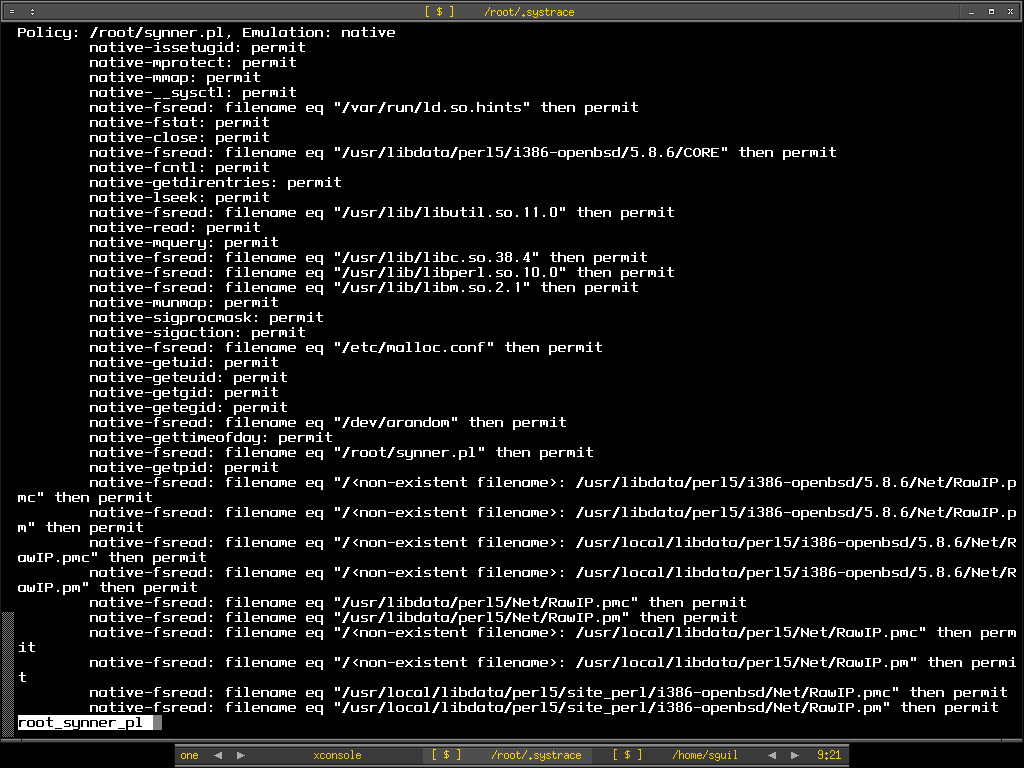
In order to know what this executable file doing without even looking at the source code, I quickly generate systrace policy file for it.

shell>systrace -A /root/synner.pl
Use ./synner.pl


To know how the executable file actually works, I run it with the sandbox of systrace by running

shell>systrace -d /root/.systrace /root/synner.pl 192.168.0.140 22 10000

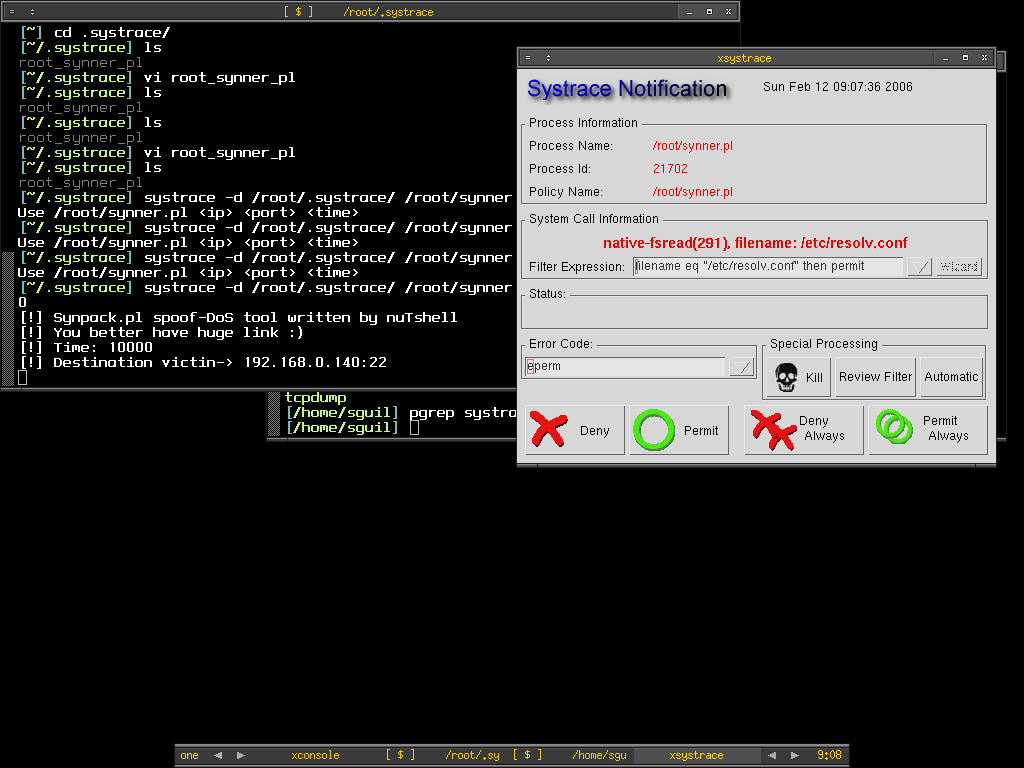
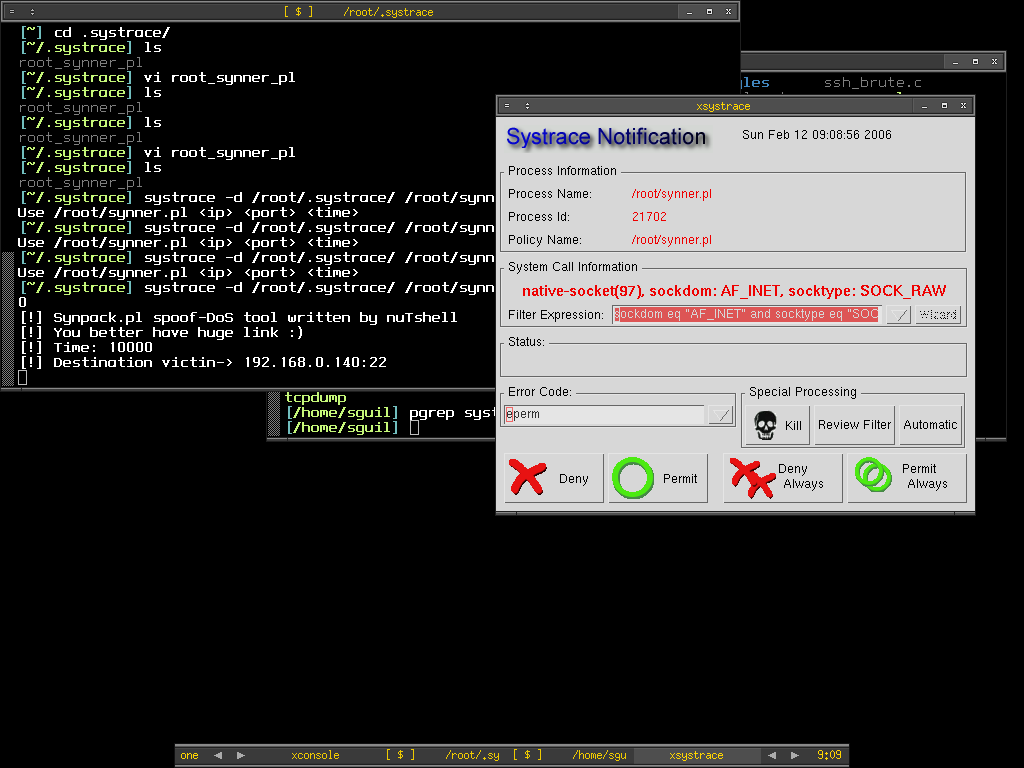
Systrace -d /root/.systrace means using the policy files in the directory /root/.systrace, this is useful if you have multiple policy files in the directory. If you just want to monitor single application per policy file, you can just go with -f switch. The synner script will connect to port 22 of host 192.168.0.140 in 10000 seconds. From the script description, we know that it is the spoof-Dos tool, and with spoofing it means it might be randomize so that's where we have seen that it need to access to /dev/arandom from the root_synner_pl policy file. Xsystrace is popped up if any access to the certain function is not implicitly allowed in the policy file, from here we can monitor each command line switches or options that need to access or perform what functions which giving us more clear view of the executable files. So here we can see that it need to access to /etc/resolv.conf, that might be used to resolve the hostname.


Then here we found out that it needs to perform function socket which create an end point for communication that uses AF_INET - address family IP v4 and raw socket. I click on permit to see how it goes next.


There we see it perform sendto function which means now it is in connected state and transmitting message to another socket.


After I keep repeating permit the same functions because it keeps doing the same thing, therefore I just click on Permit Always button to get it finished automatically. Now I have already known what is the executable file doing without even looking at the source code.

Systrace is very flexible that not only it serves as application monitoring and controlling tool but as well as a decent analyze tool. It saves time of SysAdmin to analyze the third party applications to avoid backdoor or malicious function that running on the system by hand especially to someone not a decent coder like me. I would love to learn more about it since I get to learn OpenBSD function at the same time when I dig on it.

I have always like to learn more about the native and built-in tool for OpenBSD.

Peace :]

Bad Day - Crashing of my router

My OpenBSD router at home keep giving me problem, it freezes and runs intermittently, the pppoe-in-kernel seems not reliable. When I ping www.yahoo.com, I get very high latency between my router and yahoo, this seems not accurate as sometimes it goes higher than the host ping time that behind this router which making me crazy, I'm wondering whether I should switch back to the userland ppp instead of using this unreliable pppoe interface. Since this feature is imported from netBSD, I'm not too sured how well it get tested and experimented by the user out there, if you are using pppoe-in-kernel of OpenBSD, please leave a comment. I maybe sending bug report because getting pinging time of more than 5000 is so inaccurate. I will post the screenshot when I have a chance. Because of that, I can't get a chance to try out OpenSSH new feature. :(

Anyway Cheers :)

Thursday, February 09, 2006

Another Ongoing Port - Argus

I do use Argus - the terrific tool to collect and analyze network flow data, I have come to the place where I used to install argus from source all the time, and I think it's right for me to create OpenBSD port for argus and may it benefits others. Not like previous scapy port which is much more easier to create since it needs no source compilation, argus seems to be tougher for me. However after successfully installing argus from source by fixing it's dependencies stuff, as well as old lines that need to be commented out, now I can install argus using my own port, I do learn how to create patch for the source using diff command, and understand more about the internal of OpenBSD more than I was previously, it seems that creating port for OpenBSD is one good learning path for me at the moment. If argus port works properly, I will continue to create it's client port - Argus client to have the complete argus port done.

The next port that I plan to create would be either python PyX or mysqltcl which is used by Scapy and Sguil project, maybe when I'm leet enough to create port, I will try to create OpenBSD port for Sguil including all it's components to have it fully functional on OpenBSD without going through much hassle installation.

Anyway I don't plan to submit the port to OpenBSD.org yet due to this announcement, it is better to test out the current port tree for the coming release of OpenBSD 3.9.

Cheers (:])

Wednesday, February 08, 2006

Unofficial OBSD port - Scapy

I finally decide to take the advice of dudes in #myoss and start my journey of building port, I prefer to take a simple one which is scapy since this is my first try out. After reading the man page and learning how others write the ports, I figure out that's not too hard but requires more practices and understanding of variables used in order to be handy in creating port. One of useful link would be this, it contains all the information needed to learn to write OpenBSD port properly.

After hours of tinkering with it, I finally have my first OpenBSD port created - Scapy, this is considered an unofficial OpenBSD port for Scapy, since this is my first try without intensive testing, it may break but I myself have tested it under OpenBSD 3.8 release and current. Feel free to download the port and untar it to /usr/ports/net, then just go into py-scapy directory and make install. I plan to write more ports to sharpen my skill of writing OpenBSD port in future.

Thanks to the encouragement of dudes, again I can fly even higher with Scapy (:])

Tuesday, February 07, 2006

VMware Server


Again another FREE product from VMware after VMware player - VMware Server, I myself haven't tried out yet so not much comments on it, however in the main site it states that VMware Server allows user to partition a physical server into multiple virtual machines, and to start experiencing the benefits of virtualization. Virtualization seems to be the future, Xen is one example.

VMware is always great :)

OpenSSH - New Feature


OpenSSH 4.3 released and you can find the story here. This is not the latest new however there's one new feature in OpenSSH worth mentioning. With OpenSSH 4.3, you will be able to build simple VPN solution since it can tunnel arbitrary network packets over a ssh connection between OpenSSH client and server via tun virtual network interface. This is neat and I will try to spare sometimes to play around.

:)

Monday, February 06, 2006

OpenBSD PF - tip of the day

This is by no meant to PF hardcorer but for people who new to PF. When writing PF filter rules, new comers tend to confuse the direction of IN and OUT. The IN and OUT keywords in the syntax actually is not indicating the direction of network flow coming into or getting out from your network. IN actually means the network flow that coming into your PF enabled NIC and Out means the network flow that either orignated from the PF enabled NIC or network flow that flowing out from the PF enabled NIC. The picture below illustrates the IN and OUT, the green arrows indicate the network flow.


To further understand what it means, here I try to show three rules and assuming 192.168.5.100 has NIC with variable pcn0. The first rule allows the incoming traffics from 192.168.5.0/24 to 192.168.5.100 on interface pcn0.

pass in on pcn0 proto tcp from 192.168.5.0/24 to 192.168.5.100

This second rule is blocking the network flow from 192.168.5.0/24 to reach 192.168.5.100

block in on pcn0 proto tcp from 192.168.5.0/24 to 192.168.5.100

However if you apply this rule, you can still reach 192.168.5.100 however there's no response from 192.168.5.100.

block out on pcn0 proto tcp from 192.168.5.0/24 to 192.168.0.100

Hereby I put another picutre so that you have clear view of what have been mentioned above.


Peace (:])

Friday, February 03, 2006

Hardware Compatibility Lists

If you are looking for the hardware to build your server or appliance that based on OS such as OpenBSD, FreeBSD or Linux, the URLs below maybe what you are looking for, thanks to Prabu who point it out to me. I'm more focusing on OpenBSD and have seen the URLs below.

http://www.openbsd.org/i386.html

http://www.eracks.com/

http://www.armorlogic.com/openbsd_information_server_compatibility_list.html

I'm not on behalf of any companies or trying to promote for any companies, however those URLs have mentioned and listed out what hardware is working on certain platform and not. This is useful resouces where you can take consideration when making decision on buying hardware . If you do know any link, please do tell so that people can have more references.

Cheers :]

Thursday, February 02, 2006

PADS - Passive Rocks

Reading previous #snort-gui chat log that I have missed, I found that PADS will perhaps be integrated into sguil and I'm wondering what's PADS, after asking Richard about it, he shows me the PADS url as well as his blog that related to it here. PADS is Passive Asset Detection System and it is designed to complement IDS technology by providing context to IDS alert, another good thing about it is that it never generate any traffics but intercept and intepret it(passive). With the claim it seems worth to implementing this to IDS sensor. Since OpenBSD is always my main platform, I quickly download pads source tarball from it's provided link. There's pads-archiver as well which playing main role as archiving pads data to permanent storage to lighten pads job to avoid packet loss when processing. Atm is asset to MySQL which is used to create the databases for pads, you only need it if you want the data to be inset into MySQL database.

shell>cd /usr/local/src

shell>wget http://jaist.dl.sourceforge.net \
/sourceforge/passive/pads-1.2.tar.gz

shell>wget http://jaist.dl.sourceforge.net\
/sourceforge/passive/pads-archiver-1.2.tar.gz

shell>wget http://jaist.dl.sourceforge.net \
/sourceforge/passive/atm-111104.tar.gz

After finished downloading the source, installation is very straightforward, as usual I use stow to manage my software.

shell>tar xvzf pads-1.2.tar.gz

shell>cd pads-1.2

shell>./configure --prefix=/usr/local/stow/pads-1.2 \
--enable-banner-grab

shell>make && make install

shell>tar xvzf pads-archiver-1.2.tar.gz

shell>cd pads-archiver-1.2

shell>./configure --prefix=/usr/local/stow/pads-archiver-1.2 \
--enable-mysql --with-mysql-includes=/usr/local/include/mysql \ --with-mysql-libraries=/usr/local/lib/mysql

shell>make && make install

Stowing them

shell>cd /usr/local/stow

shell>stow pads-1.2 && stow pads-archiver-1.2

Now I have to create database for pads using atm ready script and create proper user to run pads.

shell>cd /usr/local/src

shell>tar xvzf atm-111104.tar.gz

shell>cd atm-111104

shell>mysql -u root -p -e "CREATE DATABASE pads"
Enter password:

shell>mysql -u root -p -D pads < ./pads.sql
Enter password:

shell>mysql -u root -p -D pads -e "show tables"
Enter password:
+----------------+
| Tables_in_pads |
+----------------+
| assets |
| protocol |
+----------------+

shell>mysql -u root -p
Enter password:

mysql> GRANT ALL PRIVILEGES ON pads.* TO pads@localhost IDENTIFIED BY "p4d5" WITH GRANT OPTION;
Query OK, 0 rows affected (0.02 sec)

mysql> update user set Password=OLD_PASSWORD("p4d5") where User="pads";
Query OK, 1 row affected (0.05 sec)
Rows matched: 1 Changed: 1 Warnings: 0

mysql>FLUSH PRIVILEGES;

Adding pads user so that we don't have to run pads as root

shell>groupadd -g 1234 pads

shell>useradd -u 1234 -g 1234 -md /home/pads -s /bin/ksh -c "PADS user" pads

shell>touch /var/run/pads.pid

shell>touch /var/run/pads-archiver.pid

shell>chown pads:pads /var/run/pads.pid

shell>chown pads:pads /var/run/pads-archiver.pid

I create and put all the pads configuration under /home/pads instead of /etc, I prefer it that way since those configuration owner is pads. There are two configuration files, each for pads and pads-archiver.

shell>su - pads

shell>cd ~

shell>touch pads.conf pads-archiver.conf

Here's the content of my pads.conf. I prefer to specify all the options in configuration file instead of typing it in command line. The network interface I use to run pads is pcn1.

# PADS Configuration
daemon 0
pid_file /var/run/pads.pid
sig_file /usr/local/stow/pads-1.2/etc/pads-signature-list
mac_file /usr/local/stow/pads-1.2/etc/pads-ether-codes
user pads
group pads
interface pcn1
# filter
network 192.168.0.0/24
output screen
# output csv: /home/pads/pads.csv
output fifo: /home/pads/pads_fifo

This is my pads-archiver.conf

# Pads-Archiver Configuration
daemon 0
pid_file /var/run/pads-archiver.pid
user pads
group pads
input fifo: /home/pads/pads_fifo
output mysql:127.0.0.1,pads,pads,p4d5,0

You can has different types of output result and by default it is csv format which is comma separated for different data field. However I used fifo since it's not writing to disks and directly archived to MySQL database using pads-archiver which is much more faster. Now I just need to run pads and pads-archiver as root.

shell>pads -c /home/pads/pads.conf
pads - Passive Asset Detection System
v1.2 - 06/17/05
Matt Shelton

[-] Filter: (null)
[-] Listening on interface pcn1

[*] Asset Found: IP Address - 192.168.0.23 / MAC Address - 0:0A:E4:35:EA:8E (Wistron Corp.)
[*] Asset Found: IP Address - 192.168.0.181 / MAC Address - 0:0C:29:76:61:85
[*] Asset Found: Port - 0 / Host - 192.168.0.181 / Service - ICMP / Application - ICMP
[*] Asset Found: IP Address - 192.168.0.180 / MAC Address - 0:0C:29:76:61:7B

shell>pads-archiver -c /home/pads/pads-archiver.conf
pads-archiver - Archive PADS data into permanent storage.
v1.2 - 06/17/05
Matt Shelton

[v] config - Processing '/home/pads/pads-archiver.conf'.
[v] config - PARAM: |daemon| / VALUE: |0|
[v] config - PARAM: |pid_file| / VALUE: |/var/run/pads-archiver.pid|
[v] config - PARAM: |user| / VALUE: |pads|
[v] config - PARAM: |group| / VALUE: |pads|
[v] Initializing FIFO input processor.
[v] config - PARAM: |input| / VALUE: |fifo: /home/pads/pads_fifo|
[v] Initializing MYSQL output processor.
[v] MySQL Arguments: Host - 127.0.0.1 / DB - pads / User - pads / Pass - p4d5 /
[v] config - PARAM: |output| / VALUE: |mysql:127.0.0.1,pads,pads,p4d5,0|
[v] Dropping Privileges
[-] Processing FIFO File: /home/pads/pads_fifo
[v] SQL: INSERT INTO arpasset VALUES (NULL, '192.168.0.180', '0:0C:29:76:61:7B'
query error
[v] SQL: INSERT INTO asset VALUES (NULL, '192.168.0.181', 0, 1, 'ICMP', 'ICMP', 1138874261)
[v] SQL: INSERT INTO arpasset VALUES (NULL, '192.168.0.23', '0:0A:E4:35:EA:8E', '', 1138874273)
query error

You may see the query error, this is due to there's no database table called arpasset for it to insert the data and it's not created through atm, I think atm is a bit outdated. In case you are storing the asset data in csv format, you can import it to MySQL db using the perl script - atm.pl. Just run it against the pad.csv file.

shell>perl ./atm.pl --f /home/pads/pads.csv -u pads -p p4d5

PADS is really cool, I can just use it to profile and identify all the hosts in the network without tampering or connecting to any machine purposely. Pads has delivered the tool to archive the data, I do wish it comes with it's own complete sql script so that I can import it's default DB instead of creating my own especially for arpasset. Another reason I like about pads would be it can run against pcap file so this would really help especially when you just need to profile your machines in the network without running pads on the fly.

Peace and Cheers (:])

Wednesday, February 01, 2006

Vim - Cool editor for PF and Snort Rules

If you are writing pf and snort rules, vim may suit your need. I use vi for my daily task and try to play with vim which is vi clone. I come across to know that you can configure vim to be your own editor with your own preferences and settings. I have just found out that if I install vim by using OpenBSD port/package, you already have the vim syntax configuration file for pf and snort rules but you need to enabled it. Below are the screenshots of pf and snort rules file, those with syntax hightlightning and colorized.

Pf Configuraiton File

Snort Rules File

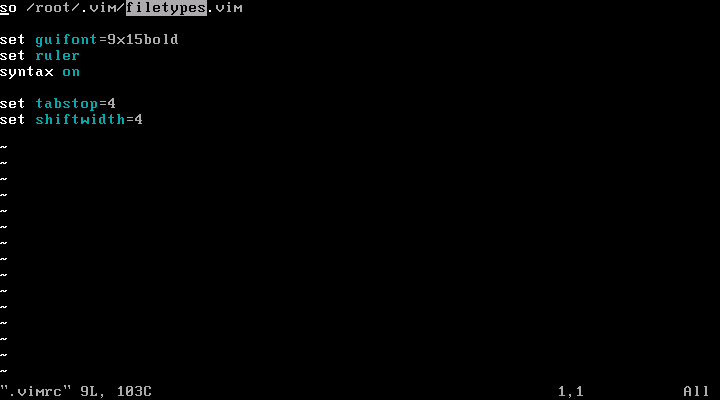
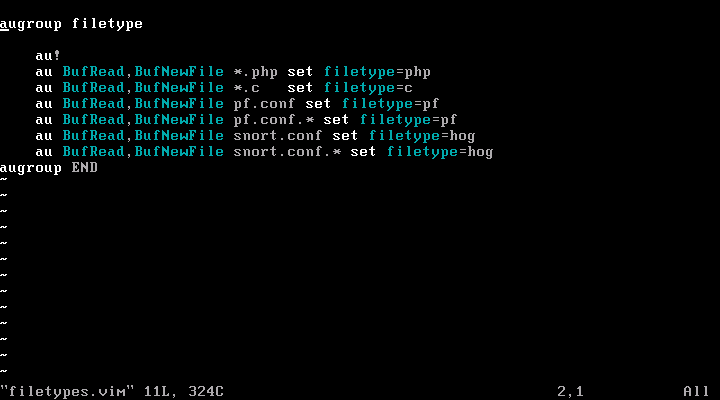
The vim syntax file is stored in /usr/local/share/vim/vim64/syntax and the syntax configuration files for pf and snort is pf.vim and hog.vim, so I have to enable it via .vimrc under user directory. Here's my .vimrc content under /root. I need another files in /root/.vim which is filetypes.vim to load the syntax file for pf.conf and snort rules file.


Here's my filetypes.vim file.


Now it's much more easy to edit and write the rules with the syntax highlightning and text colorized. However hog.vim is kinda outdated and need to be updated since there are lots of changes on snort rules syntax.

:]