Showing posts with label OSS. Show all posts

Tuesday, September 22, 2009

Mac OSX: Sguil Client

My pal Spoonfork has written about how to get sguil client works on Mac OSX previously here, however some of readers reported it won't work on Mac OSX 10.5 or later as tclX is failed to compile. If you really want to get sguil client up and running on Mac OSX, here are the steps -

Download ActiveState TCL for Mac OSX platform from the link below, you can choose either version 8.4.x or 8.5.x as both work -

https://www.activestate.com/activetcl/downloads/

Then what you need to do is click click install, once you are done, obtain sguil client 0.7 from -

http://sourceforge.net/projects/sguil/files/

I choose sguil-client-0.7.0.tar.gz, follow the steps below once you have it downloaded -

shell>tar xvzf sguil-client-0.7.0.tar.gz

shell>cd sguil-0.7.0/client

shell>wish8.5 sguil.tk

You should be good going by now, enjoy playing with sguil client console! If you install Activetcl version 8.4.x, then just run wish8.4 sguil.tk instead.

Cheers (;])

Sunday, September 20, 2009

Mac OSX: Nmap 5.0

Many people write about Nmap 5.0 when it is released, here's how I get it work on Mac OSX. If you are installing Nmap 5.0 using MacPorts, then you won't be having zenmap in your pocket, you will only get ncat, ndiff and nmap. Therefore it is best if you can obtain the nmap installation package for OSX from Nmap website and follow the instruction here to get it installed.

Once you have the package installed, you may figure zenmap will not work properly even though you can run it. In fact you need the following software installed to satisfy the dependencies.

shell>sudo port install py25-gtk

shell>sudo port install py25-py2app-devel

It might take a while to get them compiled and installed as they require some of the libraries from X11 as well, if you can get through this stage, then you should be able to run zenmap now -

shell>open /Applications/Zenmap.app


Of course Nmap is rocking in da house -

shell>nmap -V

Nmap version 5.00 ( http://nmap.org )

Peace (;])

Tuesday, September 15, 2009

Mac OSX: NetGrok

I like security visualization tools, and it helps you to interpret computer events easily. Here's how I get NetGrok running in my apple laptop -

Download and install Jpcap -

shell>wget http://netresearch.ics.uci.edu/kfujii/jpcap/jpcap-0.7.tar.gz

shell>tar xvzf jpcap-0.7.tar.gz


shell>cd jpcap-0.7/src/c

shell>make


shell>cp libjpcap.jnilib /Library/Java/Extensions/


shell>cp ../../jpcap.jar /Library/Java/Extensions/


Download and run NetGrok

shell>wget http://netgrok.googlecode.com/files/netgrok20080928.zip

shell>unzip netgrok20080928.zip


shell>cd Netgrok


There's problem with the file groups.ini, you have to change this line

Private1=Wireless=192.168.0.0/16

To -

Private1-Wireless=192.168.0.0/16

Now you can run netgrok without problem -

shell>java -jar netgrok20080928.jar

Below are two screenshots I took -


You might want to check it out, it definitely supports pcap format file! For more information you can check out at NetGrok site.

Cheers (;])

Saturday, September 12, 2009

Argus 3: Situational Awareness(ratop)

You need to know the current state of the network, who is probing your network and services, who is consuming your bandwidth, what are the stuffs running in your network, the main question remains - How much you know about your network?

Then people talk about Situational Awareness, in fact Wikipedia has well-versed explanation about it where you can find here.

As network security operator, we look at Network Situational Awareness, in fact you can use Argus 3 for this purpose, I'm going to discuss about it here. There are few argus client tools that can be used for near Real Time Network Situational Awareness -

- ratop
- rasql/rasqlinsert
- ralabel

Ratop works just like top, it can connect to argus monitor and show network flow data in near real time view, it also offers vi-like feature, where you can use / to search for flows, and : as command mode to perform various actions such as network flow record filtering/sorting, flow record field reordering, or even extract flow record based on certain timespan in real time. To run ratop, you must have argus monitor running first -

shell>argus -mAJZRU 128 -P 561

Use ratop to connect to the argus monitor -

shell>ratop -S localhost:561

Here's the ratop screenshot -


To quit ratop, it is similar to exiting vi editor, just type :q and you will disconnect from argus monitor. You can see that ratop is very useful when comes to monitor your network in real time, while it doesn't offer you insightful information, it gives quick view of the layer2/3 network conversation. Other features such as sorting can be toggled on with :s, or filtering with :f.

This is considered part 1 which I have ratop covered, and for part 2 I'm going to discuss about rasql/rasqlinsert, then I will introduce ralabel in part 3. All of them are very effective tools for Network Situational Awareness.

Enjoy (:])

OpenDPI


I just came across this Open Source Deep Packet Inspection Engine, while I haven't tried it out, this project seems to be interesting. I just want to mention it in my blog so that I can search next time in case I forget -

http://opendpi.org/

You can check out it's manual and source code which is hosted at Google Code here.

Cheers (;])

Friday, September 11, 2009

Argus 3: Database Support

If you have followed argus mailing list, you should have known that Carter has implemented argus database client(rasql/rasqlinsert) to read/write/bla network flow records to database. I'm currently testing this feature and here's the preview for you -


Currently it seems to work on my testing machine. I will introduce more about the new argus client tools such as ralabel, rasql, rasqlinsert and etc in my coming posts.

Cheers (;])

Friday, May 15, 2009

FreeBSD On VMware Time Sync Issue


We have been trying to fight with the time synchronization issue when running FreeBSD on VMware. With the new FreeBSD(7.1 and above) and new VMware workstation/fusion, the problem is fixed.

That's great as it means we can run HeX more flawlessly on VMware. On the other hand, HeX is back to active development, stay tuned!

Enjoy ;]

Thursday, April 16, 2009

Argus 3.x On Linksys WRT54GL

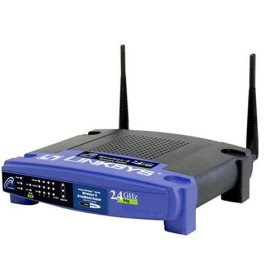
I have bought two units of Linksys WRT54GL wlan router previously so that I can run Linux and getting network security monitoring tools running on it as well. This little device has very limited space but you can't beat linux as router device. One of the unit is currently living in spoonfork's place to serve that Darth Vader, and another one is with me.
Since Carter has argus supported on OpenWRT, I have been thinking of getting argus installed on it(MIPS platform). And after some tinkering, I have successfully loading argus on it and export the network flow to another box in the network. Here's the complete howto that you can follow exactly to get argus compiled for OpenWRT Kamikaze 8.09(MIPS platform) using Ubuntu Linux.

Prepare the environment, my main directory to build this is /home/geek00l/i-Projects -

shell>sudo apt-get install gcc g++ patch binutils \

flex bison make pkg-config unzip zlib1g zlib1g-dev \

libc6 libc6-dev gawk autoconf upslug2 libncurses5-dev


To build OpenWRT Kamikaze 8.09, svn up the source first -

shell>svn co https://svn.openwrt.org/openwrt/branches/8.09 kamikaze-8.09

shell>cd kamikaze-8.09


Start the building process -

shell>make defconfig


shell>make package/symlinks


shell>make menuconfig


shell>make


Take a coffee break when you run make .....

Install libpcap, this is the only dependencies we need to get argus 3 compiled -

shell>make package/libpcap-compile V=99

shell>make package/libpcap-install V=99


Check out the gcc that we need to use -

shell>/home/geek00l/i-Projects/kamikaze-8.09/staging_dir/toolchain-mipsel_gcc3.4.6/mipsel-linux-uclibc/bin/gcc --version
gcc (GCC) 3.4.6 (OpenWrt-2.0)
Copyright (C) 2006 Free Software Foundation, Inc.
This is free software; see the source for copying conditions. There is NO
warranty; not even for MERCHANTABILITY or FITNESS FOR A PARTICULAR PURPOSE.

Now we need to set the environment variables for this build -

shell>export PATH=/home/geek00l/i-Projects/kamikaze-8.09/staging_dir/toolchain-mipsel_gcc3.4.6/mipsel-linux-uclibc/bin:/home/geek00l/i-Projects/kamikaze-8.09/staging_dir/toolchain-mipsel_gcc3.4.6/bin:$PATH

shell>export AR=/home/geek00l/i-Projects/kamikaze-8.09/staging_dir/toolchain-mipsel_gcc3.4.6/mipsel-linux-uclibc/bin/ar


shell>export AS=/home/geek00l/i-Projects/kamikaze-8.09/staging_dir/toolchain-mipsel_gcc3.4.6/mipsel-linux-uclibc/bin/as


shell>export LD=/home/geek00l/i-Projects/kamikaze-8.09/staging_dir/toolchain-mipsel_gcc3.4.6/mipsel-linux-uclibc/bin/ld


shell>export NM=/home/geek00l/i-Projects/kamikaze-8.09/staging_dir/toolchain-mipsel_gcc3.4.6/mipsel-linux-uclibc/bin/nm


shell>export CC=/home/geek00l/i-Projects/kamikaze-8.09/staging_dir/toolchain-mipsel_gcc3.4.6/mipsel-linux-uclibc/bin/gcc


shell>export CPP=/home/geek00l/i-Projects/kamikaze-8.09/build_dir/toolchain-mipsel_gcc3.4.6/gcc-3.4.6-initial/gcc/cpp


shell>export GCC=/home/geek00l/i-Projects/kamikaze-8.09/staging_dir/toolchain-mipsel_gcc3.4.6/mipsel-linux-uclibc/bin/gcc


shell>export CXX=/home/geek00l/i-Projects/kamikaze-8.09/staging_dir/toolchain-mipsel_gcc3.4.6/mipsel-linux-uclibc/bin/g++

shell>export RANLIB=/home/geek00l/i-Projects/kamikaze-8.09/staging_dir/toolchain-mipsel_gcc3.4.6/mipsel-linux-uclibc/bin/ranlib


shell>export ac_cv_linux_vers=2.4.35


shell>export LDFLAGS="-static"


shell>export CFLAGS="-Os -s"


Time to have fun, doing cross-compile for argus so it works on MIPS platform -

shell>cd /home/geek00l/i-Projects/argus-3.0.1.beta.2


shell>./configure --host=mipsel-linux \

--with-openwrt=/home/geek00l/i-Projects/kamikaze-8.09/staging_dir \

--with-libpcap=/home/geek00l/i-Projects/kamikaze-8.09/build_dir/mipsel/libpcap-0.9.8


shell>make


shell>file bin/argus

bin/argus: ELF 32-bit LSB executable, MIPS, version 1 (SYSV), statically linked, stripped

Transfer it to my OpenWRT -

shell>scp -P 55555 bin/argus root@192.168.1.1:/tmp

To export argus network flow on ppp0 interface -

shell>argus -i ppp0 -B 192.168.1.1 -P 561 -d

To intercept the network flow -

shell>ra -S 192.168.1.1:561 - ip

I have found some good references here to get me going, and I would like to thank to David Watson(UK Honeynet) for his guide on building nepenthes on openwrt too.

Reference:
http://www.frontiernet.net/~beakmyn/CrossCompile.htm
http://www.ukhoneynet.org/research/building-nepenthes-on-the-openwrt-embedded-platform/
http://forum.openwrt.org/viewtopic.php?pid=31794
http://gargoyle-router.com/openwrt-coding.php

Since this embedded device has very limited space, there's no point to run packet logger locally, other tools I would like to run on it so that I can export pcap to other system should be something like packetforward or rpcap. If anyone has experience to get any of these tools installed on OpenWRT, please do share!

Enjoy (;])

Wednesday, April 15, 2009

OpenWRT: Allow SSH Access On WAN Interface

Here's the quick way to allow SSH Access for WAN interface on OpenWRT, I configure my ssh to run on port 12345 instead of 22 to avoid automated probes from internet using the web interface, then just run this in the terminal -

shell>/usr/sbin/iptables -I INPUT 1 -p tcp --dport 12345 -j LOG

shell>/usr/sbin/iptables -I INPUT 1 -p tcp --dport 12345 -j ACCEPT


To check if it loads properly -

shell>/usr/sbin/iptables -L | grep 12345
LOG tcp -- anywhere anywhere tcp dpt:12345 LOG level warning
ACCEPT tcp -- anywhere anywhere tcp dpt:12345

To make sure it survives reboot -

shell>nvram set rc_firewall="/usr/sbin/iptables -I INPUT 1 -p tcp --dport 12345 -j LOG"

shell>nvram set rc_firewall="/usr/sbin/iptables -I INPUT 1 -p tcp --dport 12345 -j ACCEPT"


shell>nvram commit

Thanks to the link here.

Done!

Cheers (;])

Saturday, March 21, 2009

Ubuntu: Picviz 0.5 Installation

I first learned about Picviz in secviz.org and know more about it during Honeynet 2009 Annual Meeting in Malaysia when the Picviz author - Toady presented his stuffs. Anyway here's the straightforward Picviz version 0.5 installation guide on Ubuntu Linux -

shell>apt-get install \
cmake python-all-dev python-qt4 libevent-dev libpcre3-dev libcairo2-dev


Make sure you install cmake 2.6, if you are still using Ubuntu 8.04 - Hardy, you need to get this one instead -

http://packages.ubuntu.com/hardy-backports/i386/cmake/download

Download picviz-0.5 -

shell>wget \
http://www.wallinfire.net/picviz/attachment/wiki/ReleasesDownload/picviz-0.5.tar.gz?format=raw


shell>tar xvzf picviz-0.5.tar.gz


shell>cd picviz-0.5


shell>make


shell>sudo make install


If you want to install it on your prefferable directory, you can do this before make -

shell>cmake -DCMAKE_INSTALL_PREFIX=/usr/local/stow/picviz-0.5.0

Build python binding -

shell>cd src/libpicviz/bindings/python/

shell>sudo python ./setup.py install


Build gui frontend -

shell>cd src/frontend


shell>sudo python ./setup.py install


To launch the python gui -

shell>picviz-gui


Done.

Enjoy (;])

Wednesday, February 04, 2009

Ubuntu: Netdude Installation Revisit

Many people have urged me to update my old Netdude installation guide, I don't know what went wrong for them but here's how I get Netdude 0.5 installed on Ubuntu 8.04.

Make sure you have debian packages that I mentioned in old post installed properly via apt-get, now download Netdude 0.5.0, libnetdude 0.11 and libpcapav 0.8 from here.

The sequence of installation is libpcapav -> libnetdude -> Netdude.

To install libpcapav 0.8 -

shell>tar xvzf libpcapav-0.8.tar.gz

shell>cd libpcapav-0.8

shell>./configure --prefix=/usr/local/stow/libpcapav-0.8

shell>make

shell>sudo make install

shell>cd /usr/local/stow

shell>sudo stow libpcapav-0.8

To install libnetdude 0.11 -

shell>tar xvzf libnetdude-0.11.tar.gz

shell>cd libnetdude-0.11

shell>./configure --prefix=/usr/local/stow/libnetdude-0.11

shell>make

shell>sudo make install

shell>cd /usr/local/stow

shell>sudo stow libnetdude-0.11

To install netdude 0.5.0 -

shell>export LDFLAGS=-L/usr/local/lib

shell>tar xvzf netdude-0.5.0.tar.gz

shell>cd netdude-0.5.0

shell>./configure --prefix=/usr/local/stow/netdude-0.5.0

shell>make

shell>sudo make install

shell>cd /usr/local/stow

shell>sudo stow netdude-0.5.0

Now you can run netdude and check out its version -

shell>netdude --version
0.5.0

The reason why I like to use stow to manage my software installation is that I can install multiple version of netdude in /usr/local/stow first, and choose which to use by stowing and unstowing(stow -D) them.

There you go, it should be flawless unless my memory sux(though I'm).

Enjoy (;])

Saturday, January 10, 2009

Ubuntu: Unicornscan Revisit

I have written about how to install unicornscan on Ubuntu previously here, and it seems a lot of people have problem getting unicornscan compiled on Ubuntu/Debian. So here's the revisit of mine to make it more clear and it should work on Ubuntu 8.x if you are following the steps accordingly.

Install all dependencies -

shell>apt-get install \
libpcap0.8-dev libgeoip-dev libltdl3-dev ibdumbnet1 libdumbnet-dev

shell>sudo ln -s /usr/include/dumbnet.h /usr/include/dnet.h

Download unicornscan and decompress it -

shell>tar xvjf unicornscan-0.4.7-2.tar.bz2

shell>cd unicornscan-0.4.7

shell>./configure --prefix=/usr/local/stow/unicornscan-0.4.7

Thanks to Debian package, since libdumbnet is used, so we need to replace the linker flags, search for files with ldnet

shell>find ./ -type f -exec grep -H 'ldnet' '{}' \;
./src/Makefile.in:G_LDADD=$(LDFLAGS) -lscan -lparse -lunilib -lpcap -lltdl -ldnet -luext
./src/tools/Makefile.in: $(LIBTOOL) --mode=link $(CC) $(CFLAGS) -o fantaip fantaip.lo $(G_LDPATH) $(G_LDADD) -lpcap -ldnet
./src/tools/Makefile: $(LIBTOOL) --mode=link $(CC) $(CFLAGS) -o fantaip fantaip.lo $(G_LDPATH) $(G_LDADD) -lpcap -ldnet
./src/Makefile:G_LDADD=$(LDFLAGS) -lscan -lparse -lunilib -lpcap -lltdl -ldnet -luext
./src/scan_progs/Makefile.in:G_LDADD=-lscan -lparse -lunilib -lltdl -ldnet -luext
./src/scan_progs/Makefile:G_LDADD=-lscan -lparse -lunilib -lltdl -ldnet -luext

To replace ldnet to ldumbnet at one shot, do

shell>for i in `find ./ -type f -exec grep -l 'ldnet' '{}' \;`; do sed -i bak -e 's/ldnet/ldumbnet/g' $i; done

Now we can compile and install

shell>make

shell>sudo make install

You should now have it install in /usr/local/stow, just do

shell>cd /usr/local/stow

shell>sudo stow unicornscan-0.4.7

DONE!

Enjoy (;])

Wednesday, January 07, 2009

Latex Editor

If you are using latex(I do especially for presentation slide since spoonfork corrupted me), there's one good latex editor that works across multiple OS platforms. Some people will just use vim as the editor but I prefer texmaker. You can check out its main site here -

http://www.xm1math.net/texmaker/

And it even works on Mac OSX!

Cheers ;]

Monday, December 01, 2008

Drunken Monkey: Running Network Miner with Wine

Network-Based Forensics is emerging now, we are seeing more and more NBF tools in active development now, one of the decent NBF tool I would like to mention here is NetworkMiner which is developed by Erik Hjelmvik. NetworkMiner is developed using .net framework, therefore it has Windows version only, I will show you how you can get it running using Wine on *nix based OS especially Ubuntu Linux.

Installing Wine -

shell>sudo apt-get install wine wine-dev cabextract

Configure Wine -

shell>winecfg

In Application tab, change windows version to Windows 2000

shell>wget http://kegel.com/wine/winetricks

Install cofefronts and .net framework 2.0 -

shell>sh winetricks corefonts dotnet20

Download NetworkMiner -

shell>wget \
http://sourceforge.net/project/showfiles.php?group_id=189429


Unzip it and run -

shell>wine NetworkMiner.exe

Here you go -


Cheers (;])

Wednesday, November 26, 2008

Network-Based Forensics: Xplico


If you are interested in Network-Based Forensics, you should give this tool a try - Xplico, this tool is quite promising and in active development.

During HITB Training and Conference, I have mentioned about the challenge and problem with Network-Based Forensics, one of them is the lack of protocol dissectors(especially application layer). Looking at Xplico roadmap, you can see they are trying to add more and more dissectors to be more advance in traffic reconstruction(you can't really base on tcp itself as the session itself is mostly handled by the application layer these days).

Xplico is definitely designed for Network-Based Forensics only, and it follows file system forensics approach where you can create case and extract data from the pcap. There are few things I would like to see it in Xplico if possible -

1. Support more packet format(or conversion)
2. Better search engine(not only email)
3. Report generation
4. Data export to various format
5. Per host traffic information

If you are interested in trying out Xplico quickly, you can check out Deft liveCD.

More screenshots!!!!!


Enjoy ;]

Thursday, October 30, 2008

HeX In The Box

We release the HeX special edition for HITB Security Conference, the theme we use is HeX In The Box. If you are the HITB Conference participant, you might or might not get the CD we distribute in the first day of conference as we only have about 120 pieces of them so it is really limited.

This special edition comes with new wallpaper and cd sticker as well. Thanks to Vickson for the comic style of design this time!

HeXInTheBox CD Sticker

HeXInTheBox Wallpaper

On the other hand, HeX hits more than 10,000 downloads since the release of version 2.0!

Cheers (;])

Saturday, October 18, 2008

Bro 1.4: Eating Netflow

The new Bro can import NetFlow version 5 data now, if you are using HeX 2.0, you can test it quickly. Here's how you can test its new ability to work with NetFlow.

Using fprobe to export NetFlow version 5 data on network interface le0 to address 127.0.0.1 and port 5555 -

shell>sudo fprobe -n 5 -f ip -i le0 127.0.0.1:5555

Using bro to eat NetFlow data and log them to disk -

shell>sudo bro --netflow 127.0.0.1:5555 HeX netflow

You will find netflow.log in your $BROLOGS directory, and you can simply examine them with any text viewer.

I'm going to distribute bro-1.4 binary that works well with HeX so that people can try them out if they are interested in latest Bro offerings.

Enjoy (;])

Bro: 1.4 Release

Kudos again to Bro development team for making the release of version 1.4. This release has included tons of new features and also tons of bug fixes.

I'm looking forward to try out things like NetFlow, Time Machine and many others. If you are interested in Bro, grab the latest version while it's hot. You can download it at -

http://bro-ids.org/download.html

The detail changes can be read here.

Enjoy ;]

Friday, October 10, 2008

Foss.my 2008

Many friends in OSS circle have already blogged about this, so I won't repeat anything much, if you are interested in Foss, and you are in Malaysia, this is definitely the event that you should come.

For more information, look here ->

http://foss.my/

Enjoy ;]

Expanding Response: Deeper Analysis

My friend Russ McRee just published a paper called Expanding Response: Deeper Analysis for Incident Handlers with SANS for his GCIH Gold cert that includes details on Argus, HeX, NSM-console, and NetworkMiner using content from the original ISSA articles as well as current updates.

You can find his paper here -

http://www.sans.org/reading_room/whitepapers/incident/32904.php

Nice work Russ!

Cheers ;]