Wednesday, April 12, 2006

Trick To Trigger

The company I work with utilizing ticket based system, yet this is effective way to manage and handle customers since it is more interactive comparing to using email system alone. However this time, it is used by the hacker to try to perform social engineering to get around the firewall and compromising the network without much efforts.

Normally we allow customers to send attachment especially when they need to send screenshots such as ping or traceroute result. That may help to identify and fix client's issue. But allowing attachment seems not a good idea this time. The hacker was trying to trick the service support to open the attachment by sending this look so "INNOCENT" attachment.


I downloaded the attachment, and what starts to make me feel suspicious would be the attachment name is index.php after downloading it instead of the one shown in the ticket, this doesn't match at all. To identify the file type, I run the file command, and the file is uuencoded, if you don't know what is uuencoding, check the link here. Most to most it is unix to unix encoding and very popular in sending binary through email attachment these days.

I just decode it with uudecode that is installed by default in most of unix-like system, I redirect the output to fake after decoding. I recheck the filetype and apparently it is MS DOS executable.

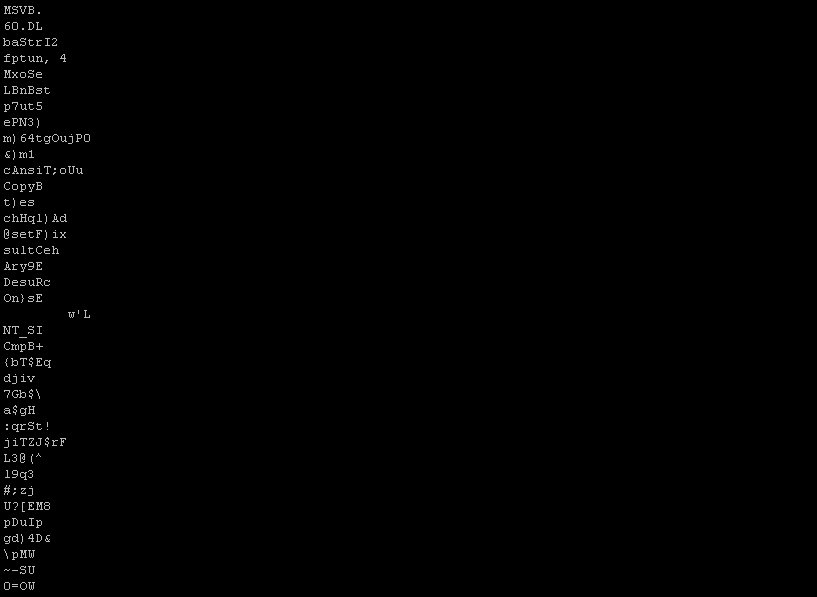
I tried to run strings against the file, and it showed some clues to me what this file is all about especially this string - Exploite ...
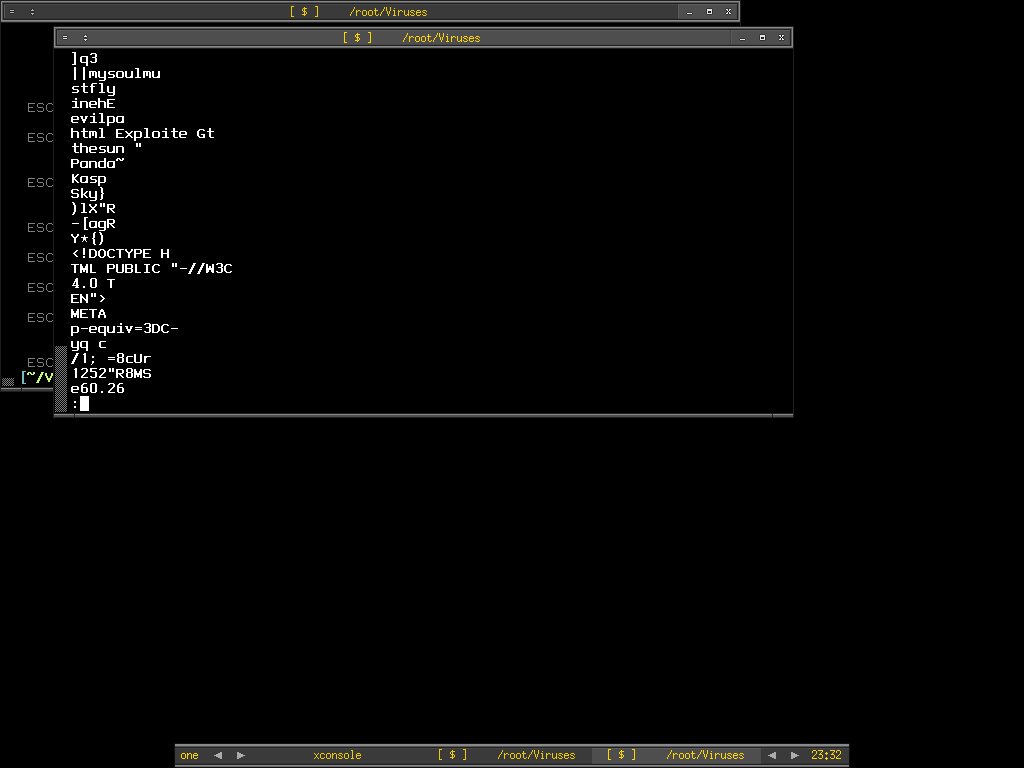
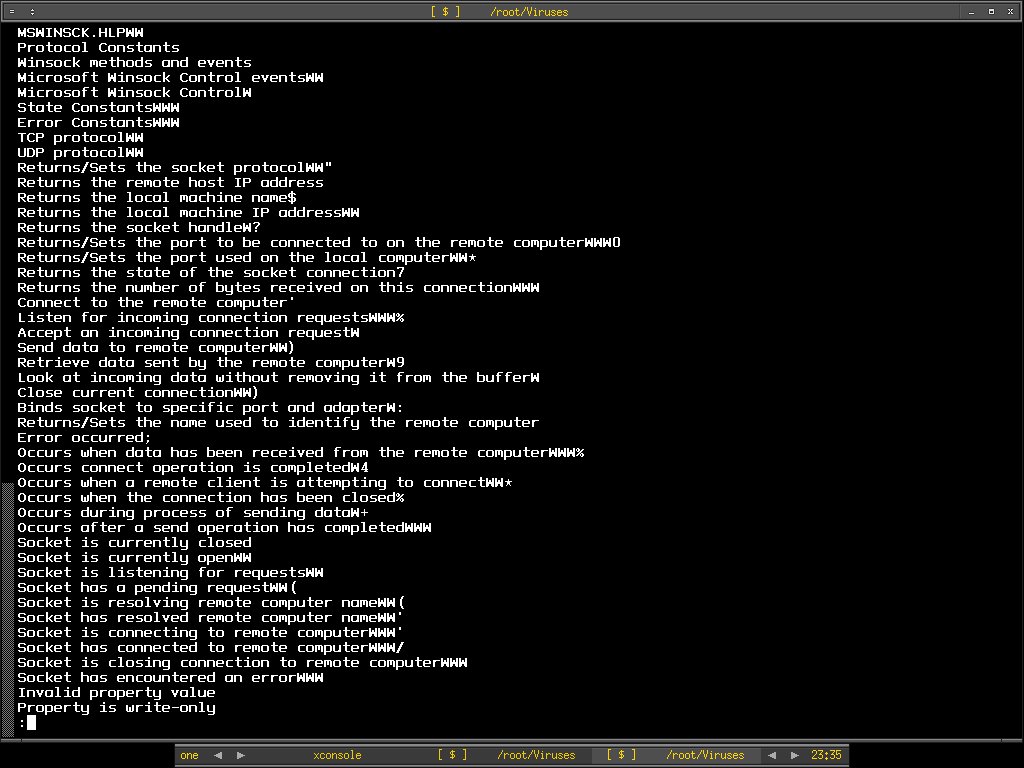
Walking down the strings, we can already guess what this executable file trying to do, though port 80 for sure is good port to bypass firewall since most firewall implementation won't block inbound or outbound http. That may makes a good and stealthy backdoor indeed.
Sometimes it is not too hard to compromise enteprise network if you play around with the social engineering tricks especially when people have no idea what they are doing. Even security policy enforcement won't help sometimes if users are not aware enough.

Living with threats everyday .....

Peace :]

8th MyCERT-SIG KSS

I forwarded the message to my blog here since MyCERT asks for the favor. If you are working in the cyber security industry or would like to know more about the current threats, feel free to join the session. By the way, it is FREE.

Dear MyCERT List Members,

Regarding the above matter, we are glad to inform that the 8th MyCERT Special Interest Group Knowledge Sharing session will be held in this month.

Details of the session is as below:

Date : Tuesday, 25th April 2006
Time : 2 pm - 5.30 pm
Venue : Auditorium, Mimos Berhad, Technology Park Malaysia, Kuala Lumpur

More information on the 8th MyCERT Special Interest Group Knowledge Sharing Session including Speakers, Topics and Registration is available at:

http://www.mycert.org.my/mycert-sig/mycert-sig-08/

Please take this opportunity to register and attend the sessions to gain more knowledge in the field of ICT security. We also appreciate if you could extend the invitation to your colleagues and friends who could benefit from attending the sessions, offered free of charge.

You may find the agenda at

http://www.mycert.org.my/mycert-sig/mycert-sig-08/agenda.html

I will be presenting The Principle Of Network Security Monitoring[NSM] and see ya all there.

Cheers :)

Sunday, April 09, 2006

TcpXtract - AddON

Sunday should be the day to hang out? But I'm still sitting in front of computers after coming back from local PC fair. Reading seems to be my hobby these days especially keeping myself up to date with cyber security requires this kind of attitude, hoping I will stop this type of life when I'm old enough since I don't want brain damage.

Recent msdos executable and portable executable add on to tcpxtract config file works pretty well for me. Then I'm wondering is there a way to extract the elf binary, I decide to run either xxd or hexdump against elf binaries and studying it's header so that I can add it to tcpxtract.conf file. It's not trivial anywhere and this is what I append to the config file.

###############################
# ELF-execute &linking Format
###############################

elf(30000000, \x7F\x45\x4C\x46);

This is another piece I added for

###############################
# NE- new executable(used by windows)
###############################

ne(40000000, \x4D\x5A\x50, \x4E\x45);


For people who really want to understand about elf, this is one of must read -

http://www.cs.ucdavis.edu/~haungs/paper/node10.html

I found it very detail and clean in explaining about elf binary and it even helps me to understand the memgrep output that I have used when collecting hostile data on hacked server where I have it written here previously.

Peace :]
P/S: There are possibilities of generating false positive when extracting files because I haven't tested the signatures intensively.

Saturday, April 08, 2006

TIPS on HTTP Log Analysis

My daily job deals a lot with apache access log, as well as mod_security which is the IPS for apache. I start to realize that understanding http status code is important when analyzing web server's log. It may help you to understand whether the code executions, traffic redirection on your web server is successful or fail.

After googling, I get to this few links which I think it is useful resource especially to me. Sharing is always good, ain't it?

http://www.w3.org/Protocols/rfc2616/rfc2616-sec10.html

http://www.ilovejackdaniels.com/apache/http-status-codes-explained/

http://www.helpwithpcs.com/courses/html/html_http_status_codes.htm

I don't think I can memorize all of them, however remember one or two which are important might get yourself handy in analyzing log.

Enjoy :]

Friday, April 07, 2006

TcpXtract - Revisited

You may heard about tcpxtract before, either from somewhere in the internet or the good write up at taosecurity blog. The cool factor of Tcpxtract is the element X where it able to eXtract and reconstruct file based on it's header and format out of pcap dump. Nick Harbour, develope this nifty tool for the sake of network forensic.

I was using foremost, to extract the msdos executable file(brontok worm) out of pcap dump. I decide to give tcpxtract a try. However tcpxtract natively doesn't support msdos executable format. I quickly google to see if I can get any clue and I found this -

http://www.windowsitlibrary.com/Content/356/11/1.html

It is very old tutorial but decent and detail in explaining portable executable file format(PE). With a little knowledge of it, I add this to the tcpxtract configuration file - tcpxtract.conf. This is the part I like about tcpxtract - flexibilities, you can add whatever format when you learn one.

#####################
# Msdos-executable
#####################

exe(10000000, \x4d\x5a);

I didn't add this part but I think some people might find it useful, this is to add PE header.

#####################
# Portable-executable
#####################

pe(10000000, \x50\x45\x00\x00);

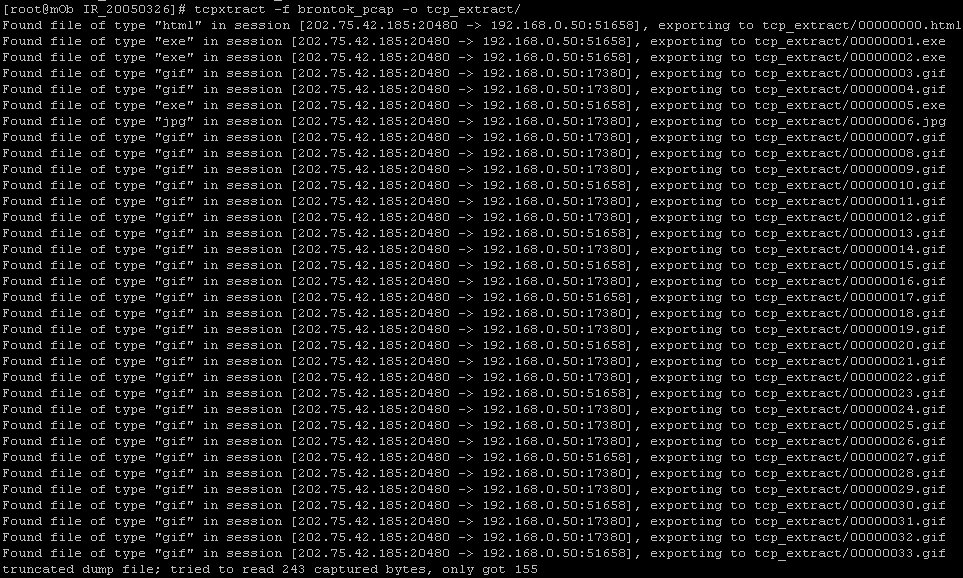
Then I start to run tcpxtract against brontok_pcap to see if I able to get the result I want. You might have to create the directory for it's output first.

shell>mkdir tcp_extract

shell>tcpxtract -f brontok_pcap -o tcp_extract/


shell> ls -la tcp_extract/*.exe
-rwx------ 1 root root 76092 Apr 7 07:18 tcp_extract/00000001.exe
-rwx------ 1 root root 64985 Apr 7 07:18 tcp_extract/00000002.exe
-rwx------ 1 root root 52253 Apr 7 07:18 tcp_extract/00000005.exe

shell> file tcp_extract/00000001.exe
tcp_extract/00000001.exe: MS-DOS executable (EXE)

Here's the content of 00000001.exe which is similar to what I get when I use foremost previously.


Tinkering with tcpxtract is fun (:])

P/S: adli, hopefully this is helping .....

My off days ...

I have 2-3 off days that I tried to away from internet, however I still can't get my hand off the keyboard since my notebook is with me. I choose to read about Securing Mysql Database, and trying out the graphical design application that recommended by Kaeru - Inkscape.

I ain't DB programmer and only a slight administrator of it, reading article about how to secure Mysql database helps me to understand the access control, priviledges and how to use grant and revoke efficiently. Since sguil is using Mysql as it's backend database, it might be useful when I understand more about the database I'm using. I have heard a lot of good things about PostgreSQL, but so far I haven't tried it yet and may take a look if I really have time.

About Inkscape, it is very powerful Open Source Graphical Drawing tool, you might be wondering why I learn this tool but it is real efficient and superb when you need a simple graphic design or maybe professional look design when you have already mastered it. I'm not a graphic designer, but you don't need to be one in order to get yourself handy on this application. It is user friendly, and providing various tools for you to draw, edit and paint, some say it is a bit of adobe illustrator, freehand and etc. If you are noob like me, I bet the tutorials that provided along with the application is what you should read, there are 5 of them and you can learn from the ground up in hours. Just click the help button on menu bar and there's tutorial in the drop down list and you can just click on it.

Here's the result ...


BTW, I don't own advertising company and I'm not fanboi of dell, this is just the picture that I think it's cool to share.

Cheers :]

Sunday, April 02, 2006

Spotting worms by analyzing session data

This maybe my last blog post about brontok as I think I had enough of it, I have just grab a copy of another brontok variant from my friend's network, coincidentally right after my post regarding brontok in last few days, lots of my friends calling me and telling that their "pc" infected by brontok. What I can say is that sorry I have no time to help you guys because I'm in busy state as well. Enough mumbling, back to the topic ....

This is not April Fool, yet I do like fooling people when I'm drunk or maybe being fooled .....

In the concept of Network Security Monitoring, collecting session data is a must. Though most people ignoring the role of it in security arsenal like I do few years back, but it is very useful when one involves in network security. There are few tools that considered in my favor list are ipaudit, argus and sancp which is used by Sguil project.

So how the hell session data will help in spotting worms? I will share a little knowledge of mine here. Before explaining about my finding, let's look at what is actually a computer worms. In wikipedia, a computer worm is a self-replicating computer program, similar to a computer virus. A virus attaches itself to, and becomes part of, another executable program; however, a worm is self-contained and does not need to be part of another program to propagate itself. They are often designed to exploit the file transmission capabilities found on many computers. The main difference between a computer virus and a worm is that a virus cannot propagate by itself whereas worms can. A worm uses a network to send copies of itself to other systems and it does so without any intervention. In general, worms harm the network and consume bandwidth, whereas viruses infect or corrupt files on a targeted computer. Viruses generally do not affect network performance, as their malicious activities are mostly confined within the target computer itself.

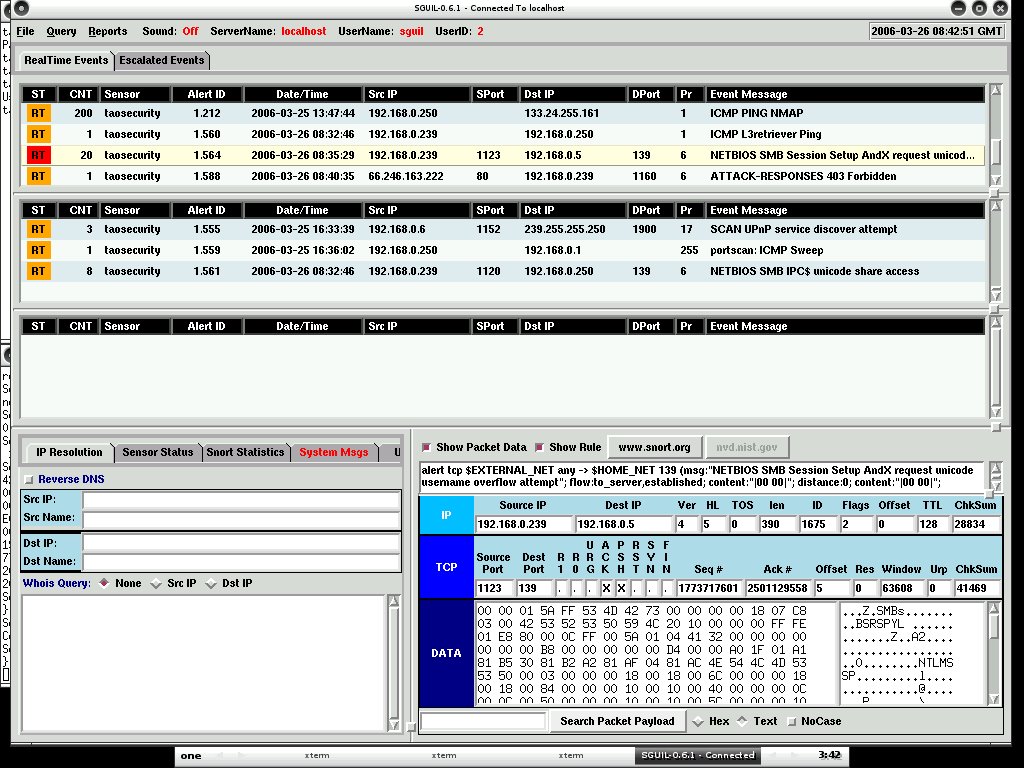
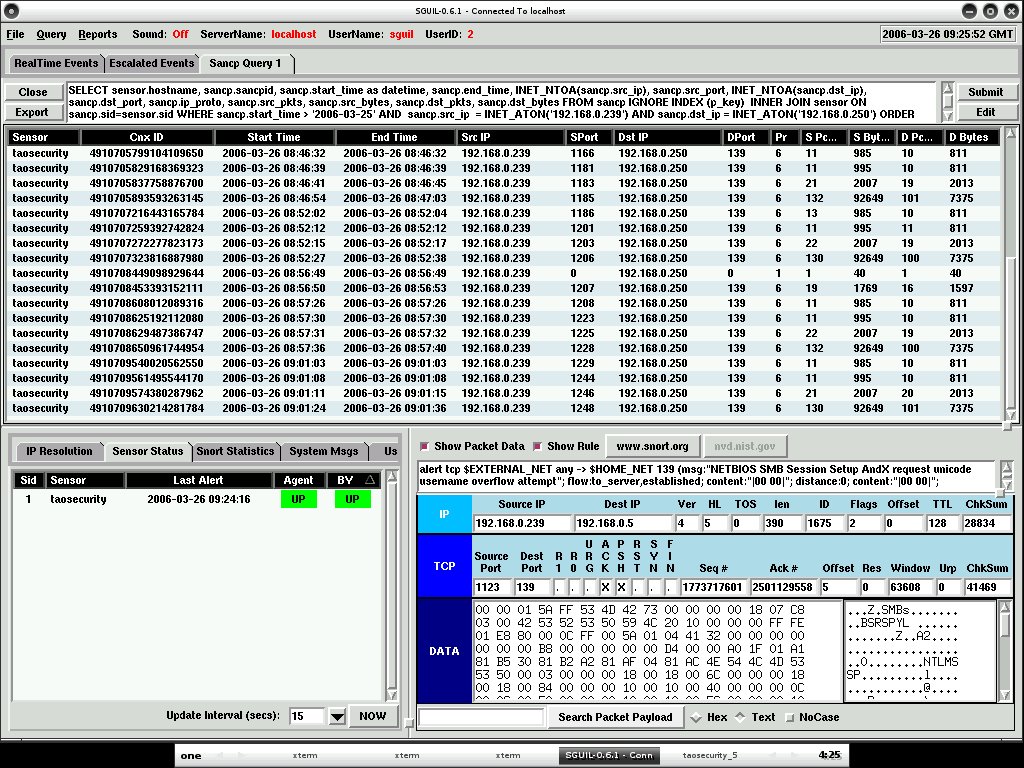
Computer worm replicates itself and try to propagate into or across the networks. Since it is written by human, it won't change by itself since it's behaviour has been predefined and programmed. Based on this fact, I believe that it is possible to spot worms by watching session data. Full content data needs to be collected if one want to analyze the payload, however the main point here is you may locate worms without even looking at anything by session data. I use brontok as experimental sampling. Here's what happen when I analyzed brontok inline with Sguil loaded in my VM at the same time. Snort generates alert on Netbios SMB Sessions. One of thing to be noticed is that the aggregate(CNT) of the event keeps increasing.


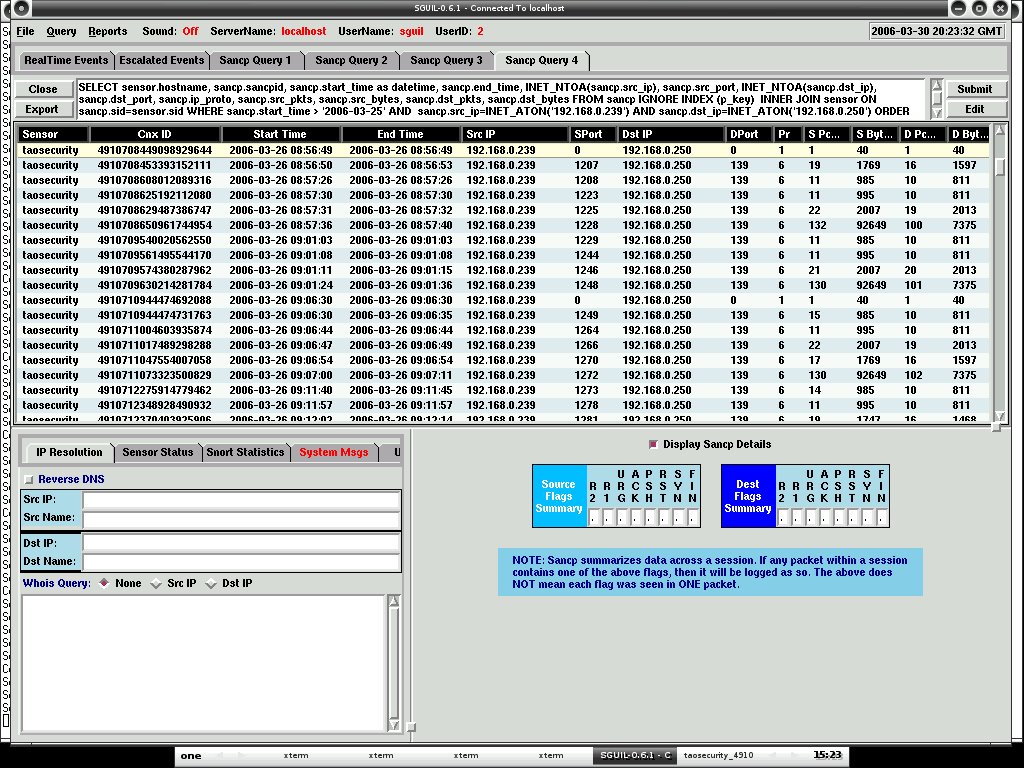
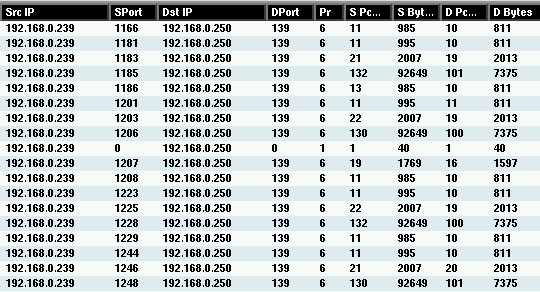
With sguil I can easily query the session data based on different criteria, below are the two screenshots that I have taken. If you have paid enough attention on source packet count and source bytes as well as destination packet bytes and destination bytes, you may find that the flow is always in the same sequence.


Here's the zoom in, so normally you will see the worm will try to ping(Pr equal to 1 which means ICMP and SPort + DPort = 0 since ICMP uses type and code instead of port) first to see if the host is alive and will try to connect to the IPC$ in order to access to victim's netbios share through port 139, and upload to the vulnerable host if there's any.


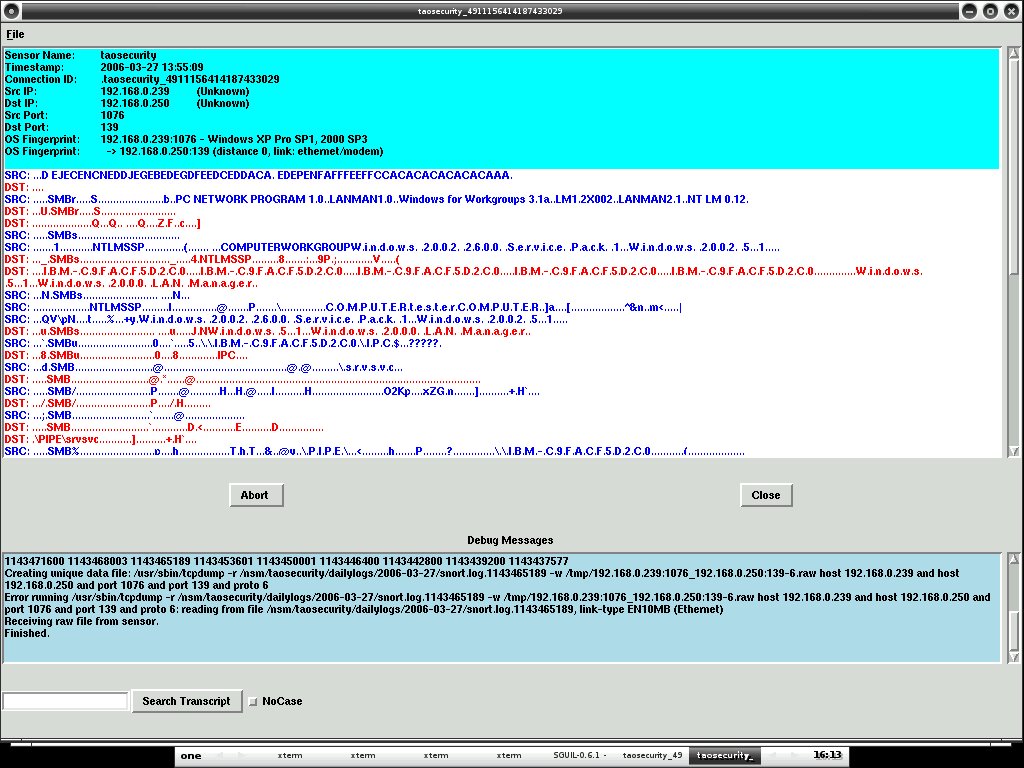
I generate the transcript of it with sguil, watching the conversation between them.


If I pull out the data using ethereal, everything will be much clearer and you may dissect everything that possible since ethereal is rich with it's decoder especially when you need to decode SMB/CIFS. However if you are analyzing it using tcpdump, you may need to run tcpdump with -vv option. Normally I use ethereal if I will have to examine full content data or learning protocols that I don't really much deal with.


My main point here is if you notice or catch session data that goes with same sequence especially it's src packet count and length as well as dst packet count and length are always the same, then most properly your network is parasited by worm or it is in the wild. Computer worms normally has no intelligence to deal with this kind of detection since this is not signature base. One may consider writing worm that spreading with random junk data padded in the payload to confuse the security analyzt however that will only change the src packet bytes but dst packet bytes will still be the same since it is not controlled by worm. Another thing is the time interval may reveal the worms too because normally computer worm is built to spread in certain time period and not randomizing. Everything seems to be logical.

I really appreciate the value of session data not to say it is cheap to store but it is neutral to any kind of connection whether it is encrypted or not, as long as we records the connection pairs, we can learn and evaluate it later. Flow pattern tracking is real good in worm detection.

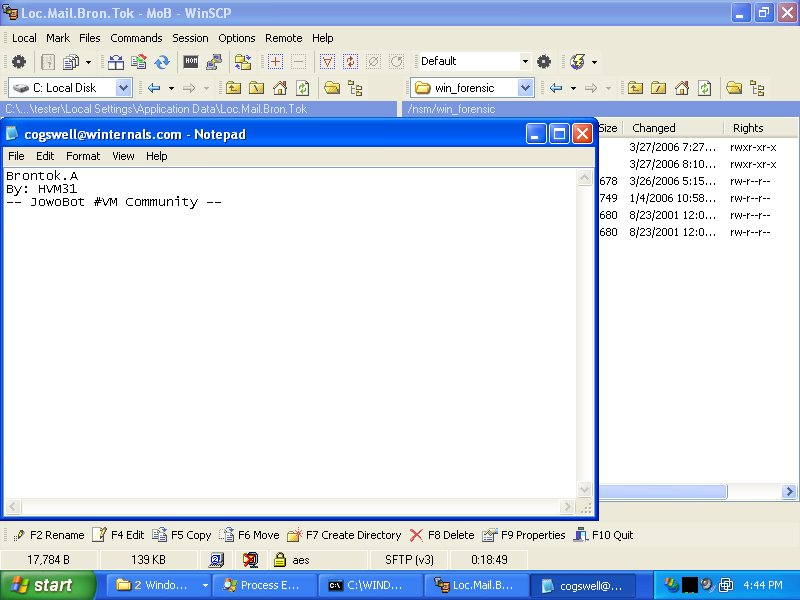
The screen below is not related to the title, I post it because someone ask me who is the papa of brontok, so here you have it.


Though nowadays worm mostly getting through by email because they know human is the easiest to be cheated since there's no human firewall where cyber security is hardly taught and delivered. However flow pattern assessment is effective enough to detect worms in the LAN.

Just my little 2 cents, peace (:])

P/S: toxicle, I hope this is not april fool thingy :P, http://mydefcon.org .....

Saturday, April 01, 2006

OpenIDS

BASE - Basic Analysis and Security Engine gains popularities among Open Source Community. I think it is because of it's predecessor - ACID and the ease of installation. However when I try to look for any Installation Guide of BASE on OpenBSD, I can't find a good one. Until I accidentally hit this URL due to it's project name with Open as prefix - http://www.prowling.nu. It is the main site for OpenIDS project where it is mainly based on OpenBSD and BASE.

I don't think I will change my mind to use BASE instead of Sguil, however OpenIDS is worth mentionning here since it eases the installation and management of IDS. As well it may help people who have hard time to install BASE on OpenBSD. By the way, no harm trying .....

Other features that caught my eyes would be pfw/hatchet(PF Web Console) and Snortalog are integrated into OpenIDS as well. If anyone interested in trying out OpenIDS, just download it from the mirror link in the download page.

Keep up the good work :]

P/S: I would prefer if anyone write a generic Base Installation Guide on OpenBSD or anyone can point me to one if there's any.

Friday, March 31, 2006

Brontok - DDOS

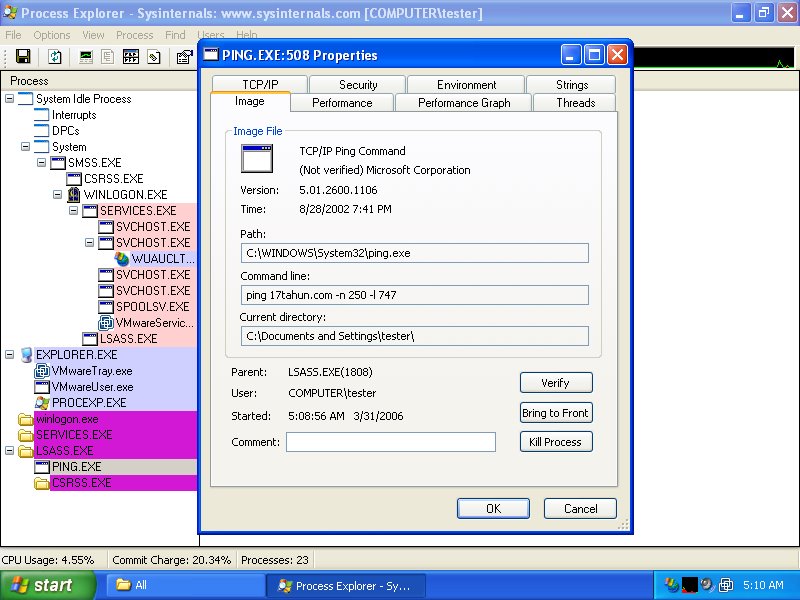
While analyzing the behaviour of brontok using Process Explorer, it is trying to perform denial of service with ping flood. It is trying to run the command - ping 17tahun.com -n 250 -l 747. Why it ping with the payload of 747 bytes, may he or she is a lover of boeing airplane 747? The airstrike seems successful since I can't browse 17tahun.com with my browser.


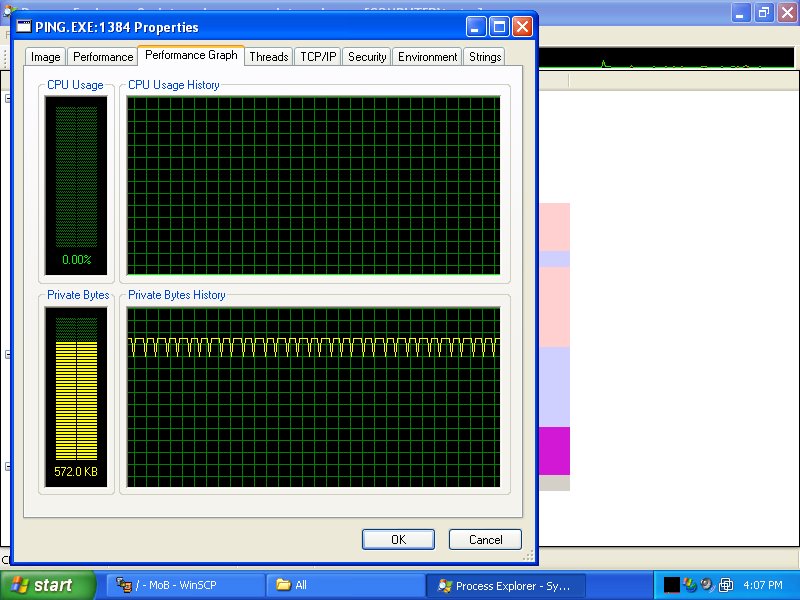
Once brontok goes wild, it will try to spawn more pings in order to bring down 17tahun.com.


You may like to view this interesting graph.


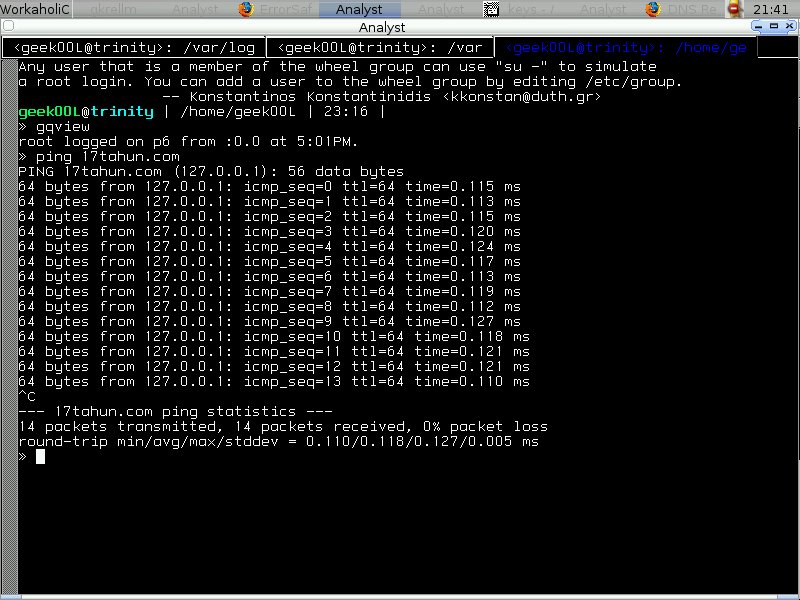
However what funny is when I tried to ping 17tahun.com manually, I get a very surprised result - 64 bytes from 127.0.0.1, it is supposed to be destination host unreachable or maybe request timed out if the destination host is down. But what tends to shock me is it replied with the lookpback address - 127.0.0.1.


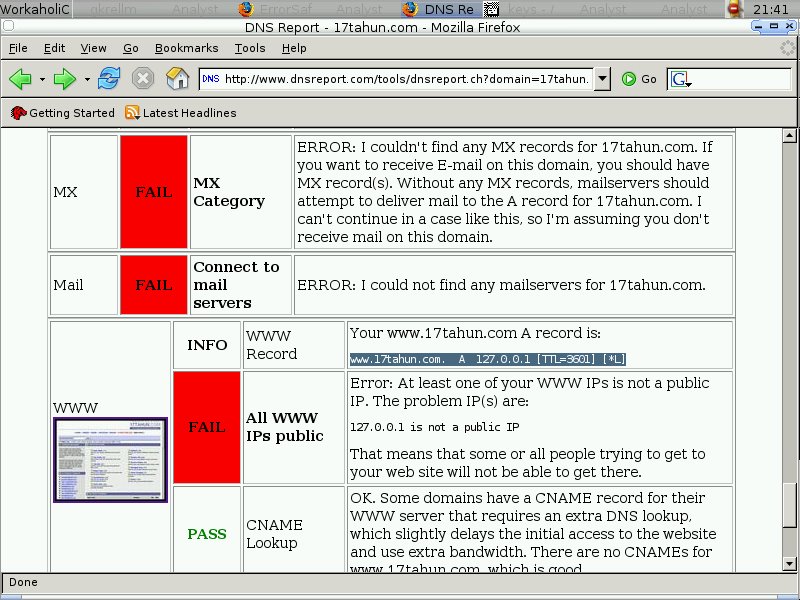
I ran into dnsreport.com and checking it's dns status, and I found this interesting piece of it's result.

Your www.17tahun.com A record is

www.17tahun.com. A 127.0.0.1 [TTL=3601] [*L]


It seems that the DNS record is totally incorrect, I'm now having doubt on this, is this something to do with DNS cache poisonning?

Enjoy .....

P/S: Brontok tries to bring down other sites by ping flooding as well, however those are not as interesting as this one.

Thursday, March 30, 2006

A to Z Introduction

I have found two applications which attracts my attention enough. One of them is Zebedee, I hardly see this tool been mentionned anywhere and it seems promising. It is used to encrypt and secure the connection over tcp/ip and udp. Maybe it will be another alternative of ssh when come to creating tunnel for your insecure connection that acrossing the network in plain text form.

The second application I would like to try out is AIRT, this AIRT is different than the one called airt-linux, airt-linux is used to detect misbehavioural of system when it is suspected to be compromised. However AIRT is developed to address the need of Incident Response Team to profile and manage all the cases effectively. It provides web based system that allows access from anywhere as long as you have internet browser.

That's all I want to share for now, cheers :]

Sunday, March 26, 2006

Monkey tricks: Extracting Viruses/Worms

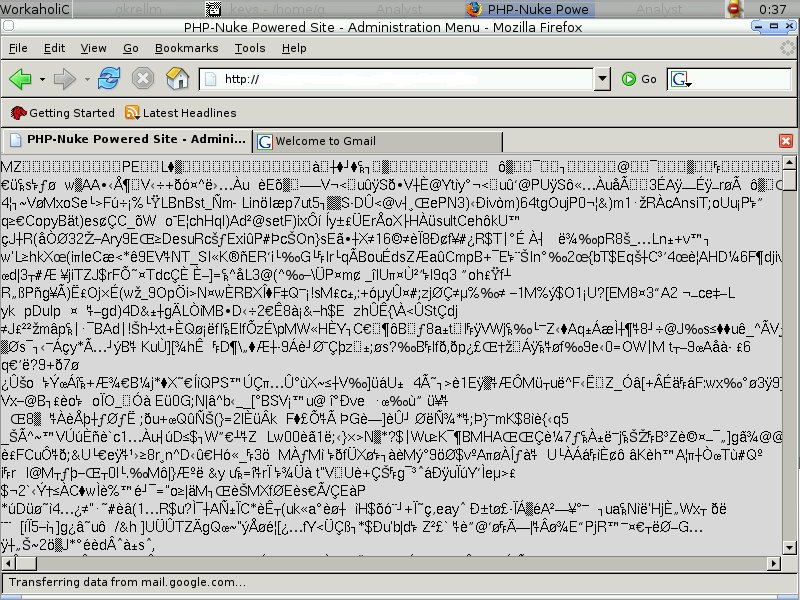
It's all start from here, browsing through the internet with my internet browser, I visited a forum based web page, and something hits my curiosity. I guess you may find it interesting as well with the screenshot below. This is totally not right since normal web page shouldn't be look like a corrupted chunk datas.


I decide to understand what is the actual contents of this data, but how can I do it? I decide to sniff my own connection and browse the same URL again. Quick launching my tcpdump to log full content data with

shell>tcpdump -qeXX -tttt -n -s 1550 -w malicious_pcap

After finished browsing the URL, I killed my tcpdump quickly with Ctrl+c, then I start my packet analysis with ethereal, one of the interesting packet is in the packet bytes pane(the lowest pane) with the string kernel32. This is most prolly Windows thingy.


I have heard about how people able to reconstruct or extract the binary(executable file) from pcap, however I haven't seen one that actually demonstrating you how to do it, most to most are the one that extracting file with jpeg, gif and such. Those are not what I need because I smell Windows EXE in this network stream. Tcpxtract maybe able to do it but need tweaking, and it is based on foremost. Foremost is a console program to recover files based on their headers, footers, and internal data structures, hence I guess I can use foremost to recover all the possible files that I need since pcap is actually in binary format.

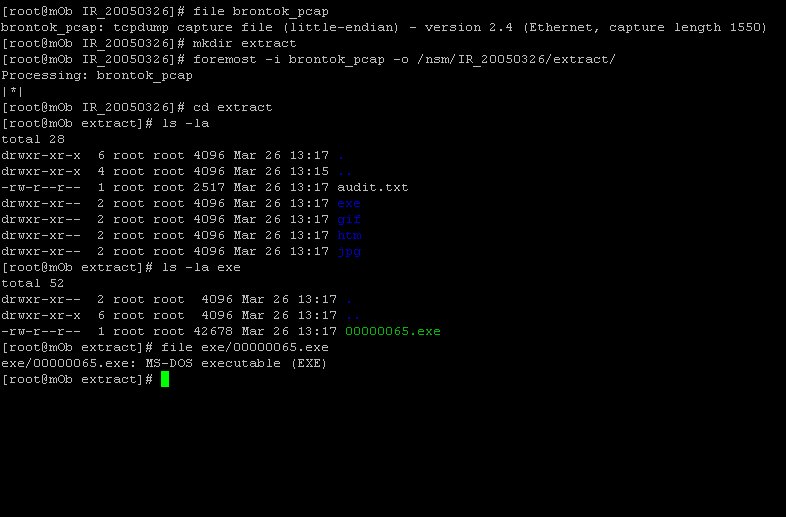
Since I'm lazy to type, here's how I extract and recover files in pcap using foremost, I have renamed malicious_pcap to brontok_pcap. Check out the screenshot .....


You may find a file called audit.txt in the extract directory which is actually a report that generated by foremost. Here's the content of it.

Foremost version 1.1 by Jesse Kornblum, Kris Kendall, and Nick Mikus
Audit File

Foremost started at Sun Mar 26 13:17:03 2006
Invocation: foremost -i brontok_pcap -o /nsm/IR_20050326/extract/
Output directory: /nsm/IR_20050326/extract
Configuration file: /usr/local/etc/foremost.conf
------------------------------------------------------------------
File: brontok_pcap
Start: Sun Mar 26 13:17:03 2006
Length: 188 KB (192512 bytes)

Num Name (bs=512) Size File Offset Comment

0: 133.jpg 1 KB 68134
1: 102.gif 497 B 52662 (20 x 20)
2: 111.gif 589 B 57195 (13 x 13)
3: 162.gif 2 KB 83314 (48 x 47)
4: 197.gif 2 KB 101333 (48 x 47)
5: 205.gif 2 KB 105152 (48 x 51)
6: 211.gif 2 KB 108098 (48 x 47)
7: 219.gif 2 KB 112196 (51 x 48)
8: 226.gif 3 KB 115742 (48 x 47)
9: 239.gif 2 KB 122553 (48 x 49)
10: 245.gif 1 KB 125504 (48 x 49)
11: 250.gif 2 KB 128453 (48 x 47)
12: 256.gif 2 KB 131419 (48 x 47)
13: 264.gif 2 KB 135561 (49 x 50)
14: 272.gif 2 KB 139375 (48 x 47)
15: 279.gif 2 KB 143205 (48 x 49)
16: 287.gif 2 KB 146982 (48 x 49)
17: 293.gif 3 KB 150488 (48 x 47)
18: 301.gif 2 KB 154478 (48 x 47)
19: 308.gif 2 KB 157943 (48 x 48)
20: 315.gif 2 KB 161438 (48 x 47)
21: 321.gif 2 KB 164781 (49 x 48)
22: 328.gif 1 KB 167942 (48 x 48)
23: 332.gif 2 KB 170202 (48 x 47)
24: 338.gif 2 KB 173370 (48 x 49)
25: 344.gif 2 KB 176608 (48 x 47)
26: 353.gif 2 KB 180947 (48 x 48)
27: 360.gif 2 KB 184442 (48 x 47)
28: 365.gif 2 KB 187154 (48 x 48)
29: 5.htm 95 KB 2944
30: 372.htm 339 B 190890
31: 65.exe 41 KB 33483 01/01/1970 00:00:00
Finish: Sun Mar 26 13:17:03 2006

32 FILES EXTRACTED

jpg:= 1
gif:= 28
htm:= 2
exe:= 1
------------------------------------------------------------------

Foremost finished at Sun Mar 26 13:17:03 2006

Notice the green color text in the screenshot above is actually MS-DOS executable file, I have performed behavioural analysis by running this executable files in a sandbox Windows VM. As well as I have launched Richard's Sguil VM to see if Sguil smells anything. That's where I found that it is actually brontok worms that trying to pinging the host to see if it is alive and try to connect to the netbios(port 139) open share and upload the brontok worms to another victims.

However one thing I found weird that never posted in any AntiVirus Resource info is that the infected host is trying to locate all the nodes with port 21 openned too, I doubted it is maybe trying to find one and download certain binaries or files from the ftp server or something. However I'm not too assured of it yet unless disaseembling binaries is done.

The reason why I blog about it is that I can't find any good info regarding recovering EXE files from the pcap file, and this time what make it interesting is that I'm using Forensic acquisition tool which used to acquire data from hd images that generated by dd, Safeback, Encase but this time on pcap that generated by tcpdump, snort or maybe tethereal and it is actually Virus/Worm binary that recovered in the process.

I guess people who visiting the forum of whom mostly are M$ Windows users infected by that so called "Mass Mailing Worms" if they don't have AntiVirus installed with latest signatures and updates.

To M$ Windows users, good luck!!!!!

P/S: Uploading worms to forum seems to be right idea since forum used to have mass users and that totally fits the term "WORM".

Saturday, March 25, 2006

New FreeBSD Sguil VM released

This time, Richard at taosecurity has built a new sguil VM that based on Sguil-0.6.1. He has just put up the descriptions and how to use the Sguil Vm in his blog here. I have downloaded and boot it up with my VMware, just follow the instructions of his blog and you may find it works in couple of minutes. I would like to try his installation script but currently I'm busy, feel free to try out and report to him if you have problem with it, by now all the components of Sguil is installed with separated scripts to clean the process of installation instead of installing everything with single script.

This is just one of my screenshot, and you may find the Sguil VM download link in his blog. With this you no longer need to go through painful installation process.


Have fun with Sguil (:])

System Recovery > System Security ?

I seldom comment about commercial solution but I really have to mention about this.

CPanel
- The gui control panel for the web hosting environment, thus it provides user friendliness of managing servers, it totally has false sense of security. The apparoach taken by CPanel is utterly stupid and destroying the evidence of server compromised. When CPanel detects that the system binaries checksum is totally different than the one in their database, they will automatically report to the sysadmin and what killing might be removing the suspicious binaries and replace it with the standard binaries that should be in the system. I understand why CPanel is taking this approach as they don't want the system being malfunctioning, and they consider

System Recovery > System Security

However without much evidence, how can we trace what was happening and how system was compromised, that might causing the server to be intruded for second or maybe n times till the sysadmin going upside down.

Another thing I would like to critic is their patching system, the patching process is definitely killing, ineffective and slow. You can't patch the standard applications manually, CPanel will replace it with it's "clean" applicaitons automatically and reports your "patched" applications serving malicious purpose. If you - CPanel really want to make the server secure, please patch the system or proving updates as soon as you have tested the available patches or updates, what happenned in the pass about the perl integer overflow that taking so long to patch is what we don't like to see.

Who's fault is that when servers get compromised, may I bill you for my loss ?????

No cheers this time? CHEERS :)

Friday, March 24, 2006

Incident Handling: Analyzing IIS6 Log

This is one of the Incident Handling that I have done recently, IP and some infos have changed to protect the related parties.

Date: 20060312

User Domain: www.server.com

Server.com IP = 1.2.3.4

Hacker IP = 6.7.8.9

Client reports about malicious files been uploaded to his web space such as

www.server.com/cgi-bin/cmd.exe
www.server.com/scripts/cmd.exe
www.server.com/scripts/cgitelnet.pl
www.server.com/scripts/NT.pl
www.server.com/scripts/win.pl

First thing I decide to do is navigating IIS6 logs since it is clearly the place to look for the sign of compromised. I compressed the web log under C:\Domains\server.com\logs\W3SVC5213.
I also compress all the malicious files under directories cgi-bin and scripts after checking the MAC time. You might say I shouldn't do anything with it however since I already tag down the MAC time, I just continue with my investigaiton.
The reason why compressing the log due to lacking of tools in Windows that can perform text processing well, so I decide to compress all the logs and perform log parsing in my Unixes machine.
Since the most of the malicious files with the timestamp of March 11, I start navigating the log of the date. And I found z.asp that seems to be malicious as it uploads through images directory. I don't think people upload file with asp extension to images directory. That's fishy!!!!!

2006-03-11 21:16:34 W3SVC5213 Server 1.2.3.4 GET /gallery/images/z.asp action=cmd 80 - 6.7.8.9 HTTP/1.1 Mozilla/ 4.0+(compatible;+MSIE+6.0;+Windows+NT+5.1;
+SV1;+.NET+CLR+1.1.4322;+.NET+CLR+1.0.3705;+.NET+CLR+2.0.50727) ASPSESSIONIDCARQRBDC=KAELDFGBBPCPAMAOCAFCHMEP - www.server.com 200 0 0 1053 350 562

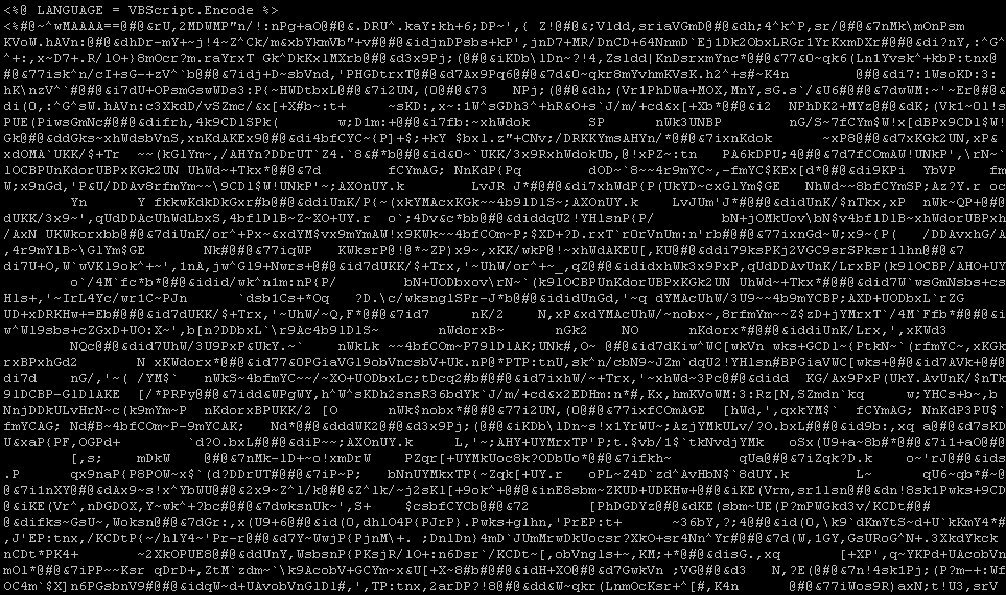
Then I have to make a copy of z.asp file to be analyzed. However when comes to analyze z.asp, I was stucked with it's content. You may view the supressed content here. Apparently it is encoded VBScript.


I won't be giving up in this way and try to look for any infos regarding VB script encoding, and I found

http://www.microsoft.com/downloads/details.aspx?FamilyID=e7877f67-c447-4873-b1b0-21f0626a6329&displaylang=en

And with collegue's help, I found the decoder's in the link below and quickly download it.

http://www.virtualconspiracy.com/index.php?page=/scrdec/intro


If you read the microsoft link, it seems the encoding tool used to encounter the hacker is used to protect the code of the hacker, what a joke. That's what happen when tools down to the hand of wrong party.

To decode z.asp, I download the decoder and run

cmd>scrdec18.exe z.asp z.decode -dumb

After decode it, I get the clear content of the VB script and try to understand the code won't be too hard now. Here's the partial contents ...


By now I already understand the function of the VB script, I need to turn back to my log parsing to search for the strings of other tools that been uploaded through z.asp since it provides such function.

To filter IIS6 Log on my Unixes machine, I just run

shell>find ./ -type -f -exec \
egrep -i 'CMD.EXE|NT.PL|cgitelnet.pl|win.pl|z.asp' '{}' \; \
-print > /nsm/WinIR_20060321/all_trace &

I have the footprints of the hacker by now and knowing what is he doing, You can view part of the entries in the screenshot below and some interesting entries would be

2006-03-11 21:17:08 W3SVC5213 Server 1.2.3.4 GET /gallery/images/z.asp raiz=C:\Documents%20And%20Settings\ 80 - 6.7.8.9 HTTP/1.1 Mozilla/4.0+(compatible;+MSIE+6.0;+Windows+NT+5.1;+SV1;+.NET+CLR+1.1.4322;+.NET+CLR+1.0.3705;+.NET+CLR+2.0.
50727) ASPSESSIONIDCARQRBDC=KAELDFGBBPCPAMAOCAFCHMEP - www.server.com 200 0 0 14121 536 968

2006-03-11 21:17:11 W3SVC5213 Server 1.2.3.4 GET /gallery/images/z.asp raiz=C:\Documents%20And%20Settings\All%20Users 80 - 6.7.8.9 HTTP/1.1 Mozilla/4.0+(compatible;+MSIE+6.0;+Windows+NT+5.1;+SV1;+.NET+CLR+1.1.4322;+.NET+CLR+1.0.3705;+.N
ET+CLR+2.0.50727) ASPSESSIONIDCARQRBDC=KAELDFGBBPCPAMAOCAFCHMEP http://www.server.com/gallery/images/z.asp?raiz=C:\Documents%20And%20Settings\ www.server.com 200 0 0 11300 640 562

2006-03-11 21:17:14 W3SVC5213 Server 1.2.3.4 GET /gallery/images/z.asp raiz=C:\Documents%20And%20Settings\All%20Users\Start%20Menu 80 - 6.7.8.9 HTTP/1.1 Mozilla/4.0+(compatible;+MSIE+6.0;+Windows+NT+5.1;+SV1;+.NET+CLR+1.1.4322;+.NET+CLR
+1.0.3705;+.NET+CLR+2.0.50727)ASPSESSIONIDCARQRBDC=KAELDFGBBPCPAMAOCAFCHMEP http://www.server.com/gallery/images/z.asp?raiz=C:\Documents+And+Settings\All+Users www.server.com 200 0 0 10931 658 843

2006-03-11 21:17:16 W3SVC5213 Server 1.2.3.4 GET /gallery/images/z.asp raiz=C:\Documents%20And%20Settings\All%20Users\Start%20Menu\Programs 80 - 6.7.8.9 HTTP/1.1 Mozilla/4.0+(compatible;+MSIE+6.0;+Windows+NT+5.1;+SV1;+.NET+CLR+1.1.4322;
+.NET+CLR+1.0.3705;+.NET+CLR+2.0.50727)ASPSESSIONIDCARQRBDC=KAELDFGBBPCPAMAOCAFCHMEP http://www.server.com/gallery/images/z.asp?raiz=C:\Documents+And+Settings\All+Users\Start+Menu www.server.com 200 0 0 21882 678 1281

2006-03-11 21:17:37 W3SVC5213 Server 1.2.3.4 GET /gallery/images/z.asp raiz=C:\Documents%20And%20Settings\All%20Users\Start%20Menu\Programs\Startup 80 - 6.7.8.9 HTTP/1.1
Mozilla/4.0+(compatible;+MSIE+6.0;+Windows+NT+5.1;+SV1;+.NET+CLR+1
.1.4322;+.NET+CLR+1.0.3705;+.NET+CLR+2.0.50727)ASPSESSIONIDCARQRBDC=KAELDFGBBPCPAMAOCAFCHMEP http://www.server.com/gallery/images/z.asp?raiz=C:\Documents+And+Settings\All+Users\Start+Menu\Programs www.server.com 200 0 0 6782 695 406

Here's part of the filtered logs.


However it seems he/she has no success on browsing other directories except the user directory because of the permission settings. At last he/she gives up since can't gain control of the whole system.

P/S: I use egrep with -i to ignore case sensitive since it is windows log.

Have fun with track and trace (:])

Thursday, March 23, 2006

Flowgrep on CentOS-4.2

Previously I have flowgrep installed on my CentOS 4.2 and I have forgotten how I get it to work and now I try to revisit it again and noted it down so that I have my memory slots for other stuffs instead of remembering how to get flowgrep installed on CentOS. Here's how I get it done ...

At first I download all the files from here. Then just go normal rpm install,

shell>rpm -Uvh libnet-1.0.2-2.2.el4.rf.i386.rpm

shell>rpm -Uvh python-nids-0.5-2.2.el4.rf.i386.rpm

shell>rpm -Uvh flowgrep-0.8-1.2.el4.rf.noarch.rpm

Since I have libpcap install previously, that's why I don't need to install it here.

Cheers :]

P/S: I would like to blog about the recent incident handling but it seems blogspot keeps killing me from posting screenshot so I might do it later, stay tuned ...

Tuesday, March 21, 2006

Fluxbox-0.9.15 Released

Again my favourite WM - Fluxbox moving to next level. You may find the changelog here

http://www.fluxbox.org/version-0.9.php

It is still in devel phase but you may find it very stable and fast. Check out another upcoming project - Knoppix-NSM that based on Network Security Monitoring model which uses Fluxbox as it's Window Manager too. Thanks Richard for the link.

http://www.knoppix-nsm.dyndns.org/

I can't wait for it's release .....

Cheers :)

Reverse Engineering

If you are studying or keen into the Art of Exploitation and Reverse Engineering, I bet these three sites might be your interest, feel free to check it out and it may help you to improve your skillz of RE. I'm not one who into this kind of thingy but it should help people who really love RE.

http://www.rootkit.com/

http://www.openrce.org/about/

http://www.uninformed.org/


Enjoy :]

Sunday, March 19, 2006

Scapy: 3D Tracerouting

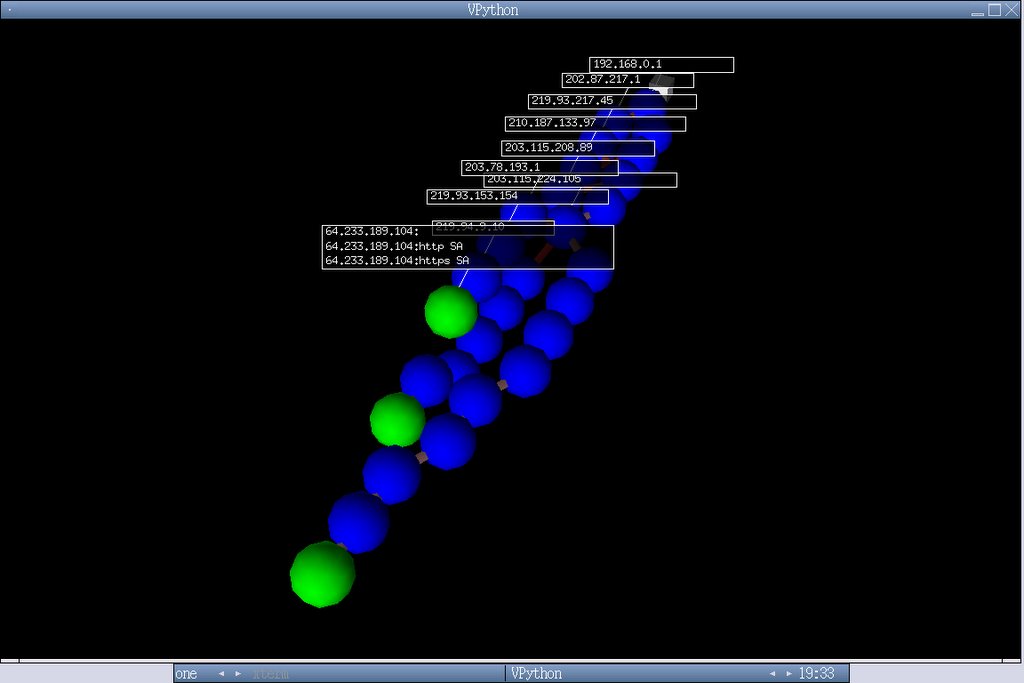
This serve as updates for my Scapy on FreeBSD installation guide. Though there's already scapy ports for FreeBSD, however it is dated and you might need to download the latest scapy to play with this new feature - 3D graph for traceroute function. You can just grab the latest scapy here -

http://www.secdev.org/projects/scapy/files/scapy.py

To enable new functionality for Scapy which is added recently that allows you to create 3D graph of traceroute like the one showing in the Scapy's main page, you will have to install boost-python and py24-visual.

Here's quicky for it,

shell>pkg_add -vr boost-python

shell>pkg_add -vr py24-visual

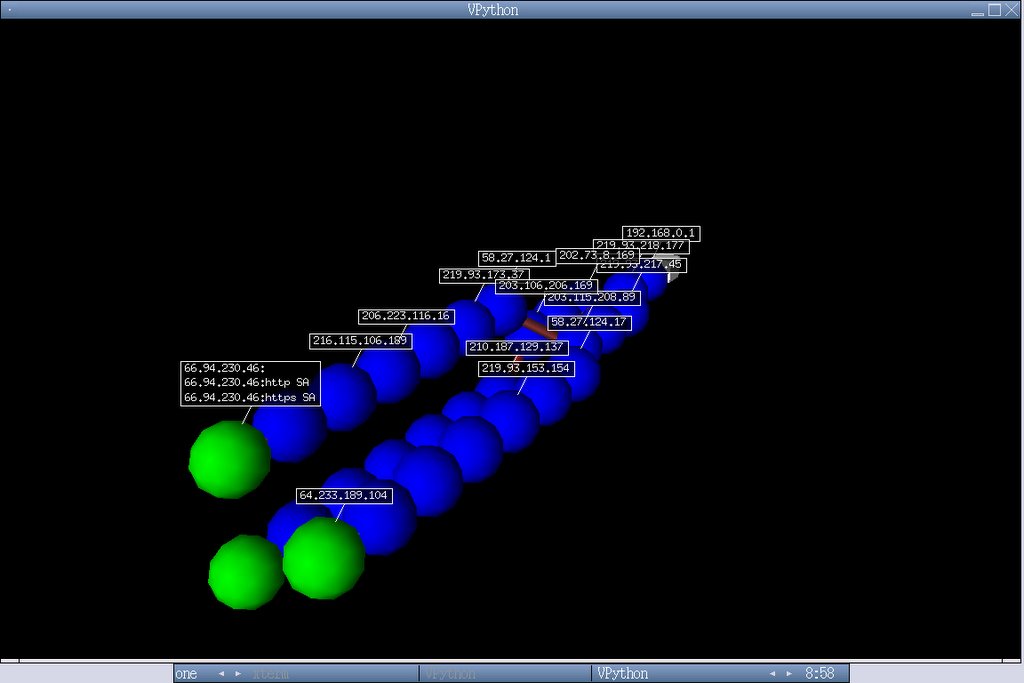
I won't be showing how you can generate the 3D graph here since it is explainned in Scapy main site. Here are the screenshots,


I'm glad that Scapy keeps improving day by day, if you really feel interested of Scapy, submit yourself to the mailing list and you might find yourself excited where you will see more and more protocols are supported and added by the scapy community.

Enjoy (:])

Saturday, March 18, 2006

OpenBSD Sguil Doc

I have been receiving lots of emails about the Sguil setup on OpenBSD, though I have written the installation guide, as well as releasing the sguil vmware image. I'm looking forward to upgrade my installation guide with better rewrite and improve the sguil vmware image as well. Though it is not easy to setup sguil on OpenBSD, I have also included the sguil installaiton script. I promise I will update the installation script too once OpenBSD 3.9 is shipped.

For anyone who have problem, please wait for OpenBSD 3.9 or you should run on either OpenBSD 3.8 stable. Mysql 5.0.18 port/package is available and it ease your installation experience. I will try to create port/package for mysqltcl when I have my spare time.

Stay tuned.

(:])

FAUST - File Audit Security Toolkit

Faust is a perl script that helps to analyze files found after an intrusion or compromised. Its goal is not to make the analysis, but to extract the pieces of information to html report that you will use afterward in your analysis. This tool is seldom mentionned anywhere but I would like to give it a try on my CentOS system. Faust requires certain dependencies and I need to install it to get it run.

Installing it's dependencies - ltrace and strace

shell>yum install ltrace
Setting up Install Process
Setting up repositories
update 100% |=========================| 951 B 00:00
base 100% |=========================| 1.1 kB 00:00
addons 100% |=========================| 951 B 00:00
extras 100% |=========================| 1.1 kB 00:00
Reading repository metadata in from local files
primary.xml.gz 100% |=========================| 75 kB 00:04
update : ################################################## 185/185
Added 4 new packages, deleted 4 old in 0.82 seconds
Parsing package install arguments
Resolving Dependencies
--> Populating transaction set with selected packages. Please wait.
---> Downloading header for ltrace to pack into transaction set.
ltrace-0.3.36-2.EL4.i386. 100% |=========================| 5.5 kB 00:00
---> Package ltrace.i386 0:0.3.36-2.EL4 set to be updated
--> Running transaction check

Dependencies Resolved

======================================================
Package Arch Version Repository Size
======================================================
Installing:
ltrace i386 0.3.36-2.EL4 base 72 k

Transaction Summary
======================================================
Install 1 Package(s)
Update 0 Package(s)
Remove 0 Package(s)
Total download size: 72 k
Is this ok [y/N]: y
Downloading Packages:
(1/1): ltrace-0.3.36-2.EL 100% |=========================| 72 kB 00:09
Running Transaction Test
Finished Transaction Test
Transaction Test Succeeded
Running Transaction
Installing: ltrace ######################### [1/1]

Installed: ltrace.i386 0:0.3.36-2.EL4
Complete!
[root@trinity FAUST-0.1.0rc2]# yum install strace
Setting up Install Process
Setting up repositories
update 100% |=========================| 951 B 00:00
base 100% |=========================| 1.1 kB 00:00
addons 100% |=========================| 951 B 00:00
extras 100% |=========================| 1.1 kB 00:00
Reading repository metadata in from local files
Parsing package install arguments
Resolving Dependencies
--> Populating transaction set with selected packages. Please wait.
---> Downloading header for strace to pack into transaction set.
strace-4.5.13-0.EL4.1.i38 100% |=========================| 12 kB 00:00
---> Package strace.i386 0:4.5.13-0.EL4.1 set to be updated
--> Running transaction check

Dependencies Resolved

======================================================
Package Arch Version Repository Size
======================================================
Installing:
strace i386 4.5.13-0.EL4.1 base 91 k

Transaction Summary
======================================================
Install 1 Package(s)
Update 0 Package(s)
Remove 0 Package(s)
Total download size: 91 k
Is this ok [y/N]: y
Downloading Packages:
(1/1): strace-4.5.13-0.EL 100% |=========================| 91 kB 00:04
Running Transaction Test
Finished Transaction Test
Transaction Test Succeeded
Running Transaction
Installing: strace ######################### [1/1]

Installed: strace.i386 0:4.5.13-0.EL4.1
Complete!

After all the needed dependencies by faust get installed, you will have to tweak the variable path of the binaries in faust.conf, I will show the only part I have tweaked and I'm running CentOS 4.2.

file /usr/bin/file
objdump /usr/bin/objdump

strings /usr/bin/strings
readelf /usr/bin/readelf
ldd /usr/bin/ldd

nm /usr/bin/nm

ltrace /usr/bin/ltrace
strace /usr/bin/strace

md5sum /usr/bin/md5sum

#ps /bin/ps

#awk /bin/awk


You config may be vary, just define properly and it's done, now should be time to run faust.

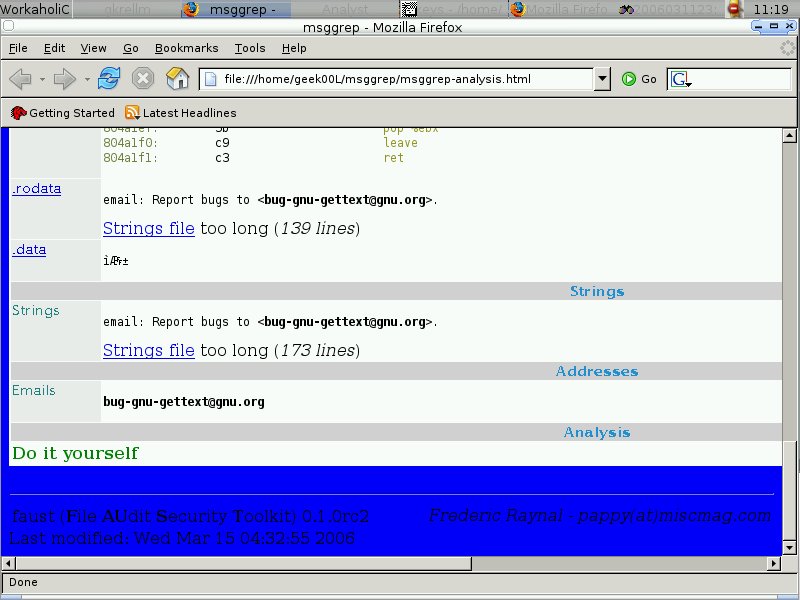
shell>faust.pl -c faust.conf msggrep


Once it runs without errors, it will generate the html file called msggrep-analysis.html with it's corresponded directory.

Modifying the generated html report since it shows the page with black color background and black color text so we see nothing, just edit bgcolor variable will do. You may modify faust.pl since it's more easy for later.

body bgcolor="blue"

table cellspacing="2" bgcolor="white" border="0" cellpadding="0" width="100%"


table cellspacing="1" bgcolor="white" border="0" cellpadding="0" width="90%"


And don't forget to copy faust.css file since it is already been included in the generated html file.

You can download faust at http://security-labs.org/index.php3?page=faust

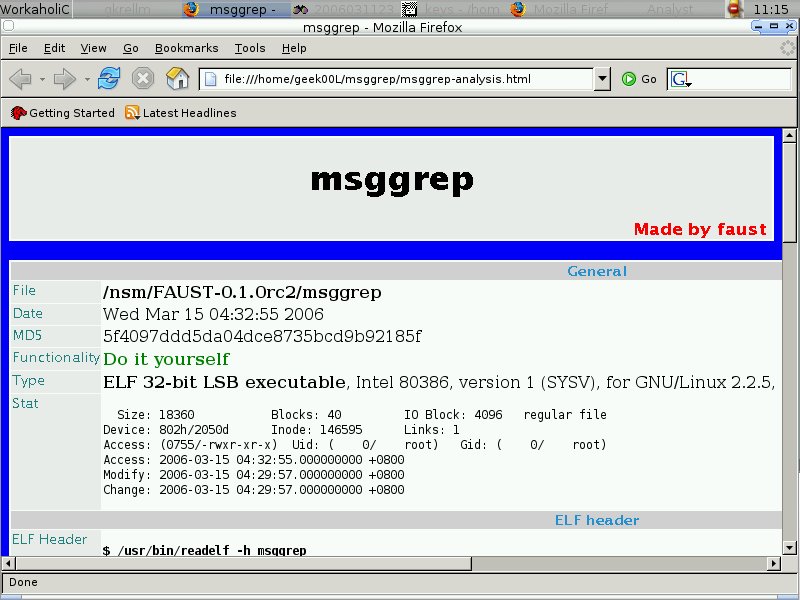
Here's the output example -


Cheers :]