Monday, December 11, 2006

I know idiot is helpless

I'm pretty dissapointed about SecurePenang. First of all - the speaker from Itrain is just another CEH instructor that been trained to be a Certified Hacker who seriously doesn't know much about the ethic of being Security Professional.

The first event of the day is Wardriving, the funny thing about the speaker is that he told us the best card for Wardriving is Orinoco - that's definitely not true as it depends on the tools and drivers that written for the networking hardware. By the way the WarDriving is pretty boring with whatever stumbler.

Coming to the Presentations that done by Symantec and Microsoft, which don't do any better, everyone feel sleepy and we all know it is boring when comes to vendors talk. Then Niser gaves the Presentation regarding Malaysia Security Outlook, this is by far the best presentation in the day, I don't want to comment anything about it but just one, building threat statistic based on incident reporting of companies is totally inaccurate, I think most of companies prefer things under the umbrella instead of sun. Please deploy sensors at ISP layer instead. I don't think DDOS cases equal to none in a quarter of the year.

The last hacking demo - this is the big woo. The so called certified hacker setup his own web server and I think he added the host mapping to the hosts file - maybank2u.com.my to his own web server with public IP. Then he uses nmap scanning to get all the opened port, then telling everyone that Maybank web server has so many ports opened including port 135 abd 139, therefore he used the script kiddies tool to launch dcom exploits and successfully getting into the server. He even shows how he able to retrieve file and so forth using tftp as well as defacing the website.

I definitely agree that there's no harm to perform live hacking demo, it should creates awareness among the audience to awake how easy your operating system can be compromised. However you should have told the audience that you are actually hacking into the demo server instead of Maybank web server, the certified hacker didn't explain and telling the audience he is hacking into demo server but Maybank Web Server. Almost 90%(can tell as most of audience are non-technical) of them believe that it is real Maybank web server. He is misguiding all the audience by showing how l33t he is, he even stated that there's no firewall or ids and they won't know what he has done(dumbass). Everyone says "WOW" and clapping hands like nobody.

Then when comes to the end of the demo, while people asking him question personally such as is he able to get into Maybank databases? Then he told that Maybank has Multilayer Network Structure and by hacking the Web Server you will have to dig out where the Database Server is located.

At the end, he still want people to believe that he(l33t) is actually hacking into Maybank Server. Remember your audience is public, you shouldn't deliver faulty information, what a breach!

Mike <- You are not qualified as ethical hacker. You just an idiot without brainer! I read from the site the Live Hacking Demo should be done by Scan Associate people and I'm wondering whether he is from Scan. The coolest statements of him - you have greater reputation if you have more bots. I bet he doesn't know the hacker communities enough. The second interesting statement is "I have never been infected by computer viruses" even I have used Windows for so long, and my antivirus program is disabled by default!" - Wow, he is definitely gosu alike.

My words to MIRC - The SecurePenang event sucks, you shouldn't have brought anyone like this to present or deliver.

P/S: I should kick Mike in the nutsack!!!!!!!! :P

Thursday, December 07, 2006

Penang ICT Week

I will be going to the Third Event of Penang ICT Week which is Secure Penang that will be held on 8th of December(Tomorrow), so it would be great if any of you are going to the event and we can most properly talked more about the Network Security Scene in Malaysia. There will be Scan Associate and Niser guys around so I hope to see some familiar faces there.

You can find the event detail here.

Anyway ping me if you are going.

Cheers :]

Wednesday, December 06, 2006

Irresistable

Working as sysadmin means that you will have to watch your puter screen most of the time, thus it is good to setup prefferable working environment. While you can't change your office layout, I'm sure you can change your screenie which don't kill. Most of my friends know that I prefer simple and slick style over anything, and I can't resist to show off my Fluxbox screenshot - it is too sexy to be true and serves as perfect workspace at least for me.


Thanks to tenner for his fluxbox style - litebox, you always rox!

Cheers ;)

P/S: Please learn to appreciate beautiful things :P

Tuesday, December 05, 2006

Honeysnap

I think there are lots of people doing the same thing apparently, I just came across this new tool that released by honeynet community - honeysnap. It is very neat as it automated the process of pcap analysis and generating the analysis report which ease the job of analyst.

To avoid doing the same thing over and over again, I have my own shell script that doing similar stuffs which used to analyse pcap files but more of following NSM model. I make use of tools like capinfos, tcpdstat, argus clients, and some other tools to generate analysis report when I have to perform generic analysis on pcap files. Don't expect me to release that as I have to keep something on my own since I guess I have already shared so much of my stuffs indeed.

Anyway honeysnap should be good learning tool for network security analyst, you can check out the report output of honeysnap here. I have seen more and more applications looking at statistical and session data analysis now, is this the hype of NSM?

I would expect this in future - hire NSM analyst instead of IDS analyst

Cheers :]

Monday, December 04, 2006

Ragrep

I wonder why I put ragrep as a title, but I think this may help someone in case they are googling about the usabilities of ragrep, I hardly find any when I tried googling. So what's the use of ragrep, I think you should have idea by looking at the "name". Heard about flowgrep or ngrep, while ngrep is packet based and flowgrep is flow based which introduces more accuracies, argus offers you the tools that doing about the same thing.

While I have done lots of flow analysis using argus client, I don't do much on the payload wise, however you can actually do so with argus tool - ragrep. In order to use ragrep, you will have to capture user data bytes, this can generate expensive argus data if you are running on high speed network, but it is not bad idea to use ragrep if you have stored full content data, or at least it can tell you whether certain commands(http/ftp commands/codes) have been successfully executed in your network by just storing first 10-15 data bytes of connection. To capture user data bytes, you will have to configure argus with the following variables in argus.conf -

ARGUS_CAPTURE_DATA_LEN=15

Or you can run argus with -U option, this is good when you want to perform offline analysis with generic pcap files. I usually do this -

shell>argus -U 15 -r test.pcap -w test.argus

Once you have data in argus format, you can check the ftp data connection close with transfer complete by running this -

shell>ragrep -i -e '226 Transfer' -r test.argus -nn

To increase the accuracy of it, you can examine the tcp state changes with -z option and checking source/destination bytes as well as duration of the flow. Racluster can be used to aggregate the record with the same pair of src/dst ip/port to avoid confusion with specific flow status interval timer. Remember smtp and ftp can be tricky to look at in the flow record when there's large bulk of data transfer thus it's good to aggregate this kind of flow record.

Enjoy (;])

Sunday, December 03, 2006

More ...

I have more things to read, but less things to blog, thus you hardly see me updating my blog these days. However I will still keep this blog going, currently I'm trying to figure out my own generic flow analysis research. I have to strengthen my knowledge of statistic and network protocols to form a better model when comes to analyse network flow.

By the way I'm setting up Sguil Demo Server of my own, the demo server will be available soon as well as the VMware image of Sguil.

Cheers :]

Monday, November 27, 2006

More weird packets, please!

This is kinda old stuff, but it is very interesting, at least to me -

http://lcamtuf.coredump.cx/mobp/

Maybe that's why we need openpacket.org! If you have weird packets that considered tricky and unique to resolve, please share with the world.

Cheers :P

Sunday, November 26, 2006

Nice Blog

I come across this blog accidentally when googling. I think it is interesting though, share with everyone indeed -

http://hhi.corecom.com/weblogindex.htm

Don't miss out his publications as well!

Enjoy :]

Tuesday, November 21, 2006

ArgusEye

I think there are people who love graphical user interface, now there's simple and lightweight interface for argus client - arguseye. It is still very young but I can see more potentials in future development.

You can probably grab it @

http://www.uni-koblenz.de/~phil/arguseye/

Here's the screenshot -


It is very simple to use, just open argus file that you collected from your passive monitoring device, and load it. You can define the filter expressions(bpf like) to extract the flow data that you are interested to examine. You can also change the column placement and data to display by editing the display field. You able to sort the field(column) as well such as source port, destination port and etc by clicking on the field tab.

The colors in the interface can be tuned since it is written using perl/GTK. I would like to see active development in this tool such as supporting more argus client tools like racluster, rasplit and so forth.

Credit goes to Phil who has developed almost the first GUI(I can't find any GUI Frontend that supports Argus 3.x yet).

Enjoy :]

P/S: Argus 3 is almost out, most probably before end of this year!

Language tutorial

Sometimes you can't resist to learn new language, I'm not talking about programming but human languages here in case someone think I'm too geeky. Learning is a process so I will learn small sum at a time.

So what have I learned today? Probably Portuguese language ...

Network protocols = poritas de rede
Network ports = portos de rede

Maybe I should learn the fundamental instead of jumping into network terms, but why should I?

I've told you I'm not geeky enough!!!!!

Enjoy ;P

Monday, November 20, 2006

MyCERT Abuse Statistic

Based on the report, I don't know how things are categorized, can someone shade some lights?

http://www.mycert.org/abuse-stat/index.html

It seriously looks confusing isn't it, hack threat, malicious codes, harassment, intrusion? Do you consider network scanning as hack threat or harassment, and malicious codes itself can't abuse unless it is used by party with purpose or intention.

Can each category be defined in more transparency and clearer sense?

I'm not drunken master when I'm writing this. MyCERT, please rethink about it, I know you can do better than that!

Cheers :]

Sunday, November 19, 2006

File System Full

I'm running into very funny problem where my /var file system is full, I observe this while looking at my log -

Dec 11 18:59:17 trinity /bsd: uid 0 on /var: file system full
Dec 11 18:59:41 trinity last message repeated 21 times
Dec 11 19:00:14 trinity /bsd: uid 0 on /var: file system full
Dec 11 19:00:14 trinity pflogd[26078]: Logging suspended: fwrite: No space left
on device

I run df -h to check it,

Filesystem Size Used Avail Capacity Mounted on
/dev/wd0a 251M 43.4M 195M 18% /
/dev/wd0f 126M 22.0K 120M 0% /home
/dev/wd0h 11.5G 1.2G 9.7G 11% /nsm
/dev/wd0d 126M 6.0K 120M 0% /tmp
/dev/wd0g 5.9G 2.7G 2.9G 48% /usr
/dev/wd0e 502M 501M -24.2M 105% /var

I figure out that I have really big log file - pflog which is around 400MB under /var/log, thus I remove it. I try to check /var again with following command -

shell>du -sh /var
100M /var

That's cool, I think I have reclaim the space I need, but I can't log anything to /var due to file system full even after removing pflog. It seems odd to me, I try to recheck again -

shell>df -h
Filesystem Size Used Avail Capacity Mounted on
/dev/wd0a 251M 43.4M 195M 18% /
/dev/wd0f 126M 22.0K 120M 0% /home
/dev/wd0h 11.5G 1.2G 9.7G 11% /nsm
/dev/wd0d 126M 6.0K 120M 0% /tmp
/dev/wd0g 5.9G 2.7G 2.9G 48% /usr
/dev/wd0e 502M 501M -24.2M 105% /var

It still shows the same thing, I can't think of why df is still showing the same result and it doesn't allow me to even create a file under /var. My only solution should be a "Reboot", since giving it a try do no harms, I rebooted my machine.

I run df -h again after system is rebooted -

Filesystem Size Used Avail Capacity Mounted on
/dev/wd0a 251M 43.4M 195M 18% /
/dev/wd0f 126M 22.0K 120M 0% /home
/dev/wd0h 11.5G 1.2G 9.7G 11% /nsm
/dev/wd0d 126M 6.0K 120M 0% /tmp
/dev/wd0g 5.9G 2.7G 2.9G 48% /usr
/dev/wd0e 502M 104M 373M 22% /var

Now it looks fine, but why does it need reboot to reclaim back the disk space? Pretty odd it seems on my OpenBSD 4.0 box.

Enjoy (:()

Thursday, November 16, 2006

Time Machine - Payload Centric

I don't think NSM is the only approach that appreciate the value of full content data, Bro-ids Community do believe and identify that full content data is important when one needs to perform network forensic and analysis, by travelling back to the incident scene with their time machine.

However, full content data collection is a problem when comes to implementation due to some limitations, again Bro-ids community tries to solve the problem with their innovative ideas. Since it is already well mentioned in the link below, I won't be mentioning it here -

http://www.net.t-labs.tu-berlin.de/research/tm/#doc

They have developed the tool called time machine where you can download from their site, I'm pretty interested to run it using my testing server as they state that time machine runs well on gigabits network. I remember I have packets drop when using other network based tools to log the packets.

I'm using FreeBSD as my platform for the setup, I untar the source after downloading it, the installation runs fine with ./configure and make, the developers of time machine encourage users to run time machine from the same directory you compile the source code.

It seems to be trivial at first but you will definitely get clearer picture after reading the how-to. I just configure the file - tm.conf before running tm. Here's my config -

# Example TM configuration file
# $Id: tm.conf 107 2006-11-11 03:11:40Z gregor $

main {
logfile "tm.log";
# these directories must exist when tm starts!
workdir "/nsm/tm/";
indexdir "indexes/";
queryfiledir "queries/";

log_interval 10;
device "fxp1";
# read_tracefile "trace.pcap";
# filter "not port 80";
# bro_connect_str "localhost:47757";
console 1;
conn_timeout 180;
rmtconsole 1;
rmtconsole_port 42042; # 42042 is default
rmtconsole_listen_addr 127.0.0.1; # 127.0.0.1 is default

}

class "all" {
filter "";
precedence 5;
cutoff 15k;
disk 50g;
filesize 1000m;
mem 300M;
pkts_to_disk 2;
}

I need to create few directories before running tm, the pcap log will archive by itself after reaching 1GB(1000m). The network interface that I'm monitoring is fxp1. You can tweak the cutoff value based on your need. I don't set any bpf filter as I want full content data.

shell>mkdir -p /nsm/tm/indexes
shell>mkdir /nsm/tm/queries

Now I just need to execute

shell>./tm -c ./tm.conf
timemachine version 20061111-0
capture started
CLI console thread started
tm@testing.org#

I navigate /nsm/tm and the pcap is logged properly, most importantly there's no packets loss, here's some of the entries in my log - /nsm/tm/tm.log

shell>cat /nsm/tm/tm.log
1163664440.846803 stats: 46061451/0 recvd/dropd P (0.00) 46061371 Pkts, 32689159206 B, 58.6 Mbit/s
1163664440.847054 class_all: 3978554364 11891524 28708322158 34132765 300526337 877840 1163663733.592655 3854246971 11013684 1163654237.963090
1163664440.847312 stats_conns: 36781 conns

shell>ls -la /nsm/tm
total 4126504
drwxr-xr-x 4 root sguil 512 Nov 16 16:20 .
drwxr-xr-x 18 sguil sguil 1024 Nov 16 13:17 ..
-rw-r--r-- 1 root sguil 1048575623 Nov 16 14:15 class_all_00000001
-rw-r--r-- 1 root sguil 1048575410 Nov 16 14:57 class_all_00000002
-rw-r--r-- 1 root sguil 1048574833 Nov 16 15:40 class_all_00000003
-rw-r--r-- 1 root sguil 1048575974 Nov 16 16:20 class_all_00000004
-rw-r--r-- 1 root sguil 28655616 Nov 16 16:21 class_all_00000005
drwxr-xr-x 2 root sguil 1536 Nov 16 16:04 indexes
drwxr-xr-x 2 root sguil 512 Nov 16 12:38 queries
-rw-r--r-- 1 root sguil 368285 Nov 16 16:21 tm.log

I run bpfstat as well and apparently there's no packets drop so far. I'm currently running the time machine for few days to test it. Maybe I will perform stress testing when I have time.

Time machine is aimed to solve the storage and performance issue while retaining the all possibilities to perform network forensic and analysis functions. At the moment the communication of time machine with bro-ids is done via brocolli and they will integrate time machine into bro-ids in future.

I'm sured time machine is one of efficient option available for you to collect full content data. We have already seen many protocol header centric solutions - netflow, argus and etc, time machine is packet payload centric instead.

Enjoy (:])

Qcow -> Vmdk

I have created the qemu image using qcow format, while I have promised to create image for VMware users, you can actually do this by yourself without waiting for my new image(with Sguil Current). Qemu offers you a tool to convert the image format. You can do this via -

shell>qemu-img convert -f qcow OpenNSM.img -O vmdk OpenNSM.vmdk

Now you should be able to load the converted image to VMware. Thanks to lightstar who point me out.

Cheers :]

Monday, November 13, 2006

OpenBSD Darkstat

Darkstat is network statistic collection tool, and it works pretty well with ppp, I have been using pppoe that supported by Screamyx and I would like to collect statistic from it. Darkstat package is available for OpenBSD so installation is not much issue, I just need to execute it after installation.

shell>darkstat -i tun0 -p 80 -d

By default darkstat binds to any available interfaces and you can specify it if you want, I don't do so as this is just for testing and I just wanna see if it works. After running it and getting it listen on port 80, I just open my browser and the traffic graphs are shown.


It also has collected traffic statistics per host, you can examine each host and understand what ports and services are used by specific host when needed.


If you want to be more specific when collecting network statistic, just use its filter expression such with -f argument will do. By default darkstat doesn't offer any access control so using .htaccess to protect the information is what you can do for the moment.

Enjoy ;]

Sguil - Tips of Da Day

Someone is asking me about Sguil, and he raises interesting question - I know you can use Sguil to retrieve most of the data you want as you have collected it in all forms that you need to perform your analysis process. But what if I have to monitor heavy load networks(gigabits) where the data transfer is tremendous(WAN environment perhaps)?

The first thing I can really think of should be bpf filtering, reducing noise and collecting what you really need is important and it can lighten your workload and reduce your analysis time, but yet you are afraid of missing the traffics you may want badly.

Bpf filtering is not your only solution, if you still want to run sguil in heavy loads network, you can reduce the visibility level by discarding the full content data logging, however you are not much into worry as you still have session/flow data that available in hand which allows you to perform analysis and understand the connections between source and destination host.

So everything is about log_packets.sh that comes with sguil source tarball. You can either choose to tune the bpf filtering or not running it when you don't have enough disk storage for full content data. It may eliminate some functions in Sguil but you are still able to perform the necessary steps to monitor your network security in high speed network.

So whoever think that Sguil can't survive big networks - rethink about it!

Cheers (;])

Tuesday, November 07, 2006

Sguil Qemu Image: Corrections

I just realized that I have done a stupid mistake where I have this one liner in /etc/hostname.ne3 -

inet 192.168.0.248 255.255.255.0 none

It is supposed to be NONE instead of none, I have smaller letters in the file and it should be changed, sorry for any inconvinience. Once you change it, either running -

shell>sh /etc/netstart

Or rebooting and the network will work by now if you are in 192.168.0./24 network. The other thing that need to be done should be the net-config.sh script under /root/nsm-scripts, please change it as well if you want the network configuration can be done via script instead of manual configuration. in fact my silly error is due to not testing the net-config.sh script enough before delivering the image.

Cheers :]

Monday, November 06, 2006

PgOSS - Call For Helps

I'm busy and need some helping hands on the next PgOSS Meetup, while surface and aizat can't be around. If any of you interested in organizing PgOSS Meetup, please do email me. I have received few emails from the people who are interested in the Meetup but so far what I need is people who can help in making the meetup running smooth for every month(monthly meetup event).

We need to properly push on Penang Island to create awareness about OSS, please let me know as soon as possible if you would like to help.

Thanks :]

OpenNSM Released

Finally it is done, the OpenBSD + Sguil Qemu Virtual Appliance, I named it OpenNSM, this is the first initial version and feel free to try out. The image size is around 920MB but has been compressed to 210MB with bzip, the image should be pretty smaller and lesser than 920MB, however since it is qcow format that can grow but not reducing the size even if you deleted the files in the image, thus it remains around 1GB size, and that also explains why the compression rate is so significant. If you like the virtual appliance, just donate me a thank will do. OpenBSD 4.0 Release and Sguil-0.6.0p1 are the main core of this virtual appliance so if you would like to try out OpenBSD 4.0 Release, this is one of good chance to try without installation as well.

The virtual appliance is available here -

http://www.dissectible.org/anonymous/OpenNSM/OpenNSM.tar.bz2

You can find the README on how to use OpenNSM virtual appliance here -

http://www.dissectible.org/anonymous/OpenNSM/README

So far I have tested it and it is pretty stable for me on my FreeBSD workstation. As usual if you are running into any problems or you have any suggestions regarding OpenNSM, feel free to email me - geek00L [at] gmail[dot] kom

The VMware version of OpenNSM will be released when I have time, cheers.

Enjoy (;])

Sunday, November 05, 2006

OpenNSM Qemu Virtual Appliance

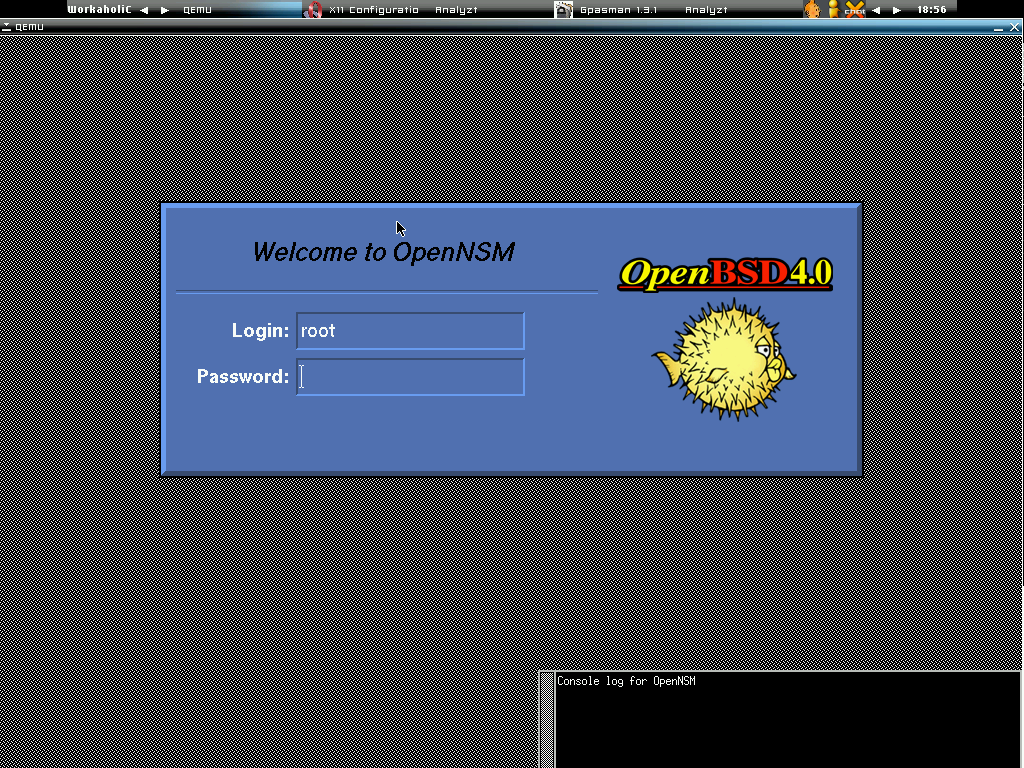
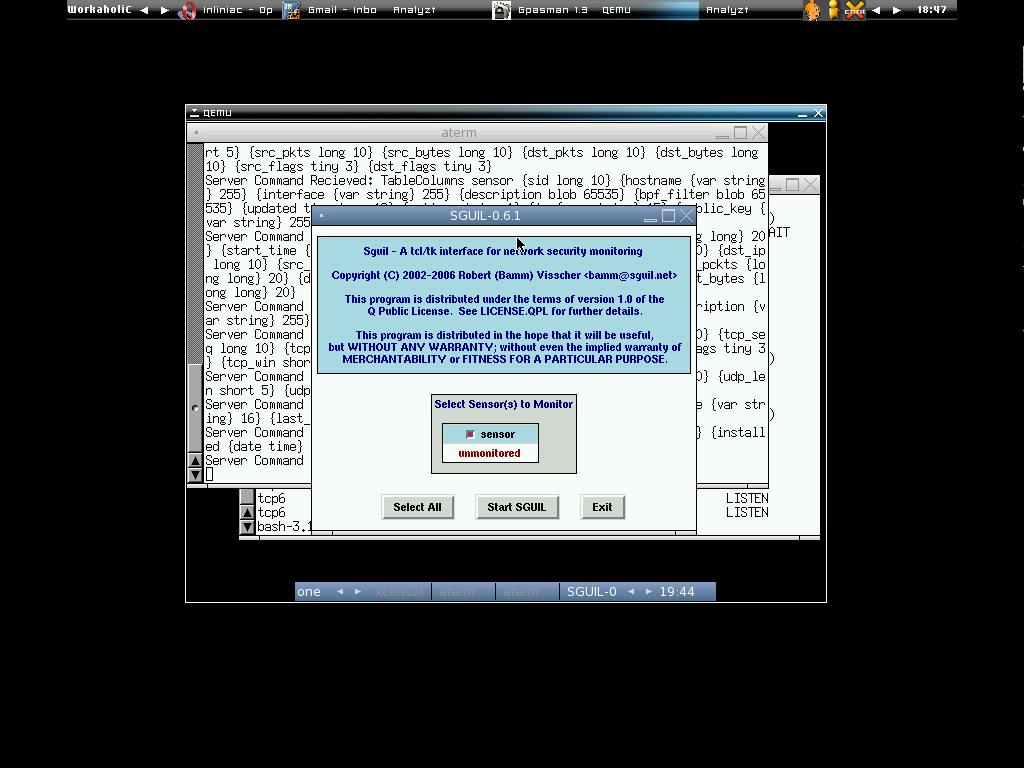
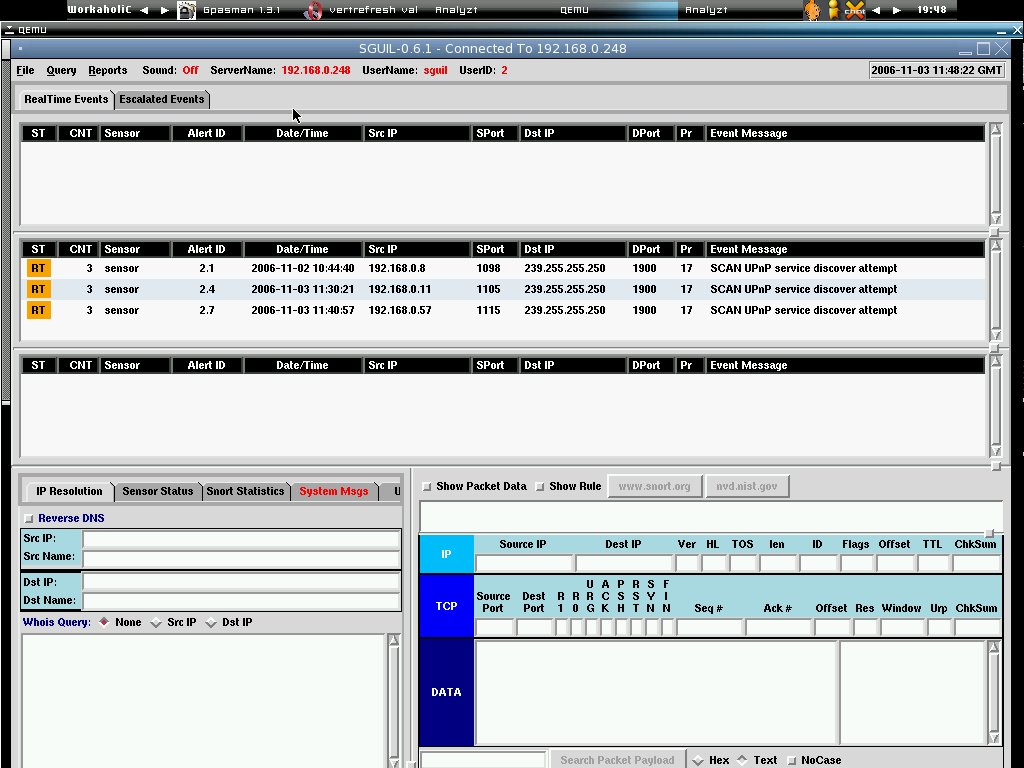
Long time I haven't had uploaded any screenshots to my blog, here are 3 screenshots from my OpenBSD + Sguil qemu virtual appliance before releases. Seriously I don't know how many qemu users out there(I guess not as many as vmware, however I still believe qemu makes a good alternative and pretty good for bsd users).

The OpenBSD XDM Login Screen

Choosing sguil sensor .....

Sguil Analyzt Console

The release is pretty soon!!!!!

Cheers :]

Saturday, November 04, 2006

FreeBSD Network Tap & Sguil Virtual Appliance

Follow up the OpenBSD Network Tap, I have added the section on NSM wiki for FreeBSD Network Tap after my testing on it. You can find the quick setup here -

http://www.vorant.com/nsmwiki/index.php?title=FreeBSD_Network_Tap

By the way, my OpenBSD 4.0 + sguil qemu virtual appliance is almost done inline with the setup guide will be released around next week. For people who prefer VMware virtual appliance(I know most people do), I have delayed the release of it as my Ubuntu system crashes after upgraded to the latest version(edgy) and now I need to fix it before I can run vmplayer.

Thanks to nikns who has ported sguil to OpenBSD which seriously improves the sguil installation experience. I think latvian rox :P

Cheers :]

Wednesday, November 01, 2006

OpenBSD Network Tap

Most of the time I like to write something useful in my blog here, however I choose to contribute to NSM wiki as I always love to have everything in one place. Hopefully more and more people will contribute to the wiki and improve its contents.

Since I'm lazy to write it twice to avoid overlapping content, you can find how to setup OpenBSD box as transparent Network Tap at the link below -

http://www.vorant.com/nsmwiki/index.php?title=OpenBSD_Network_Tap

With this setup you can distribute the network traffics to dedicated traffic collectors or sensors. This is always much preferred in enterprise environment.

Cheers (;])

OpenBSD 4.0 Released


OpenBSD team creates new milestone again, after heavy development and testing from the communities, 4.0 is finally released. Greet to all of the people out there who makes it successful.

I'm pretty stunned with all the improvements and features that been added to this release, check it out here.

Lets rock with the puffy, enjoy :]

Tuesday, October 31, 2006

Back from Cambodia

Finally my long holidays ended, I have very good time while in Cambodia as well as Bangkok and amazed with all the ancient buildings and its histories. Anyway I'm back on track now, the first interesting stuff that I read is the interview of OpenBSD developers regarding OpenBSD 4.0. You can check it out at here.

After finish reading it, now I strongly believe that OpenBSD is considered to be one of most robust and best platform offered to build VPN, Routing and Firewalling solution ever.

Kudos to all OpenBSD developers for their decent work!!!!!

Enjoy :]

Saturday, October 21, 2006

Festival Moments

To all the people out there, I know you are in good mood - happy Deepavali, happy AidilFitry and happy holidays!!!!!

I won't be much online on next week so if any of you have emailed me regarding anything, please be patient on the reply. Cheers.

Enjoy!

Friday, October 20, 2006

OpenBSD Sguil Port

Nikns has submitted his OpenBSD Sguil ports, if you happen to deploy sguil on OpenBSD platform, give it a try and test, test and test so that Nikns can get it into OpenBSD ports tree and produces better and stable sguil port since it relies on many other applications as well where Nikns has ported. It should be working on OpenBSD 4.0 or Current.

The detail is here.

I'm currently installing OpenBSD using snapshot just to test the port, hopefully I can produce feedback when possible.

Thanks Nikns for his effort to create OpenBSD Sguil Port, Ch33rs!!!!!

Enjoy :]

Bro-IDS v1.2

For people who doesn't notice, Bro-IDS v1.2 is released, the major improvement should be the dynamic protocol detection, I can't really comment about it yet since I'm not getting into it yet. Other than that, there are lots of features and bugfixes been done in this latest version and you can find the changelogs here. If you want to know more about dynamic protocol detection, you can check this out.

Since I have Bro-IDS v1.1 running, surprisingly upgrading to version 1.2 can be done in a glance, just untar 1.2 source once you download it, and run the common steps - configure -> gmake && gmake install and you are done. I have no problem at all upgrading it to 1.2 on my FreeBSD box.

We all know Bro-IDS is not as popular as snort, however it is one of obvious alternative if you want to deploy network IDS since not many Open Source NIDS projects survive long enough as lots of efforts needed to produce solid NIDS.

Prelude is long gone for its NIDS feature, it is now more of SIM instead.

To Bro-IDS development team, you guys just rox!

Cheers :]

Wednesday, October 18, 2006

Good Link Indeed

Thanks to the anonymous reader who commented on my previous blog post and also posted a good link regarding squid+clamav+adzapper setup -

http://www.kernel-panic.it/

The link also contains various kind of tutorials especially on OpenBSD while not many but with good quality write up. Check it out!

Enjoy :]

Tuesday, October 17, 2006

Dansguardian+ClamAV+Squid

After digging all the possible content filtering solutions, I decided to give dansguardian a try, the interesting part of dansguardian is that it plays well with other open source applications such as clamAV and squid proxy, by integrating these two applications into dansguardian, you can easily setup your proxy with AntiVirus filtering and deploying powerful access control list to tighten your network access. Since most of the desktop users are not aware of network threats, this can serve as the platform to minimize the risk and saving users from the bad day.

Since I used to write lots of technical stuffs on my blog, however for this setup, I decide to write more comprehensive guide and put it up online to share with everyone, it does take some times to figure out most of the things and I seriously thank to chflags who has offered his much helps and times. Big credits to him and I really appreciated for the knowledge sharing from him.

For people who are interested on setting this up, you can download the guide at

http://www.dissectible.org/anonymous/Misc/Dgn-Clam-Squid.pdf

Any inputs and comments are welcomed, I hope you find it useful.

P/S: The setup is on FreeBSD platform, it shouldn't be vary too much from OpenBSD platform except for the dansguardian installation part where you will have to install from source on OpenBSD.

Enjoy (;])

Friday, October 13, 2006

Helix Live CD - Ntfs RW Support

The latest Helix Forensic Live CD is just released not long time ago, I always love it for the ease of use for Forensic Practioner. This release includes few interesting features that you can find here.

Instead of using captive for NTFS rw capability, now they are using ntfs-3g which is this. The ntfs-3g is better and clean tool to acces NTFS file system. While most people have problem with their Windows boxen but need to access the NTFS file system to retrieve the data, Helix seriously provides a very good solution now. Here's my testing on it.

I booted the Helix Live CD on my Windows box and choose gui(which is default), and you will see the XFCE desktop. I setup the network configuration by using the Netword Card Configuration which under Network in Helix Menu. Then I first enable ssh sever by clicking on Helix Menu -> Services -> Start SSH server, I will have to set the password for user - knoppix and I'm good to go, then I login to Helix via my FreeBSD workstation -

[root@trinity /nsm]# ssh knoppix@192.168.0.195
The authenticity of host '192.168.0.195 (192.168.0.195)' can't be established.
DSA key fingerprint is ac:ac:3b:40:23:73:90:2e:36:d3:ea:c4:1b:0e:eb:55.
Are you sure you want to continue connecting (yes/no)? yes
Warning: Permanently added '192.168.0.195' (DSA) to the list of known hosts.
Password:
Welcome to Helix (Kernel 2.6.14-9)

[knoppix (~)]$ su

Checking the file system that mounted on boot -

[root (knoppix)]# cat /etc/fstab
proc /proc proc defaults 0 0
sysfs /sys sysfs noauto 0 0
/dev/pts /dev/pts devpts mode=0622 0 0
/dev/cdrom /media/cdrom0 udf,iso9660 user,noauto 0 0
/dev/fd0 /media/floppy0 auto rw,user,noauto 0 0
# Added by HELIX
/dev/hda1 /media/hda1 vfat ro,noauto,users,noexec,nodev,noatime,umask=000,shortname=mixed,quiet 0 0
# Added by HELIX
/dev/hda5 /media/hda5 vfat ro,noauto,users,noexec,nodev,noatime,umask=000,shortname=mixed,quiet 0 0
# Added by HELIX
/dev/hda6 /media/hda6 ntfs ro,noauto,users,noexec,nodev,noatime,ro,umask=000 0 0

I have 3 partitions of which hda6 is using NTFS file system, then I can remount with read write capability by executing

[root (knoppix)]# ntfs-3g /dev/hda6 /media/hda6 -o force

Now I can read NTFS file system which is under /media/hda6

[root (knoppix)]# ls -la /media/hda6
total 371202
-rw------- 2 root root 32666 May 12 22:34 Cool-Ethereal-screenshot.PNG
-rw------- 2 root root 387584 Jul 26 01:29 Enterprise-Network-4.vsd
-rw------- 2 root root 421888 Jul 26 22:20 Enterprise-Network-6.vsd
-rw------- 2 root root 1655134 Apr 20 2005 GCIA.Silver.hi.eps
-rw------- 2 root root 1703856 Apr 12 2005 GCIA.Silver.hi.res.tif
-rw------- 1 root root 24498 Aug 22 05:18 ackcmd.zip
-rw------- 1 root root 62464 Jul 24 13:50 example.vsd
-rw------- 2 root root 1621662 Apr 21 2005 gcia_logos_silver.zip
-rw------- 1 root root 59767 May 24 15:37 hexquiz.pdf
-rw------- 2 root root 60636 May 24 15:37 hexquiz_answers.pdf

I can even delete one of the file since I have write permission -

[root (knoppix)]# rm -rf /media/hda6/hexquiz.pdf

[root (knoppix)]# ls -la /media/hda6/h*
-rw------- 2 root root 60636 May 24 15:37 /media/hda6/hexquiz_answers.pdf

It's gone. Now I can umount it with fuse :]

[root (knoppix)]# fusermount -u /media/hda6

This is neat indeed. Have fun with Helix Live CD.

Cheers (;])

FreeBSD - Lets BuRN!

I never burn any iso image using my thinkpad X41 laptop and just try yesterday when burning the new helix liveCD iso, seems not hard with cdrecord, here's how I do it,

[root@trinity ~]# cdrecord -scanbus
Cdrecord-Clone 2.01 (i386-unknown-freebsd6.1) Copyright (C) 1995-2004 Jörg Schilling
Using libscg version 'schily-0.8'.
scsibus0:
0,0,0 0) 'IBM ' 'CD-RW/DVD-ROM ' 'H.2E' Removable CD-ROM
0,1,0 1) *
0,2,0 2) *
0,3,0 3) *
0,4,0 4) *
0,5,0 5) *
0,6,0 6) *
0,7,0 7) *

[root@trinity ~]# cdrecord -v -pad \
speed=2 dev=0,0,0 /nsm/i-Iso/Helix_V1.8-10-05-2006.iso
cdrecord: No write mode specified.
cdrecord: Asuming -tao mode.
cdrecord: Future versions of cdrecord may have different drive dependent defaults.
cdrecord: Continuing in 5 seconds...
Cdrecord-Clone 2.01 (i386-unknown-freebsd6.1) Copyright (C) 1995-2004 Jörg Schilling
TOC Type: 1 = CD-ROM
scsidev: '0,0,0'
scsibus: 0 target: 0 lun: 0
Using libscg version 'schily-0.8'.
SCSI buffer size: 64512
atapi: 0
Device type : Removable CD-ROM
Version : 0
Response Format: 2
Capabilities :
Vendor_info : 'IBM '
Identifikation : 'CD-RW/DVD-ROM '
Revision : 'H.2E'
Device seems to be: Generic mmc2 DVD-ROM.
Current: 0x000A
Profile: 0x0010
Profile: 0x000A (current)
Profile: 0x0009
Profile: 0x0008
Using generic SCSI-3/mmc CD-R/CD-RW driver (mmc_cdr).
Driver flags : MMC-2 SWABAUDIO BURNFREE
Supported modes: TAO PACKET SAO SAO/R96P SAO/R96R
Drive buf size : 1421312 = 1388 KB
FIFO size : 4194304 = 4096 KB
Track 01: data 698 MB padsize: 30 KB
Total size: 802 MB (79:27.92) = 357594 sectors
Lout start: 802 MB (79:29/69) = 357594 sectors
Current Secsize: 2048
ATIP info from disk:
Indicated writing power: 3
Reference speed: 6
Is not unrestricted
Is erasable
Disk sub type: High speed Rewritable (CAV) media (1)
ATIP start of lead in: -11635 (97:26/65)
ATIP start of lead out: 359849 (79:59/74)
1T speed low: 4 1T speed high: 10
2T speed low: 4 2T speed high: 0 (reserved val 6)
power mult factor: 1 5
recommended erase/write power: 3
A1 values: 24 1A BC
A2 values: 26 B2 26
Disk type: Phase change
Manuf. index: 3
Manufacturer: CMC Magnetics Corporation
Blocks total: 359849 Blocks current: 359849 Blocks remaining: 2255
Starting to write CD/DVD at speed 4 in real TAO mode for single session.
Last chance to quit, starting real write 0 seconds. Operation starts.
Waiting for reader process to fill input buffer ... input buffer ready.
BURN-Free is ON.
Turning BURN-Free off
Performing OPC...
Starting new track at sector: 0
Track 01: 698 of 698 MB written (fifo 100%) [buf 99%] 4.1x.
Track 01: writing 30 KB of pad data.
Track 01: Total bytes read/written: 732317696/732348416 (357592 sectors).
Writing time: 1200.037s
Average write speed 4.0x.
Min drive buffer fill was 99%
Fixating...
Fixating time: 70.291s
cdrecord: fifo had 11535 puts and 11535 gets.
cdrecord: fifo was 0 times empty and 11115 times full, min fill was 81%.

Then I mount my cdrom and check if the image is written properly on CD,

[root@trinity ~]# mount -t cd9660 /dev/cd0 /mnt/cdrom

[root@trinity ~]# ls /mnt/cdrom
AutoPlay KNOPPIX autorun.inf helix.ico
EULA.pdf Language boot index.html
IR Static-Binaries helix.exe

It seems everything goes well, cheers to myself.

Enjoy ;]

Thursday, October 12, 2006

Real Rant

When will our .gov.my stop being defaced?

I hope someone can give me answer on this .....

No Cheers :[

Saturday, October 07, 2006

Security Implementation is not about BrandName

I have to write this since I feel sick with brand name products that kills my brain. Talking about network security implementation, we can always listen people who are brainless discussing about how powerful those commercial appliances - either firewall, ids or whatever commercial hype terms are. Those companies used to release old technologies with their powerful packaging idea. Due to that lots of enterprises start to believe and trust them for their network security deployment.

Outsourcing is another trend that follow up to provide all kind of network security services. Those third party vendors who provide the network security services also form alliance with the companies that selling their so called brand name security devices. We can see that this trend will be the future indeed.

Lots of enterprises start to buy in those vendors to plan and deploy their network security structure, and then hiring all the dumb system admin to maintain their workstation and fixing small network issues, and they can play blaming to the third party vendors if their security deployment is broken somewhere.

Now come back to the topic, yes and those third party vendors will deploy those branded network security devices such as ciscock, junipet, and so forth since those devices can do A to Z, but my point here should be no matter what kind of security devices you have, the problem occurs if you have faulty network security implementation. I do know those security service provider will plan properly so that they can maintain their business consistency. But I do believe one thing - trust your internal sysadmin and network admin when comes to network security implementation. They are the one who know and understand what is running in the network, yeah you may tell me how about internal threats however this is not in my discussion here.

I'm open source centric person, but I just don't want to compare what open source security applications can do comparing to commercial branded name applications here. It will only create stupid flame war which I don't want, I'm just try to awake those dumbass(enterprises?) when comes to implement your network security.

- Think brain > brand

- Network & Service profiling(Trust your internal sysadmin and netadmin for this)

- Plan, plan & more plans(Discussion of your tech team with vendors maybe)

- Implementation & Deployment(Never ask for what kind of brand name devices that they can provide, asking what kind of security implementations they can deploy which suits your network)

- Never trust non-tech people to discuss with security service providers - they are the dumbass!

- No undertable - corruption used to happen because those dumbass will accept money from security provider for their buy in especially if those dumpass are one of decision maker and hey, that's easy money.

- Don't think buying 100K branded firewall can cover your ass!

- Improve over time based on the changes of your network architectures

I have seen and talk to lots of technical department managers out there, apparently they are coming from management or business background, ouch! You shouldn't have hired this kind of people at the first place. Those talkers can't do all the tech stuffs but bullshiting a lot. Kick them out of the room, please!!!!! By the way don't tell me you have CISSP, I don't bother.

To those people who insist believe a very good brand name products can survive todays threats, I can tell you that yeah, the products may not suck but you suck of believing those marketing hypes.

For those people who work as real sysadmin|netadmin|secadmin, saluteeeeee!

Happy Ranting :]

Thursday, October 05, 2006

Argus - Read This!!!!!

For people who plan to use argus and don't know what it actually is -

http://www.rfc-editor.org/rfc/rfc2724.txt


Lets RTFM

For people who want to know how argus can do in Network Security Context -

http://www.qosient.com/argus/security.htm

For people who want to try out latest argus -

ftp://qosient.com/dev/argus-3.0

Enjoy :)

Argus-3.0(dev) - Ragraph

Argus 3.0 is in active development, I guess most of argus users should give the development version a try since there are a lot of changes from 2.0 to 3.0, by the way tools like ratop, racluster, ragraph and etc are added. I have no problem to get it compiled however I have problem when I run ragraph, anyway I just solve it with pkg_add since it requires certain perl module to work.

shell>pkg_add -r p5-RRDTool-OO

This is just note to myself in case I have forgotten next time, by the way I think argus 3.0 will be in FreeBSD port when it is released.

Cheers to all arguser :]

P/S: Feel free to contribute to argus wiki page -
http://www.vorant.com/nsmwiki/index.php?title=Argus

Wednesday, October 04, 2006

Bittwiste - Revision

Talking about editing pcap files, I always have this problem where I want to change the IP address to another IP address, for example I want to change 1.2.3.4 to 192.168.48.21, I can do it easily if it is only fewer records or small pcap files with netdude. However I always have problem with this kind of Pcap files where IP 1.2.3.4 is in the source and destination IP field(bidirectional for example TCP connections), if I use netdude to change the IP address by highlighting the pcap records, all the source IP will be changed to the same as 1.2.3.4 which I don't want. In TCP connections, we usually have this kind of connections,

1.2.3.4 -> x.x.x.x
x.x.x.x -> 1.2.3.4
1.2.3.4 -> x.x.x.x

So if I use netdude, it will becomes -

192.168.48.21 -> x.x.x.x
192.168.48.21 -> 1.2.3.4
192.168.48.21 -> x.x.x.x

This is very inconvinient and I have to manually change either the source and destination IP. I feel that there's lack of tool that can do the thing I want and fortunately we have latest Bitwiste which able to do this type of thing.

Let's say now I have this Pcap file called TCP-Learning.pcap -

shell>tcpdump -nr TCP-Learning.pcap

reading from file TCP-Learning.pcap, link-type EN10MB (Ethernet)
17:19:46.623049 IP 222.64.79.60.3493 > 1.2.3.4.80: S 676482397:676482397(0) win 65535
17:19:46.623101 IP 1.2.3.4.80 > 222.64.79.60.3493: S 814542684:814542684(0) ack 676482398 win 5840
17:19:46.834035 IP 222.64.79.60.3493 > 1.2.3.4.80: . ack 1 win 65535
17:19:46.882274 IP 222.64.79.60.3493 > 1.2.3.4.80: P 1:313(312) ack 1 win 65535
17:19:46.882323 IP 1.2.3.4.80 > 222.64.79.60.3493: . ack 313 win 6432
17:19:46.883334 IP 1.2.3.4.80 > 222.64.79.60.3493: P 1:615(614) ack 313 win 6432
17:19:47.184978 IP 222.64.79.60.3493 > 1.2.3.4.80: . ack 615 win 64921
17:19:53.598808 IP 222.64.79.60.3493 > 1.2.3.4.80: P 313:625(312) ack 615 win 64921
17:19:53.599825 IP 1.2.3.4.80 > 222.64.79.60.3493: P 615:1229(614) ack 625 win 7504
17:19:53.927832 IP 222.64.79.60.3493 > 1.2.3.4.80: . ack 1229 win 64307
17:20:09.744646 IP 1.2.3.4.80 > 222.64.79.60.3493: F 1229:1229(0) ack 625 win 7504
17:20:09.946046 IP 222.64.79.60.3493 > 1.2.3.4.80: . ack 1230 win 64307
17:20:14.316555 IP 222.64.79.60.3493 > 1.2.3.4.80: R 625:625(0) ack 1230 win 0

Now I want to change 1.2.3.4 either in source or destination IP field to 192.168.48.21, what I can do is just one liner with bitwiste,

shell>./bittwiste -I ./TCP-Learning.pcap -O TCP-Learning-edited.pcap -T ip -s 1.2.3.4:192.168.48.21 -d 1.2.3.4:192.168.48.21

shell>tcpdump -nr TCP-Learning-edited.pcap
reading from file TCP-Learning.pcap, link-type EN10MB (Ethernet)
17:19:46.623049 IP 222.64.79.60.3493 > 192.168.48.21.80: S 676482397:676482397(0) win 65535
17:19:46.623101 IP 192.168.48.21.80 > 222.64.79.60.3493: S 814542684:814542684(0) ack 676482398 win 5840
17:19:46.834035 IP 222.64.79.60.3493 > 192.168.48.21.80: . ack 1 win 65535
17:19:46.882274 IP 222.64.79.60.3493 > 192.168.48.21.80: P 1:313(312) ack 1 win 65535
17:19:46.882323 IP 192.168.48.21.80 > 222.64.79.60.3493: . ack 313 win 6432
17:19:46.883334 IP 192.168.48.21.80 > 222.64.79.60.3493: P 1:615(614) ack 313 win 6432
17:19:47.184978 IP 222.64.79.60.3493 > 192.168.48.21.80: . ack 615 win 64921
17:19:53.598808 IP 222.64.79.60.3493 > 192.168.48.21.80: P 313:625(312) ack 615 win 64921
17:19:53.599825 IP 192.168.48.21.80 > 222.64.79.60.3493: P 615:1229(614) ack 625 win 7504
17:19:53.927832 IP 222.64.79.60.3493 > 192.168.48.21.80: . ack 1229 win 64307
17:20:09.744646 IP 192.168.48.21.80 > 222.64.79.60.3493: F 1229:1229(0) ack 625 win 7504
17:20:09.946046 IP 222.64.79.60.3493 > 192.168.48.21.80: . ack 1230 win 64307
17:20:14.316555 IP 222.64.79.60.3493 > 192.168.48.21.80: R 625:625(0) ack 1230 win 0

This is clean and neat, thanks to Addy(author of bittwist) who has added this feature for the ease of use. Feel free to download it at here and give it a try.

What a powerful pcap editing tool!!!!!

Enjoy (:])

Crime Detections

While watching news on TV yesterday night, I were surprised that our police enforcement don't have computer system that keeping track of criminal activities. With this kind of criteria, I'm wondering how our security is guaranteed in such a way, the criminal profiling is handled in very inefficient ways which is decentralized and by each branches in different locations.

And now only they come to realized that they need to have centralized management and start to build the database system, this can be considered as good new since it is never too late to do it while other countries have this kind of system ages ago.

I think with this kind of system, the correlations can be done and it is time saver as well since each branches doesn't have to take much times to query the records and profiles of criminals. The information sharing within each branches will help and all the police stations are now merged into empowered body even they are all separated physically.

They should be sharp in crime detections with this kind of deployment. By the way I'm wondering when the system will be completely built while the project is started on December of this year if I'm not mistaken.

Cheers :]

Sunday, October 01, 2006

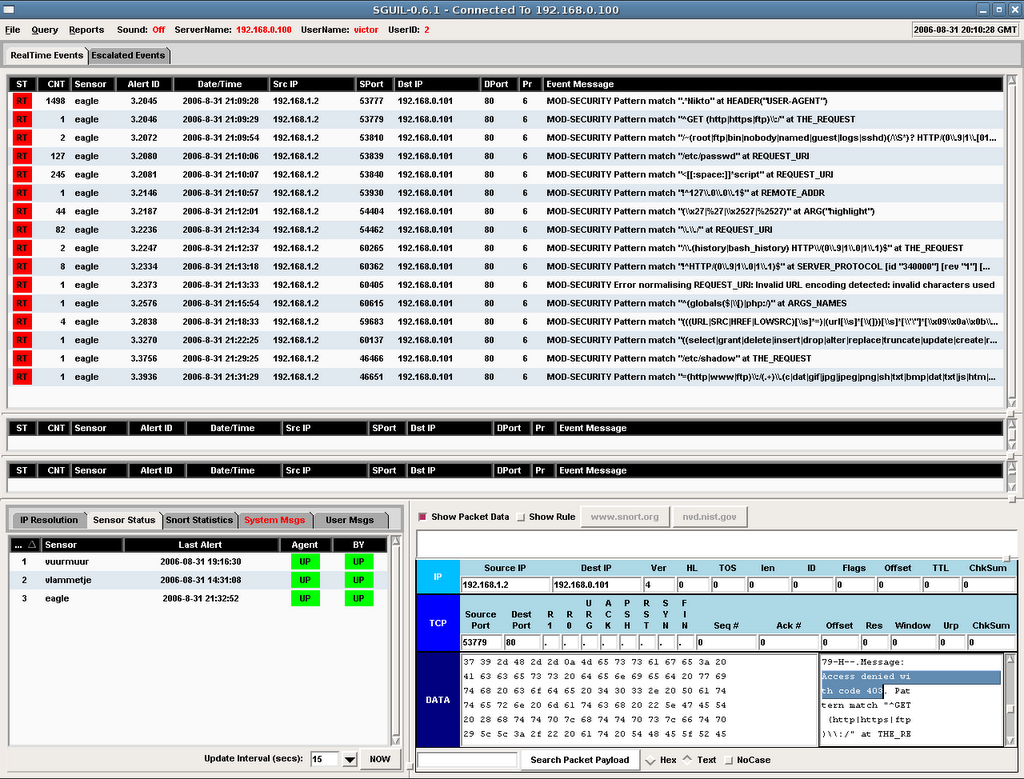
ModSec2Sguil Screenshots

I just hacked into Victorj's blog and stole his screenshot so that I can share it with everyone, I don't think he will know it since I can easily bypass his IDS. Enjoy the Mod_Security Logs in Sguil!!!!!


Oops, I just forgot he deployed NSM instead of IDS only, damn!!!!!

Enjoy :]

Saturday, September 30, 2006

PgOSS Meetup - Continued

Thanks to surface for recording the talk in mp3 format so that we can share the PgOSS presentation with others. Here's the second presentation that done by Vicky -

http://mysurface.no-ip.org/download/02vick.mp3

And for anyone who stay around Pulau Penang, and you would like to join us in the next meetup, you can find the information @t

http://foss.org.my/projects/meetups/2006-09/pgoss/

By the way I'm looking for anyone who would like to share their OSS expereience and skills in the meetup, please email me and I would like to hear from you. My email is as the same as always geek00L[at]gmail.com.

Enjoy :]

PgOSS Meetup

This is the first official meetup for Penang Open Source Software Meetup, you can find the initial meetup announcement @t

http://my.opera.com/mysurface/blog/show.dml/484686

http://aizatto.com/blog/archives/180

The meetup is over, I know many of you are looking for me in the meetup since I'm one of organizer, however I were not be able to attend the meetup due to some personal issue, fortunately there are aizat and surface who are willing to help, aizat was down from Kuala Lumpur to Penang and I'm glad that he makes his way here :)

Anyway thanks to everyone that coming to the meetup, especially Dr. Dhanesh who has helped organizing the meetup.

I hope that we can organize the meetup again next month and looking forward to see everyone in the meetup if possible. For more information regarding the meetup, I think aizat and surface will blog the wrap-up.

This is not a hardcore OSS meetup, and PgOSS guys have captured the scene to share and you can download it via

http://mysurface.no-ip.org/download/01aizat.mp3

Have fun with OSS!!!!!

Cheers :]

P/S: For whoever think I'm coming, I'm cheating for good intention :P

Thursday, September 28, 2006

Snort and ModSec2Sguil

I know I haven't been posting in my blog for quite sometimes, lots of things in my mind that I have to get it done. However for those who is snort lover, the snort 2.6.1 beta2 is already out for quite sometimes, and I just noticed it. Lots of decoders are added to solve the detection issue. I hope I can spare my time to test those preprocessors but this is not the case, maybe next month or when snort 2.6.1 releases.

For Sguil Lovers, check out -

http://www.inliniac.net/blog/?p=43


Mod_Security Logs now can be managed and analyzed thru Sguil, thanks to Victorj who has written ModSec2Sguil. I hope it will be added as extra features for Sguil. This is good news for serious and heavy users of Mod_Security. You can have centralized center to perform analysis on Mod_Sec Logs now.

I will try my best to write more about NSM stuffs when I have time, currently I'm still testing OpenBSD PF layer 2 filtering stuffs and hopefully I can blog about it when I have time.

Cheers :]

Saturday, September 23, 2006

HITB Conference 2006

Finally everything is over, I'm glad that the training class was going fine for the first time me and mel conducting it together.

For the Capture The Flags Hacking Competition. While it is not perfect, we all learnt something from the setup and improvement can be done in future, thanks to all the CTF Crews, speakers who submitted the daemons as well as the volunteers who doing the cabling job.

I don't have much time to get into any speaker's talk but Philippe Biondi, since I use Scapy a lot and his talk was really interesting including the tricks and tips on toying with IPv6.

Finally thanks to all the HITB members to make this conference successful.

Again, I'm glad to work with you guys - mel, takizo, rd, xwings, ditesh, adli, y0muds and some other cool guys. You all just r0x0r5!!!!!

Special thanks to mel for his clothes, takizo who offers me his place to stay while I'm homeless..... and his kindness for donating so much $$$$$ to NCC.

Cheers :]

Saturday, September 16, 2006

Short Note

FreeBSD gtk theme for user is located at ~/.gtk-2.0 but the global one is at /usr/X11R6/share/themes. Change the theme as you wish or you can download those themes from whatever look - gnome-look, kde-look, and so forth.

By the way, for user who are not using gnome or kde, if you want to change your gtk setting, try

http://plasmasturm.org/code/gtk-chtheme/


Nice little tool indeed.

Anyway I will be heading to Kuala Lumpur for HackInTheBox Conference, geek party will be launched soon!!!!!

Enjoy :]

Monday, September 11, 2006

TCPstat: Detecting SYN DOS?

shell>tcpstat -i fxp0 -o "PPS\=%p\ TCP\=%T\n"
PPS=1505.20 TCP=6850
PPS=1642.80 TCP=7540
PPS=1492.60 TCP=7020
PPS=1565.20 TCP=7384
PPS=1500.00 TCP=6958
PPS=1649.80 TCP=7724
PPS=1622.80 TCP=7505
PPS=1653.20 TCP=7658
PPS=1791.40 TCP=8443

shell>tcpstat -i fxp0 -o "PPS\=%p\ TCP-SYN\=%T\n" -f "tcp[13]=2"
PPS=42.40 TCP-SYN=212
PPS=44.00 TCP-SYN=220
PPS=40.40 TCP-SYN=202
PPS=38.20 TCP-SYN=191
PPS=42.00 TCP-SYN=210
PPS=38.60 TCP-SYN=193
PPS=49.60 TCP-SYN=248
PPS=38.80 TCP-SYN=194
PPS=34.80 TCP-SYN=174

I'm running them in parallel, with ratio you can easily detect SYN DOS. Just mindless idea here :P

Happy monitoring (:])

TCPstat - Report your NIC statistic

Just come across this network interface statistic reporting tool, while most of the tools just offer links accounting, this tools can do protocol breakdown on the fly. The default mode of tcpstat reports

shell>tcpstat -i fxp0
Time:1157911172 n=7049 avg=607.08 stddev=659.37 bps=6846924.80
Time:1157911177 n=6614 avg=632.79 stddev=668.06 bps=6696438.40
Time:1157911182 n=7242 avg=648.16 stddev=677.81 bps=7510414.40
Time:1157911187 n=6533 avg=555.01 stddev=651.15 bps=5801387.20
Time:1157911192 n=1417 avg=588.38 stddev=659.08 bps=1333964.80

You can tweak the output format to display per protocol basis,

shell>tcpstat -i fxp0 -o "TotalPackets\=%n\ ARP\=%A\ IP\=%I\ ICMP\=%C\ TCP\=%T\ UDP\=%U\n"
TotalPackets=6482 ARP=10 IP=6466 ICMP=37 TCP=5858 UDP=570
TotalPackets=5423 ARP=13 IP=5406 ICMP=33 TCP=4710 UDP=662
TotalPackets=6288 ARP=18 IP=6261 ICMP=36 TCP=5462 UDP=762
TotalPackets=6271 ARP=11 IP=6256 ICMP=37 TCP=5451 UDP=767
TotalPackets=6466 ARP=12 IP=6449 ICMP=34 TCP=5669 UDP=744
TotalPackets=6909 ARP=6 IP=6898 ICMP=42 TCP=6197 UDP=658
TotalPackets=6530 ARP=13 IP=6512 ICMP=43 TCP=5824 UDP=644
TotalPackets=6629 ARP=7 IP=6617 ICMP=42 TCP=5805 UDP=769
TotalPackets=7382 ARP=8 IP=7367 ICMP=44 TCP=6448 UDP=874
TotalPackets=5904 ARP=9 IP=5891 ICMP=42 TCP=5128 UDP=720
TotalPackets=5991 ARP=8 IP=5977 ICMP=35 TCP=5140 UDP=801
TotalPackets=5959 ARP=10 IP=5945 ICMP=41 TCP=5195 UDP=708
TotalPackets=5439 ARP=8 IP=5425 ICMP=34 TCP=4880 UDP=510

By the way, this tools support BPF expression filtering, neat!

Enjoy ;]

TCPdstat Graphing & P0f 2 New Release

Just have some interesting read on graphing network statistic using tcpdstat. I think sometimes visualization helps in traffics analysis. Check it out @

http://ilopez.com/?postid=166

By the way for people who hasn't noticed, P0f-2.0.8 is out, the tool is re-written and better now however one have to relearn P0f signatures writing since it is completely different now. Check out all the interesting features here -

http://lcamtuf.coredump.cx/p0f/README


Cheers :]

Friday, September 08, 2006

! Computer

Having sticking with computer too much, I come to realize I need sports. Apparently it is not healthy to sit in front of computers without experience other activities. Today I decide to do swimming, and yes I decide to do it maybe twice a week because it is refreshing me, especially now I'm kind of braindead. Sport is helping, especially when you are stucked with computer too much.

By the way I may buy basketball as well, been a while I haven't played basketball and I need the sound - sop!

Let's kick ass without computing, cheers!!!!!

Thursday, September 07, 2006

OpenBSD 4.0 BPF

I read this in OpenBSD Current(4.0) Daily changelog .....

- Allow bpf(4) to ignore packets based on their direction.

I tag this down so that I will test it out when OpenBSD 4.0 is ready. Sound like a feature to analyzt.

Cheers :]

Friday, September 01, 2006

The Art Of Network Stegno Detection

Dealing with network covert channel, it would be seriously hard to detect by using purely signature based detection methodologies, you will come to realize that when you can't fingerprint it, you'll have to characterize it. What I mean by characterize is "To be a distinctive trait or mark of; distinguish"(definition from thefreedictionary.com). To be even clear about how it can be done, think behavioural and statistical analysis. I'm coming to this conclusion when I have almost finished reading the papers in the link below -

http://www.gray-world.net/papers.shtml

I most properly agree that covert channel detection can occur by luck when you are monitoring large network. But in small and medium network, you will have higher chance of detecting covert channel if you are implemeting the following -

- Tighten Network Access Control

- Client & Server Services Profiling

- Network Traffic Profiling

Most of the covert channels will try to act as normal legitimate traffics, or it will be more of protocol over protocol tunneling. It doesn't break the protocol, however it will introduce different behaviour in the protocol, the most obvious will be long and continuatious traffic of http, odd sequence numbers usage and so forth. Keep in mind that the attribute of protocol fields may change and the connection states as well.

Tightening network access control can prevent network noise, we are not using network access control to block against covert channel(as you can never block this type of stealthy connections that looks like legitimate one). Client service profiling is defined as what kind of services are allowed to be used by client such as http, https, pop3 and all(outgoing). Server service profiling should be the services that are accessible to the world(incoming). Depends on your network environment, services profiling is a must to identify covert channel because the covert channel will mostly carry over the legitimate services(as I said it bypasses network access control). The network traffic profiling will be the protocol break down and each protocol usages, this is mostly done by using flow/session data collectors, it will generate the statistic of the network flows that allowing you to identify the weird connections by protocols, this is the lead to analysis of covert channels.

There's a little tool to demonstrate statistical covert channel detection which is called tcpstatflow written by fryxar, you can download it here -

http://www.geocities.com/fryxar/

While I don't get it to compiled on FreeBSD, I have luck with Ubuntu. Here's what I have done

geek00l@hell:~/Desktop/Covert-Tools$ cd tcpstatflow/
geek00l@hell:~/Desktop/Covert-Tools/tcpstatflow$ make
geek00l@hell:~/Desktop/Covert-Tools/tcpstatflow$ ls
datalink.c datalink.o flow.c flow.o main.c main.o Makefile README tcpflow.h tcpip.c tcpip.o tcpstatflow util.c util.o
geek00l@hell:~/Desktop/Covert-Tools/tcpstatflow$ ./tcpstatflow
./tcpstatflow[29633]: no suitable device found
geek00l@hell:~/Desktop/Covert-Tools/tcpstatflow$ ./tcpstatflow -h
./tcpstatflow version 1.1 by Fryxar (thanks Jeremy Elson!)

usage: ./tcpstatflow [-hpvD] [-d debug_level] [-f tcptimeout]
[-i iface] [-t statistics_time] [-x bytes_threshold]
[-y time_threshold] [-z packets_threshold] [expression]

-d: debug level; default is 1
-D: start as daemon (log to syslog)
-h: print this help message
-i: network interface to listen
(type "ifconfig -a" for a list of interfaces)
-f: TCP timeout in seconds; default is 7200
-p: don't use promiscuous mode
-v: verbose operation equivalent to -d 10
-t: statistics time; default is 3600, use 0 to disable
-x: cummulative bytes in both senses threshold to report an alarm; default is 50000
-y: duration (in seconds) threshold to report an alarm; default is 86400
-z: cummulative packets in both senses threshold to report an alarm; default is 1000000
expression: tcpdump-like filtering expression

Running my own simple but fast ssh sock proxy channel(Dynamic port forwarding)

geek00l@hell:~/Desktop/Covert-Tools/hcovert-0.5$ ssh -ND 5555 root@1.2.3.4 -p 2222

On the other hand, I also run corkscrew which allowing tunneling ssh through http proxy that I have setup at 1.2.3.4 port 8080. You can install corkscrew by using apt-get on Ubuntu and pkg_add on FreeBSD.

Now I have run the sock proxy and ssh over http proxy, I also connect my browser and other applications to use the sock proxy as well as scp through the http proxy.

Here's the result of my tcpstatflow,

geek00l@hell:~/Desktop/Covert-Tools/tcpstatflow$ sudo ./tcpstatflow -i eth0
Password:
./tcpstatflow[29651]: listening on eth0
Potencial tunnel = 10.0.0.10:2302->1.2.3.4:2222: packets rx=1860 tx=1135, bytes rx=1808079 tx=50182, seconds=234
Stats= mallocs: 9, cleans: 8, reuses: 0, flows: 1, Packets: 4219 drops: 707 (16%)
Potencial tunnel = 10.0.0.10:2496->1.2.3.4:8080: packets rx=3425 tx=4741, bytes rx=50023 tx=5204157, seconds=228

That's pretty neat, but I'm running tcpstatflow in default mode, you can tweak the threshold when coming to detect different kind of covert channels, while you may think that icmp covert channel can bypass this tool, it may be true since this is only for tcp connection, but I believe that icmp covert channel can be restricted with your network access control(Only allow icmp ping echo and reply) and the detection of icmp covert channel can be done via its bytes transfer per flow easily when you have your flow collector in place.

You may check out one of sguil aliance - Victorj, using his mysql-fu, to detect icmp tunnel via Sguil

http://www.inliniac.net/blog/?p=24

http://www.inliniac.net/blog/?p=27

I have mentioned that monitoring large network can be very headache for covert channel detection, but guess what? Try ourmon!

Now you know why NSM emphasizes on statistical data as well!!!!!

Enjoy (:])

Wednesday, August 30, 2006

Ubuntu - Where is my traceroute?

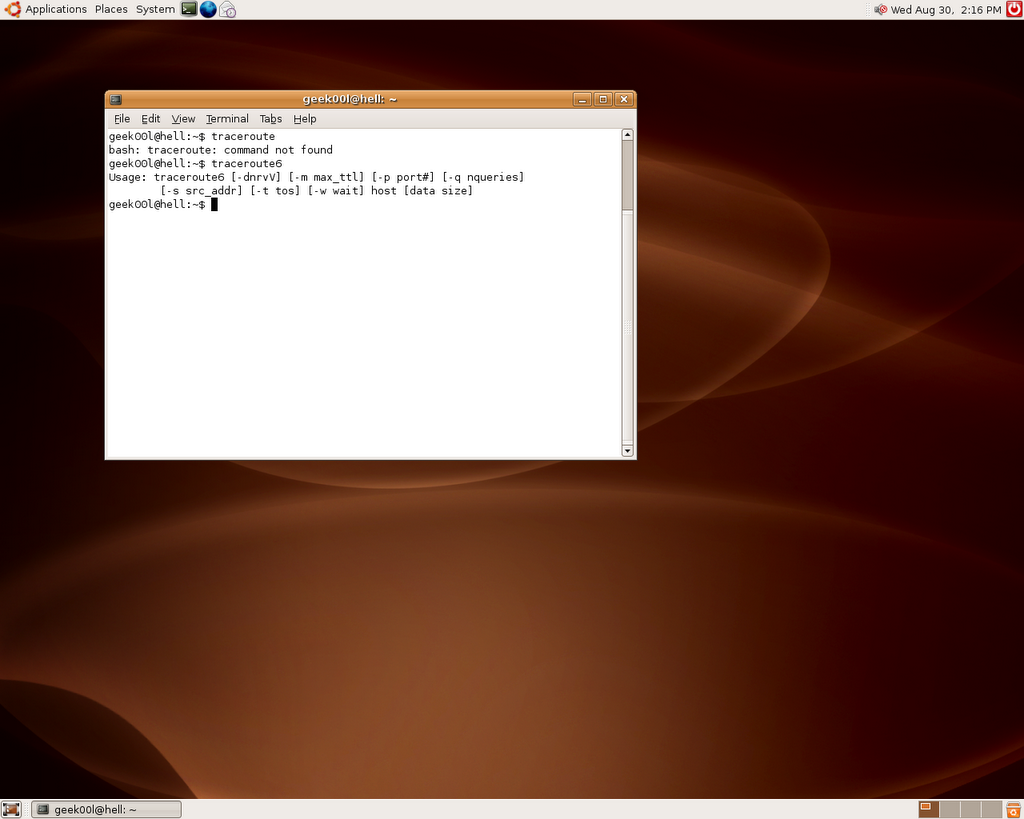
I have the internet problem where I need to figure out, while my laptop is busy on something else, I was thinking of using my ubuntu box that I just upgraded to Dapper Drake to trace the network issue. I may need to clarify that while I had been long time user of ubuntu linux, I'm a serious noob on it where I only used it for movie and music(Entertainment Desktop). Let's see what I can do when I need to traceroute -

Command not found? I hope my typo is wrong but this is not the case, after talking to some folks, they told me that Ubuntu is meant for Desktop users where it doesn't need network debugging tools. Okay fine, let's notice what I have executed in the screenshot - traceroute6

Oh yeah, desktop users surely know how to configure IPv6, or else why traceroute6 is included while traceroute is not there. Now I even wondering what it is like when coming to user friendly(Even windows users know how to use tracert).

Ubuntu, another lovely linux desktop, sigh!

Peace :]

Monday, August 28, 2006

Internet Freedom: Unleashed

Interesting read though ->

http://zensur.freerk.com/

My shortest post (:p)

~Enjoy~

Sunday, August 27, 2006

Proxy - Your Guardian

Proxy can serve as double edged sword, while it can mask one's track by hopping through multiple proxies(stepping stone), it can be a very effective defensive|preventive perimeter. Most of people know the infamous Squid, which can run as either transparent proxy or reverse proxy. Squid definitely is a powerful tool, however sometimes we would like to have alternative, here are the other good alternatives -

- Apache(Forward & Reverse Proxy)

- Pound(Reverse Proxy)

- Delegate(Application Proxy)

I'm looking at pound and delegate, thanks to Chflags who recommends me to take a look at it. Delegate seems to be very interesting when comes to proxying application protocol as well, and it has whole lot of features that I need to try.

While network security monitoring requires visibilities of network, pound can be used as ssl terminator, decrypting the ssl connection and send it back to the backend web server.

Other nifty proxy application that can be used will be Privoxy, privoxy can be used to mangle the traffics, hence it can used to protect your browser bug. While reverse proxy serve as server side protection layer by applying sanitizer and filtering, transparent proxy will be more of protection layer for client side. It may sound like security through obscurity, but it is the fastest way to defense against outbreak period since applying filtering rules in proxy can be done in short time.

On the other hand, remember proxy is fast - with caching enabled.

Cheers :]

Saturday, August 26, 2006

Nice Kit - Overload

While I was in Kuala Lumpur last week, I have bought a laptop backpack. While looking for targus backpack, I found High Sierra. Thanks to Mel for bringing me to the shop located at Curve. It is worth the time and price that I have paid to look for the backpack that I would like to carry everywhere, here's the description and look of the backpack,

http://www.highsierrasport.com/ItemDetail.jsp?itemNum=54602

I have black one which matches my laptop color. It has name - Overload !!!!! Remind me of StartCraft.

Side note: Since I don't want to write another blog post, lazy me just include this url as linux/bsd laptop installation guide especially for IBM thinkpad. Thanks to gutizz for good reference.

http://tuxmobil.org/ibm.html


Enjoy :]

Friday, August 25, 2006

FreeBSD TightVNC

For the HITB2006 training, since Wireshark(Ethereal), netdude and some others tools need demonstration, I'm considering of letting users to access to FreeBSD VMware image remotely, while ssh is a shiny choice for CLI, I think most prolly access is needed for GUI applications as well, I remember I used to use VNC on windows and digging in the FreeBSD port, I found tightvnc. Installing tightvnc is in a glance, just pkg_add will do. After installation done, you may find vnc related application under /usr/X11R6/bin,

shell>ls -la vnc*
-r-xr-xr-x 1 root wheel 3948 Mar 17 05:49 vncconnect
-r-xr-xr-x 1 root wheel 12284 Mar 17 05:49 vncpasswd
-r-xr-xr-x 1 root wheel 15226 Mar 17 05:29 vncserver
-r-xr-xr-x 1 root wheel 81476 Mar 17 05:49 vncviewer

You will run the vncserver at the first time, and it will ask you to assign remote access password, then it will ask to assign for view only password. Once assigning the password, you can start running vnc server by execute

shell>vncserver

I have the problem at the first time and I figure out it searches for ~/.Xresources, hence I just create a blank file called .Xresources will do. To run vncserver with geometry,

shell>vncserver -geometry 1024x768

shell>ps auxww | grep vnc
root 1239 0.0 12.1 12228 10848 p1 I 10:10AM 0:35.05 Xvnc :4 -desktop X -httpd /usr/X11R6/share/tightvnc/classes -auth /root/.Xauthority -geometry 1024x768 -depth 24 -rfbwait 120000 -rfbauth /root/.vnc/passwd -rfbport 5904

shell>netstat -an | grep 5904
tcp4 0 0 *.5904 *.* LISTEN

We have verified that vnc server has launched on port 5904 successfully. Now we can just run the vnc client from the other host. Since my vnc server runs on 192.168.0.6, I just need to run

shell>vncconnect 192.168.0.6::5904

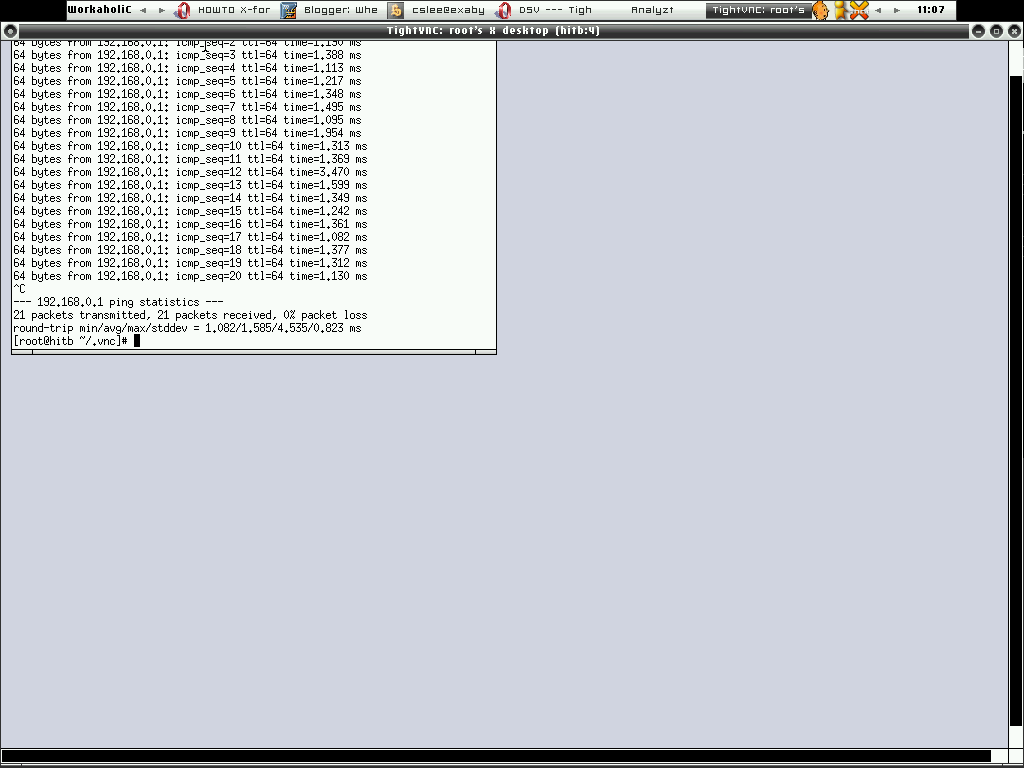
After type in the password, there it goes ----->


However the traffics between the vnc server and client is not encrypted, hence I'm thinking of getting it to work with ssh tunnel. As usual I used to read man page before anything, and I found -via gateway option in tightvnc. Maybe that's what I need, just run

[root@trinity ~]# vncviewer -via 192.168.0.6 192.168.0.6::5904
Password:
VNC server supports protocol version 3.3 (viewer 3.3)
Password:
VNC authentication succeeded
Desktop name "root's X desktop (hitb:4)"
Connected to VNC server, using protocol version 3.3
VNC server default format:
32 bits per pixel.
Least significant byte first in each pixel.
True colour: max red 255 green 255 blue 255, shift red 16 green 8 blue 0
Using default colormap which is TrueColor. Pixel format:
16 bits per pixel.
Least significant byte first in each pixel.
True colour: max red 31 green 63 blue 31, shift red 11 green 5 blue 0
Tunneling active: preferring tight encoding

That's cool, I would seriously agree that tightvnc is nifty tool to setup secure remote access especially when there's a need to grant access for GUI.

Cheers :)

Does .gov.my take security as concern?

We have Mycert, Gcert and all kind of Certs, that for sure indicating Malaysia Boleh! However I would like to ask again - Does Malaysia Government takes Internetwork Security as its one of primary concern?

I don't have to mention any, but after working in network security field for quite sometimes, I figure out our Government generally not taking this virtual world for real.

- Government Internetwork is considered decentralised, they are not actually fully managed and monitored. Outsourcing is seriously bad idea for the network that contains critical data, unless you find a promising and respectable vendor.

- This is a joke, while I found it amusing, however hackers found it as easy target. There are many .gov.my sites are built upon Content Management System. It is fine to deploy CMS but without proper patching and update management, it can be a total screw up.

- No strong policy enforcement - Yes, you can install anything on your laptop and bring it to work even you are working for .gov.my, on the other hand, you can't count how many rookits & viruses reside in .gov.my network happily.

- No human education - Inpersonating is good way to gain access to .gov.my, it works all the while since no one is educated about cyber threats even for those who working closely with .gov.my.

- Faulty implementation & deployment - No DMZ, no network screening and strong network control. What can I say about this? If you don't build defensible network, blame yourself for intrusions and extrusions.

I'm not representing any party, while I'm not ranting(I don't think I'm), I'm just trying to figure out and criticize on what I see as unnecessary. Pointing out the weakness can lead to correctness. I'm not who working for government, however I'm just here pointing out all the risks that we have encountered.

While our country is on the way to establish Multimedia Super Corridor(MSC), surprisingly Security is not putting into main concern. Do they need to re-think about it?

Electronic Government, I hope this is not a joke.

Peace :]

Sunday, August 20, 2006

Network Security Monitoring - The Big Screen

Yes, I know you would love to monitor the network security with eyes wide open!!!!!

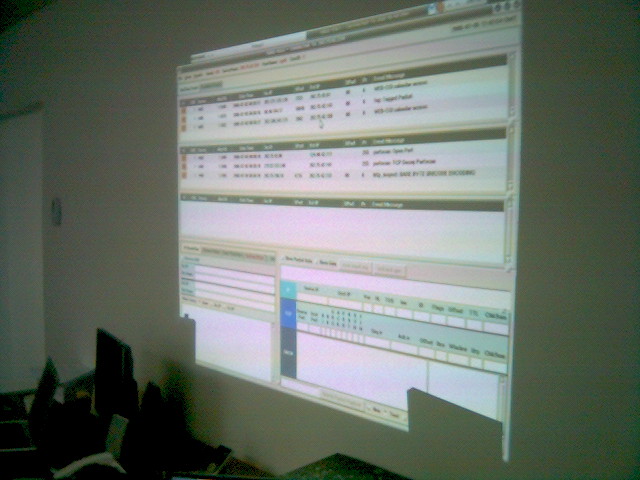
~Sguil In Action~

Enjoy :]

Saturday, August 19, 2006

Network Security Toolkits

Got Sguil?

NST - One of the interesting LiveCD that contains fruitful Open Source Network Security Applications finally got Sguil, while I consider this is late coming but I'm still glad to see it in. You can check out the details here -

http://nst.sourceforge.net/nst/docs/scripts/nstsguil.html

Sguil becomes more and more popular these days, Network Security Monitoring is what we need!!!!!

Enjoy :)

HITB 2006 Training


Just in case you don't notice, me and mel will be conducting a workshop - Structured Network Threat Analysis & Forensic @ HackInTheBoxConf 2006. You can check out the detail here -

http://conference.hackinthebox.org/hitbsecconf2006kl/?page_id=89

If you are interested in mastering packet analysis, especially with Open Source Tools. We will demonstrate how you can detect and understand different level of network attacks - From fingerprinting phase to serious intrusions. Don't miss it!

Cheers :]

P/S: I'm very busy lately and having no time to blog much, stay tuned!

Friday, August 11, 2006

Create BPF device

Sometimes you need more than one bpf interface to run your network monitoring application, especially if you are using creative IDS like Bro-IDS and snort or some other tools such as trafshow and so forth, thus you need to have multiple bpf interfaces, while you may run into problem where bpf interface not exists or permission denied, you can create the bpf interface manually before running those kind of applications. Login as root and run -

shell>cd /dev; mknod bpf5 c 0 0

Now you will find bpf5 is created under /dev directory, changing the permission to 744 will most properly lead you to run the network monitoring application successfully without problem.

By the way this is applied to FreeBSD and OpenBSD.

Peace :]

Thursday, August 10, 2006

OpenBSD Application Port/Package Tracking

While using FreeBSD, I used to look for new packages/ports by refering to www.freshports.org, that makes life whole lot more easier to track the applications I'm using and I want to use in future maybe. Now, you will have the similar thing in OpenBSD, check out -

http://ports.openbsd.nu/

I think many people may find it useful, it would be better to add the new ports request and status as well. But I see this as very good kickstart for port tracking and maybe it can be improved from time to time. Thanks to OpenBSD.nu in cooperation with NetBSD.se to create OpenBSD packages/ports frontend.

Cheers :)

Monday, August 07, 2006

Testing Firewall Rules

And yet you are using PF and want to test your firewall rules remotely but afraid of locking yourself out of box, you can actually do this. Create a pf config file name /etc/pf-open.conf, and with the open all rulesets,

pass all

Then you have the PF configuration file calls /etc/pf-server.conf that you want to test which having heavy filter rules, now to test it. Run

shell>pfctl -f /etc/pf-server.conf; sleep 90; pfctl -f /etc/pf-open.conf

The filter rules will be applied and it will change to the pass all rules over 90 seconds. With this you can relogin to the box remotely after 90 seconds in case you accidentally lock out of the box or you internet got screwed.

I found this tip from here, apparently this is very useful.

The safer way is putting the commands above into the shell script and run that script instead in case you get terminated and the terminal closed before 90 seconds causing the pfctl -f /etc/pf-open.conf not getting executed.

Enjoy :]

Sunday, August 06, 2006

Penang Open Source Community

Since there are many times I have been thinking of activating the Open Source Community in Penang State, Malaysia especially some of folks in MyOSS been asking about it as well. I would like to give it a kick, however it ain't enough with my sole efforts, I need helping hands and apparently surface is the right guy to help me out on this. If you are the guy who like to tinker with open source, or newcomers that would like to learn up one or two things about the open source thingy, feel free to send me email or ping me at freenode myoss channel. We would like to see more and more members that joining the community.

Currently we are looking for a place to organize the meetup, and apparently USM is the right place with young and energitic souls. However we also would like to see anybody who already have been using Open Source in the Industry to share thier experience or perhaps presenting topics regarding Open Source stuffs.

It's never been too late, I think with the Community based structure, we can push the OSS awareness to the next level.

Feel free to join us. Cheers :)

Tuesday, August 01, 2006

Passive Tap in Actions

Nikns has his own web page on creating passive network tap in actions. It seems interesting, however it is seriously hard to find all the kits needed to build the network tap in Malaysia. I will need to dig a bit and look around if any company selling those kits. If you have any idea where can get those kits, please do let me know.

Check it out here, Nikns rox!

http://openbsd.secure.lv/tap/

Enjoy (;])

Good Time in KL

Back from Kuala Lumpur, I might say it was good trip, having chance to stay at the infamous Paul Ooi's place, I was given a room and free internet access as well. I also enjoyed the good foods there as well. Thanks to Paul for everything and I'm glad to have friend like you.

Anyway I can't wait for the next trip to Kuala Lumpur again especially for Hack In the Box events, and I think at that moment Paul already moved to the New Place :P

Peace :]